
When searching for portable external hard drives, the key considerations are often speed, durability, capacity, and compatibility. The Seagate 2TB Portable Hard Drive USB 3.0 stands out as the overall best for its reliable performance and affordability. For those prioritizing speed, the SanDisk 1TB Portable SSD offers impressive transfer rates, while the WD 6TB Elements provides massive storage for large backups. Each option balances tradeoffs: faster drives tend to be pricier, and bulkier models may sacrifice portability. Continue reading for a detailed breakdown of the top picks and what makes them different.
Complete the kit


Key Takeaways
- SSD options generally offer faster transfer speeds but come at a higher price compared to HDDs.
- Capacity varies widely; choose based on your storage needs to avoid overpaying or running out of space.
- Compatibility with both Windows and Mac can influence your choice, especially for cross-platform users.
- Durability and build quality are critical for portable drives, especially if used outdoors or during travel.
- Price-performance balance is key; the most expensive drive isn’t always the best for every user.
| Seagate 2TB Portable Hard Drive USB 3.0 |  | Best Overall for Versatile Storage and Compatibility | Storage Capacity: 2TB | Connection: USB 3.0 | Compatibility: Windows and Mac | VIEW LATEST PRICE | See Our Full Breakdown |
| WD 4TB Elements Portable External Hard Drive for Windows and Mac |  | Best Value for High Capacity and Portability | Capacity: 4TB | Interface: USB 3.2 Gen 1 / USB 3.0 | Compatibility: Windows, Mac | VIEW LATEST PRICE | See Our Full Breakdown |
| 500 GB External Hard Drive, Portable USB 3.0 Slim HDD for Windows, Mac, PS4, Xbox |  | Best for Compact Multi-Device Compatibility | Capacity: 500 GB | Transfer Speed: 110MB/s – 133MB/s | Interface: USB 3.0 | VIEW LATEST PRICE | See Our Full Breakdown |
| Western Digital 5TB Elements Portable External Hard Drive | | Best for Large-Scale Data Storage and Backup | Capacity: 5TB | Interface: USB 3.2 Gen 1 / USB 3.0 | Compatibility: Windows, Mac | VIEW LATEST PRICE | See Our Full Breakdown |
| Seagate Portable 1TB External Hard Drive HDD – USB 3.0 for PC, Mac, PlayStation, & Xbox |  | Best for Moderate Storage and Gaming Compatibility | Capacity: 1TB | Connection: USB 3.0 | Compatibility: PC, Mac, PlayStation, Xbox | VIEW LATEST PRICE | See Our Full Breakdown |
| UnionSine 500GB Ultra Slim Portable External Hard Drive HDD-USB 3.0 |  | Best for Compact Mobility and Simple Use | Capacity: 500GB | Interface: USB 3.0 | Transfer Speeds: Up to 125MB/s read, 103MB/s write | VIEW LATEST PRICE | See Our Full Breakdown |
| UnionSine 500GB Ultra Slim Portable External Hard Drive HDD-USB 3.0 |  | Best for Compact, Reliable On-the-Go Storage | Capacity: 500GB | Interface: USB 3.0 | Transfer Speed: Up to 125MB/s read, 103MB/s write | VIEW LATEST PRICE | See Our Full Breakdown |
| SanDisk 1TB Portable SSD – Up to 800MB/s, USB-C, USB 3.2 Gen 2 |  | Best for Speed and Durability on the Move | Capacity: 1TB | Read Speed: up to 800MB/s | Write Speed: up to 800MB/s | VIEW LATEST PRICE | See Our Full Breakdown |
| Seagate Portable 4TB External Hard Drive HDD – USB 3.0 for PC, Mac, Xbox, & PlayStation | | Best for Large Capacity Multi-Device Use | Capacity: 4TB | Interface: USB 3.0 | Transfer Speed: Up to 125MB/s | VIEW LATEST PRICE | See Our Full Breakdown |
| SanDisk 2TB Extreme Portable SSD |  | Best for High-Speed, Rugged, Secure Storage | Capacity: 2TB | Read Speed: 1050MB/s | Write Speed: 1000MB/s | VIEW LATEST PRICE | See Our Full Breakdown |
| WD 6TB Elements Portable External Hard Drive for Windows and Mac | | Best Overall for Massive Capacity and Versatility | Capacity: 6TB | Interface: USB 3.2 Gen 1 / USB 3.0 | Compatibility: Windows, Mac | VIEW LATEST PRICE | See Our Full Breakdown |
| WD 4TB My Passport Portable External Hard Drive, Black |  | Best Value with Security and Backup Features | Capacity: 4TB | Color: Black | Connectivity: USB 3.1/USB 3.0 | VIEW LATEST PRICE | See Our Full Breakdown |
| UnionSine 1TB Ultra Slim Portable External Hard Drive HDD-USB 3.0 | 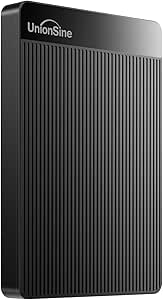 | Best for Ultra-Portable On-the-Go Use | Capacity: 1TB | Interface: USB 3.0 | Transfer Speeds: up to 125MB/s | VIEW LATEST PRICE | See Our Full Breakdown |
| Maxone 500GB Ultra Slim Portable External Hard Drive HDD USB 3.0 |  | Best for Durable, Compact Storage for Light Users | Capacity: 500GB | Design: Ultra Slim, All-Aluminum | Thickness: 0.4 inch | VIEW LATEST PRICE | See Our Full Breakdown |
| portable external hard drife | Capacity | Compatibility | Interface |
|---|---|---|---|
| Seagate 2TB Portable Hard Driv | — | Windows and Mac | — |
| WD 4TB Elements Portable Exter | 4TB | Windows, Mac | USB 3.2 Gen 1 / USB 3.0 |
| 500 GB External Hard Drive | 500 GB | Windows, Mac, PS4, Xbox | USB 3.0 |
| Western Digital 5TB Elements P | 5TB | Windows, Mac | USB 3.2 Gen 1 / USB 3.0 |
| Seagate Portable 1TB External | 1TB | PC, Mac, PlayStation, Xbox | — |
| UnionSine 500GB Ultra Slim Por | 500GB | Plug and Play | USB 3.0 |
| UnionSine 500GB Ultra Slim Por | 500GB | Plug and Play | USB 3.0 |
| SanDisk 1TB Portable SSD | 1TB | — | USB-C, USB 3.2 Gen 2 |
| Seagate Portable 4TB External | 4TB | PC, Mac, Xbox, PlayStation | USB 3.0 |
| SanDisk 2TB Extreme Portable S | 2TB | — | — |
| WD 6TB Elements Portable Exter | 6TB | Windows, Mac | USB 3.2 Gen 1 / USB 3.0 |
| WD 4TB My Passport Portable Ex | 4TB | — | — |
| UnionSine 1TB Ultra Slim Porta | 1TB | — | USB 3.0 |
| Maxone 500GB Ultra Slim Portab | 500GB | — | — |
More Details on Our Top Picks
Seagate 2TB Portable Hard Drive USB 3.0
This Seagate model stands out for its generous 2TB capacity combined with simple plug-and-play operation, making it a dependable choice for users who need reliable storage on both Windows and Mac without fuss. Compared to the WD 4TB Elements, it offers a larger capacity but requires a USB 3.0 port to perform at its best. Its straightforward setup and compatibility make it ideal for everyday backups and file transfers, though its performance hinges on the USB port’s speed and the actual storage capacity can vary slightly. The absence of additional features like backup software keeps it lean but limits advanced functionality.
Pros:- Large 2TB storage capacity for extensive backups
- Plug-and-play setup with no additional software needed
- Compatible with both Windows and Mac systems
Cons:- Performance depends heavily on USB 3.0 port availability and speed
- Storage capacity may vary slightly from advertised
Best for: Users who want a reliable, large-capacity drive that works seamlessly across multiple operating systems without extra features.
Not ideal for: Power users seeking built-in backup or encryption software, or those with older computers lacking USB 3.0 ports.
- Storage Capacity:2TB
- Connection:USB 3.0
- Compatibility:Windows and Mac
- Cable Length:18 inches
Our verdict“This drive suits users seeking straightforward, high-capacity portable storage with broad compatibility.”
WD 4TB Elements Portable External Hard Drive for Windows and Mac
The WD Elements 4TB drive offers a compelling balance of high storage capacity and a compact form factor, making it perfect for users who need to carry large files without extra bulk. Compared with the Seagate 2TB, it doubles the capacity but is limited to 4TB, which might not suffice for those with massive media libraries. Its use of USB 3.2 Gen 1 ensures quick transfers, yet it lacks included backup software, requiring users to manage backups manually. Its lightweight design makes it easy to carry, though it depends entirely on USB connectivity for power and data transfer.
Pros:- High capacity of 4TB in a small, lightweight package
- Fast data transfer with USB 3.2 Gen 1
- Plug-and-play with both Windows and Mac
Cons:- Limited to 4TB capacity, no higher options available in this line
- No included backup or encryption software
Best for: Individuals needing a large-capacity portable drive for photo, video, or document storage on the go, with minimal fuss.
Not ideal for: Users seeking integrated backup solutions or those who want more than 4TB of portable storage from a single device.
- Capacity:4TB
- Interface:USB 3.2 Gen 1 / USB 3.0
- Compatibility:Windows, Mac
- Plug and Play:Yes
Our verdict“This drive is ideal for users who prioritize high storage capacity in a portable, easy-to-use package.”
500 GB External Hard Drive, Portable USB 3.0 Slim HDD for Windows, Mac, PS4, Xbox
This 500GB slim drive emphasizes portability and broad compatibility, making it a strong choice for gamers and mobile users alike. Unlike the larger capacity drives like the WD 4TB, it offers less space but excels in portability, weighing only 0.35 lbs and fitting easily into a pocket. Its USB 3.0 speeds handle large files efficiently, yet it cannot run current-gen games directly from the drive on newer consoles, and requires reformatting for Mac use. It’s perfect for quick backups and media storage for users with limited space requirements but less demanding capacity needs.
Pros:- Lightweight and slim for easy portability
- Fast USB 3.0 transfer speeds
- Wide compatibility across devices and OS
Cons:- Limited 500GB capacity may be insufficient for large media collections
- Cannot run current-generation games directly from the drive on newer consoles
- Requires reformatting for Mac compatibility
Best for: Travelers and gamers who need a lightweight, versatile drive for media and file storage, not for large game libraries or extensive backups.
Not ideal for: Power users or gamers with large libraries who require more than 500GB or run games directly from the drive on next-gen consoles.
- Capacity:500 GB
- Transfer Speed:110MB/s – 133MB/s
- Interface:USB 3.0
- Weight:0.35 lbs
- Compatibility:Windows, Mac, PS4, Xbox
Our verdict“This drive suits mobile users and gamers needing a compact, quick-access storage solution with broad device support.”
Western Digital 5TB Elements Portable External Hard Drive
The WD 5TB Elements drive offers substantial capacity for users needing to expand storage quickly and easily. Compared with the Seagate 2TB and WD 4TB options, it provides even more room for multimedia libraries or backups, though it sticks to USB 3.2 Gen 1 speeds, which may limit transfer rates for very large files. Its simple plug-and-play setup makes it accessible for a range of users, but it lacks any built-in backup or encryption features. This model appeals to those prioritizing capacity over advanced security features or faster transfer protocols.
Pros:- Very high capacity of 5TB for large data sets
- Easy plug-and-play setup
- Compatible across Windows and Mac
Cons:- Limited to USB 3.2 Gen 1 speeds, which may slow large file transfers
- No included backup software or encryption
Best for: Professionals and home users needing extensive storage space for backups or media libraries without complex setup or features.
Not ideal for: Users seeking faster transfer speeds or integrated backup software, or those who prefer drives with encryption features.
- Capacity:5TB
- Interface:USB 3.2 Gen 1 / USB 3.0
- Compatibility:Windows, Mac
- Features:Plug and Play
Our verdict“This drive is a strong choice for large storage needs where speed is secondary to capacity and simplicity.”
Seagate Portable 1TB External Hard Drive HDD – USB 3.0 for PC, Mac, PlayStation, & Xbox
This Seagate 1TB drive offers a balanced option for users who need a reliable, portable device compatible with a variety of gaming consoles and computers. It compares well to the 2TB Seagate, offering less space but at a lower price point, making it suitable for lighter backups or gaming profiles. Its USB 3.0 interface ensures decent transfer speeds, though reformatting may be necessary for Mac users. The drive’s simplicity and broad compatibility make it ideal for gamers and casual users, but those with larger media collections might find the capacity limiting.
Pros:- Reliable, easy plug-and-play setup
- Compatible with multiple platforms including consoles
- Portable and lightweight
Cons:- May require reformatting for Mac compatibility
- Limited 1TB capacity for users with extensive storage needs
Best for: Casual users and gamers who need an affordable, portable storage solution for moderate data and game backups.
Not ideal for: Power users with large collections or those seeking drives with faster interfaces like USB-C or SSD options.
- Capacity:1TB
- Connection:USB 3.0
- Compatibility:PC, Mac, PlayStation, Xbox
- Included Cable:18 inch USB 3.0
Our verdict“This drive offers a dependable, budget-friendly option for moderate storage needs across multiple devices.”
UnionSine 500GB Ultra Slim Portable External Hard Drive HDD-USB 3.0
This model stands out for its ultra-slim profile and straightforward plug-and-play operation, making it a top choice for users who prioritize portability over large storage capacity. Compared with the UnionSine 1TB Ultra Slim, this 500GB version offers less space but is lighter and easier to carry. Its heat dissipation strips help maintain performance during extended use, yet its limited capacity may be a drawback for those needing extensive storage. The absence of software requirements simplifies setup, but the need for a USB 3.0 port for optimal speeds could be restrictive for older systems. Overall, this drive is best suited for on-the-go users who need quick, reliable access to moderate-sized files without extra frills.
Pros:- Ultra-slim, lightweight design for maximum portability
- Fast transfer speeds up to 125MB/s
- No software needed for quick setup
- Includes warranty and support
Cons:- Limited to 500GB capacity, which may not suffice for large data needs
- Requires USB 3.0 port for full performance, limiting compatibility with older devices
Best for: Travelers and students who need a lightweight, no-fuss backup solution for small to medium files
Not ideal for: Power users with large media libraries or those working with demanding data transfer tasks, due to its limited capacity
- Capacity:500GB
- Interface:USB 3.0
- Transfer Speeds:Up to 125MB/s read, 103MB/s write
- Design:Ultra-slim, lightweight, heat dissipation strips
- Compatibility:Plug and Play
- Warranty:Included
Our verdict“This drive is perfect for users who prioritize portability and ease of use over large storage capacity.”
UnionSine 500GB Ultra Slim Portable External Hard Drive HDD-USB 3.0
While sharing a capacity and speed profile with the UnionSine 500GB Ultra Slim, this version emphasizes its anti-interference aluminum layer and enhanced heat dissipation, making it slightly more durable during frequent travel. Its plug-and-play design makes setup effortless, but compared to larger drives, it still offers limited space, which might be restrictive for users with bigger data collections. The drive’s compactness and aluminum shielding make it well-suited for those who frequently move between locations, but it’s less ideal for long-term storage of large media libraries. Overall, this drive caters best to users seeking a slim, easy-to-use option with added durability for light to moderate storage needs.
Pros:- Compact and portable with anti-interference aluminum layer
- Fast transfer speeds up to 125MB/s
- Easy plug-and-play setup
- Heat dissipation strips for reliable operation
Cons:- Limited to 500GB, not suitable for large media libraries
- No included encryption or security features
- Requires USB 3.0 for optimal speeds
Best for: Students and mobile professionals needing a sturdy, portable drive for small to moderate data loads
Not ideal for: Content creators or gamers with extensive files, due to its limited capacity and no encryption features
- Capacity:500GB
- Interface:USB 3.0
- Transfer Speed:Up to 125MB/s read, 103MB/s write
- Design:Ultra-slim, heat dissipation strips, aluminum layer
- Compatibility:Plug and Play
- Durability:Drop and interference resistant
Our verdict“This drive is ideal for users who need a durable, portable storage solution for everyday moderate use.”
SanDisk 1TB Portable SSD – Up to 800MB/s, USB-C, USB 3.2 Gen 2
This SSD is designed for users who need rapid data access combined with rugged durability. Its impressive read speeds of up to 800MB/s surpass many external HDDs, including the Seagate Portable 4TB, making it a prime choice for editing large files or quick backups. Its IP65 water and dust resistance, along with drop protection up to 2 meters, adds resilience that HDDs can’t match. However, the high performance comes at a higher price point, and performance can vary depending on the host device’s capabilities. Lacking encryption features, it’s best for users who prioritize speed and ruggedness over security. This drive is perfect for professionals on the go who need reliable, fast storage in challenging environments.
Pros:- High-speed read and write up to 800MB/s
- Rugged design with IP65 water and dust resistance
- Drop protection up to 2 meters
- Compact with USB-C connectivity
Cons:- Higher cost compared to traditional HDDs
- Performance may depend on device compatibility
- No built-in encryption or security features
Best for: Photographers, videographers, and mobile creatives needing fast, durable storage for large files
Not ideal for: Budget-conscious buyers seeking large capacity at a lower price, or those needing encryption security
- Capacity:1TB
- Read Speed:up to 800MB/s
- Write Speed:up to 800MB/s
- Interface:USB-C, USB 3.2 Gen 2
- Durability:IP65, drop protection up to 2m
- Additional:Rubber hook for attachment
Our verdict“This SSD suits professionals who prioritize speed, portability, and durability over cost and encryption features.”
Seagate Portable 4TB External Hard Drive HDD – USB 3.0 for PC, Mac, Xbox, & PlayStation
This drive offers a massive 4TB of storage, making it ideal for users who need to store extensive media libraries or backups across multiple platforms. Its compatibility with PCs, Macs, and gaming consoles like Xbox and PlayStation makes it versatile, especially compared to more specialized drives like the SanDisk 2TB Extreme SSD. The simplicity of plug-and-play with no software requirements makes it accessible for most users, but the reliance on USB 3.0 limits transfer speeds to around 125MB/s, which is slower than SSD options. It’s a straightforward, high-capacity option for those prioritizing storage volume over speed or encryption, but it won’t satisfy users seeking rapid data transfer or advanced security features.
Pros:- Huge 4TB capacity for extensive storage needs
- Compatible with PC, Mac, and gaming consoles
- Easy plug-and-play setup
- Affordable compared to SSDs
Cons:- Limited to USB 3.0 speeds, slower than SSDs
- No encryption or security options
- Bulkier design due to higher capacity
Best for: Gamers, media collectors, and backup enthusiasts needing large, cross-platform storage without fuss
Not ideal for: Users requiring fast transfer speeds or security features, as this HDD is relatively slow and lacks encryption
- Capacity:4TB
- Interface:USB 3.0
- Transfer Speed:Up to 125MB/s
- Compatibility:PC, Mac, Xbox, PlayStation
- Setup:Plug and Play
- Size:Bulkier
Our verdict“This drive is best for users who need large, versatile storage and are less concerned with speed or security.”
SanDisk 2TB Extreme Portable SSD
This portable SSD stands out for its rapid data transfer speeds—up to 1050MB/s—making it ideal for professionals handling large files or needing quick backups. Its rugged IP65 rating offers water and dust resistance, comparable to the SanDisk 1TB SSD, but with double the capacity and enhanced durability features like drop protection up to 3 meters. Its hardware encryption adds a layer of security, though performance may vary depending on the host device’s capabilities. While more expensive than traditional HDDs, its combination of speed, durability, and security makes it a top choice for on-the-move users who demand reliable, fast storage in tough environments.
Pros:- Exceptional read/write speeds up to 1050MB/s
- Rugged with IP65 water and dust resistance
- Drop protection up to 3 meters
- Hardware encryption for data security
Cons:- Performance can vary with host device compatibility
- Higher cost compared to HDDs
- No included carrying case
Best for: Travel photographers, videographers, and field workers who need fast, durable, and secure storage options
Not ideal for: Budget buyers or those with minimal speed requirements, as this SSD commands a premium price
- Capacity:2TB
- Read Speed:1050MB/s
- Write Speed:1000MB/s
- Water Resistance:IP65
- Drop Protection:Up to 3 meters
- Encryption:256-bit AES hardware
Our verdict“This SSD suits users who need fast, rugged, and secure storage in demanding environments on a regular basis.”
WD 6TB Elements Portable External Hard Drive for Windows and Mac
This drive stands out for its enormous 6TB capacity, making it ideal for users who need to store large media libraries or extensive backups without sacrificing compatibility. Compared with smaller drives like the UnionSine 1TB Ultra Slim, it offers significantly more storage, though it trades off portability for size and weight since it’s limited to a 2.5-inch form factor. Its plug-and-play design with both Windows and Mac simplifies setup, and SuperSpeed USB 3.2 Gen 1 ensures quick data transfers. However, it requires a USB connection without an external power source, which could limit its usability in certain situations. The drive’s durability may also be less than larger desktop models, but that’s expected for a portable device of this size. Overall, this is a strong choice for anyone prioritizing capacity and speed over ultra-compact size.
Pros:- Massive 6TB storage capacity for extensive data needs
- Plug-and-play compatibility with Windows and Mac
- Fast data transfer with USB 3.2 Gen 1
Cons:- Requires USB connection without external power, limiting placement options
- Less durable than larger, desktop-class drives due to its portable form factor
Best for: Power users who need high-capacity storage for multimedia projects or backups on the go
Not ideal for: Travelers seeking a lightweight, ultra-compact drive for minimal daily carry
- Capacity:6TB
- Interface:USB 3.2 Gen 1 / USB 3.0
- Compatibility:Windows, Mac
- Plug and Play:Yes
Our verdict“This drive is best suited for users who need large storage capacity and fast transfers in a portable package, accepting some bulk for the space.”
WD 4TB My Passport Portable External Hard Drive, Black
Compared with the larger capacity WD Elements 6TB, this My Passport offers a more manageable size and includes valuable security features like hardware encryption, password protection, and ransomware backup software. Its 4TB capacity suits users who want ample storage but prefer a smaller, more portable device. The durable, slim design enhances portability, and the 3-year warranty provides peace of mind. However, its capacity is limited compared to the 6TB option, and the warranty period is shorter, which might matter for long-term users. The inclusion of security and backup software makes it a compelling pick for those handling sensitive data. Yet, if maximum capacity is a priority, the larger WD Elements might be better, even if it lacks built-in security features.
Pros:- Durable and slim design for easy portability
- Includes backup software with ransomware protection
- Hardware encryption and password security
Cons:- Capacity limited to 4TB, even though 6TB models exist
- Warranty period of 3 years may be shorter than some competitors
Best for: Photographers or professionals needing portable, secure backup with moderate capacity
Not ideal for: Users requiring maximum storage without emphasis on security features
- Capacity:4TB
- Color:Black
- Connectivity:USB 3.1/USB 3.0
- Warranty:3 years
Our verdict“This drive is ideal for users who want secure, portable storage with integrated backup features at a reasonable price point, despite its smaller capacity.”
UnionSine 1TB Ultra Slim Portable External Hard Drive HDD-USB 3.0
This 1TB drive makes a strong case for portability, with an ultra-slim profile and quick transfer speeds up to 125MB/s, perfect for frequent travelers or students. Its heat-dissipating shell and quiet operation add to convenience, though the limited capacity restricts its use for extensive media collections or backups. Unlike the WD drives, it lacks encryption or backup software, which could be a concern for privacy-sensitive users. Compared with the Maxone 500GB drive, it offers double the storage, yet is still very lightweight and easy to carry. This makes it a smart choice for those who prioritize size and speed over security features or large storage space.
Pros:- Fast transfer speeds up to 125MB/s
- Ultra-slim and lightweight for maximum portability
- Quiet operation with heat dissipation
Cons:- Limited to 1TB capacity, which may not suffice for large collections
- No included security or backup features
Best for: Travelers or students needing a lightweight, fast, and compact drive for everyday file transfers
Not ideal for: Power users with large media libraries or security needs
- Capacity:1TB
- Interface:USB 3.0
- Transfer Speeds:up to 125MB/s
- Dimensions:Ultra-slim
- Warranty:3 years
Our verdict“This drive is best suited for users who want a portable, speedy solution for smaller data sets on the move, without security concerns.”
Maxone 500GB Ultra Slim Portable External Hard Drive HDD USB 3.0
Compared to the UnionSine 1TB, the Maxone offers half the capacity but emphasizes durability with an all-aluminum shell and a thickness of just 0.4 inches. Its fast transfer speeds up to 5 Gbit/s make it suitable for quick file transfers, especially for users who need a sturdy, lightweight drive for light storage needs. However, the 500GB capacity might be limiting for media-heavy users, and there’s no mention of included encryption or security features, which could be a drawback for sensitive data. Its durability and sleek design make it a reliable choice for those who value physical robustness and portability over maximum capacity. If you need more storage, larger drives like the WD 6TB or 4TB models might be better, but for light, durable use, this pick excels.
Pros:- Ultra-slim and durable all-metal construction
- Fast data transfer speeds with USB 3.0
- Lightweight and easy to carry
Cons:- Limited to 500GB capacity, which may be insufficient for larger collections
- Lacks security or backup software
Best for: Business travelers or students needing a tough, slim drive for light data transfers
Not ideal for: Heavy media users or those needing built-in security features
- Capacity:500GB
- Design:Ultra Slim, All-Aluminum
- Thickness:0.4 inch
- Connectivity:USB 3.0
Our verdict“This drive is ideal for users seeking a durable, portable solution for light storage needs, accepting limited capacity for enhanced robustness.”

How We Picked
Each product was evaluated based on performance, build quality, usability, and value. Speed benchmarks, especially for SSDs, were considered alongside capacity options to cater to different user needs. We also prioritized compatibility with multiple operating systems and gaming consoles, along with durability features like shock resistance. Our rankings reflect a combination of these factors, aiming to recommend drives that excel in real-world usage scenarios rather than just specs. Cost-effectiveness was also a decisive element, ensuring options are accessible for various budgets.| portable external hard drife | Compatibility | Interface |
|---|---|---|
| Seagate 2TB Portable Hard Driv | Windows and Mac | — |
| WD 4TB Elements Portable Exter | Windows, Mac | USB 3.2 Gen 1 / USB 3.0 |
| 500 GB External Hard Drive | Windows, Mac, PS4, Xbox | USB 3.0 |
| Western Digital 5TB Elements P | Windows, Mac | USB 3.2 Gen 1 / USB 3.0 |
| Seagate Portable 1TB External | PC, Mac, PlayStation, Xbox | — |
| UnionSine 500GB Ultra Slim Por | Plug and Play | USB 3.0 |
| UnionSine 500GB Ultra Slim Por | Plug and Play | USB 3.0 |
| SanDisk 1TB Portable SSD | — | USB-C, USB 3.2 Gen 2 |
| Seagate Portable 4TB External | PC, Mac, Xbox, PlayStation | USB 3.0 |
| SanDisk 2TB Extreme Portable S | — | — |
| WD 6TB Elements Portable Exter | Windows, Mac | USB 3.2 Gen 1 / USB 3.0 |
| WD 4TB My Passport Portable Ex | — | — |
| UnionSine 1TB Ultra Slim Porta | — | USB 3.0 |
| Maxone 500GB Ultra Slim Portab | — | — |
Factors to Consider When Choosing Portable External Hard Drives
Choosing the right portable external hard drive involves balancing several factors. Speed is critical if you frequently transfer large files; SSDs excel here, but HDDs often provide more storage at a lower cost. Compatibility across operating systems and devices ensures seamless use, especially if you switch between Windows, Mac, or gaming consoles. Durability matters if you’ll take your drive on the go; look for shock resistance and sturdy casing. Capacity should match your typical storage needs, but avoid paying for more space than you require. Lastly, consider the physical size and weight, as portability is key in this category.Performance and Speed
Performance is often defined by transfer speed, which directly impacts how quickly you can move data. SSDs typically offer speeds exceeding 500MB/s, making them ideal for large files or frequent backups. HDDs, while slower, are more affordable for bulk storage. Think about your workflow: if speed is a priority, investing in an SSD makes sense, but for occasional backups, a traditional HDD may suffice. Keep in mind that real-world speeds can vary based on connection type and device compatibility.
Capacity and Storage Needs
Matching capacity to your needs can prevent overspending or running out of space. For everyday use, 1-2TB often suffices, while professional workflows or large media collections benefit from 4TB or more. Larger drives tend to be bulkier and more expensive, so assess your typical data volume before committing. Remember that some drives offer expandable options or cloud integration, which might reduce the need for enormous physical storage. Balance your current needs with potential future growth to avoid frequent upgrades.
Compatibility and Connectivity
Most portable drives support USB 3.0 or USB-C, but it’s important to verify compatibility with your devices. USB-C offers faster data transfer and is more common on newer laptops and smartphones, but older devices may require adapters. Cross-platform compatibility (Windows and Mac) can simplify use, especially if you switch systems often. Some drives come pre-formatted for specific OSes, so check if reformatting is necessary. Consider whether you need additional ports or connection types for versatility.
Durability and Portability
If you’re frequently on the move, durability features like shock resistance and water resistance can protect your data. Compact sizes and lightweight designs enhance portability, but often come with tradeoffs in capacity or heat dissipation. Hard drives with rugged casings are better suited for outdoor or travel use, while sleek, slim models excel for everyday portability. Factor in how often you’ll carry your drive and the environments you’ll encounter to choose a model that withstands your routine.
Price and Value
While higher-priced drives often offer advanced features or faster speeds, they aren’t always the best deal for every user. Budget drives can still provide reliable storage, especially HDDs, but may lack speed or durability features. Conversely, premium SSDs deliver superior performance but at a cost that might not be justified for casual use. Consider how often you’ll use the drive, your performance expectations, and your budget to find the best value. Sometimes, spending a bit more upfront saves frustration and additional purchases later.
Frequently Asked Questions
How do I know if an external hard drive is compatible with my device?
Most external drives connect via USB, with USB 3.0 and USB-C being the most common standards. Check your device’s available ports and supported standards—USB-C is faster and more modern, but many older computers rely on USB 3.0. Compatibility also depends on the drive’s formatting; some drives come pre-formatted for Windows or Mac, so reformatting might be necessary for cross-platform use. Always review the product specifications to confirm compatibility before purchasing.
Is an SSD worth the extra cost compared to an HDD?
SSDs offer significantly faster data transfer speeds, which can greatly improve productivity—especially when working with large files or running applications directly from the drive. They are also more shock-resistant and quieter, making them ideal for portable use. However, SSDs tend to be more expensive per gigabyte, so if your storage needs are modest and budget is a concern, an HDD might be more practical. For high-performance tasks, the investment in an SSD often pays off.
What capacity should I choose for my external hard drive?
Your ideal capacity depends on your typical data storage requirements. If you mainly store documents and photos, 1-2TB should suffice. For video editing, large media libraries, or frequent backups, 4TB or more is advisable. Keep in mind that larger drives tend to be more expensive and can be bulkier. If your needs are uncertain or fluctuate, consider a drive with expandable storage options or one that supports cloud backups to supplement physical storage.
Are rugged or shockproof drives worth it?
Rugged drives are designed to withstand drops, shocks, and sometimes water exposure, making them a smart choice for outdoor use or frequent travel. If you often carry your drive in unpredictable environments, investing in a shockproof model can prevent data loss and hardware damage. However, these drives tend to be bulkier and more expensive than standard models. For desktop or home use, a regular drive may suffice, but if portability and durability are priorities, rugged options are worth considering.
Should I prioritize speed or capacity when choosing a portable drive?
This depends on your primary use case. If you transfer large files regularly or run applications directly from your drive, speed should be the main focus—SSD options excel here. If your main goal is to store a large volume of files, such as media libraries or backups, capacity becomes more important, and HDDs may offer better value. Often, a balance can be struck with mid-range drives that provide decent speed and capacity, but understanding your typical workflow helps clarify which aspect to prioritize.
Conclusion
For most users, the Seagate 2TB Portable Hard Drive offers a reliable balance of performance and affordability, making it the best overall choice. Those needing high-speed transfers should consider the SanDisk 1TB Portable SSD for its rapid data rates. Budget-conscious buyers will find the UnionSine 500GB Ultra Slim Drive provides good value, while professionals working with large media files may prefer the WD 6TB Elements for its generous capacity. Beginners or casual users can opt for simpler models, and travelers should prioritize rugged, shockproof designs. Each choice aligns with specific needs, ensuring you find a drive that fits your workflow and environment.