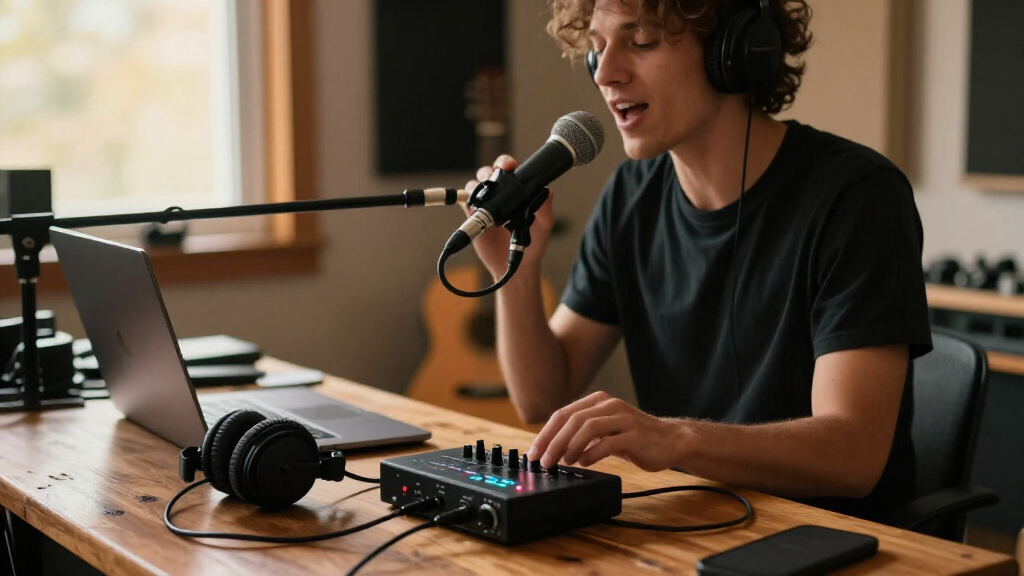
For most home recordists, I’d start with the Focusrite Scarlett 2i2 4th Gen: its two inputs suit vocals and instruments recorded together, while its controls are more useful for growing setups than a one-input interface. The MOTU M4 stands out for buyers who need more I/O and monitoring flexibility, while the Scarlett Solo 4th Gen is a simpler fit for recording one source at a time. The main tradeoff is straightforward: extra inputs and controls add flexibility, but a basic solo setup may not need them. I compare all 15 options by recording workflow, connectivity, usability, and practical limitations—continue reading for the full breakdown and help matching an interface to your setup.

Get audio and creator gear delivered free with Prime
- Fast, free delivery on millions of items
- Prime Video, Amazon Music and more included
- Member-only deals all year
Complete the kit


Key Takeaways
- Two inputs are the most useful step up for home recording: the Scarlett 2i2 4th Gen and MOTU M4 fit simultaneous vocal-and-instrument or two-microphone sessions better than the Solo models.
- The Scarlett Solo 4th Gen and 3rd Gen serve different needs: both suit one-source recording, but the newer model is the more current pick while the 3rd Gen remains a simpler-generation alternative.
- The MOTU M4 is the most capable choice in this lineup for expanding a recording setup: its 4×4 configuration offers more connection options than the basic 2×2 interfaces.
- Portable podcasting is a separate use case from studio recording: MAONO’s P1 and P2 are aimed at computer, phone, or tablet workflows, so buyers should match their intended setup to their connection needs.
- Many low-cost 2×2 models share headline features: phantom power and high sample-rate figures alone do not settle the choice; input layout, controls, monitoring, and clear compatibility matter too.
| Focusrite Scarlett Solo 3rd Gen USB-C Audio Interface |  | Best for Solo Singer-Songwriters | Connectivity: USB-C | Channels: 2 | Input types: XLR, instrument | VIEW LATEST PRICE | See Our Full Breakdown |
| MAONO P2 Hybrid USB Audio Interface Dual XLR for PC, Phone, iPad, Guitar |  | Best for Multi-Device Recording and Streaming | Connectivity: USB | Channels: 2 | Audio inputs: Microphone, guitar, PC, smartphone, iPad | VIEW LATEST PRICE | See Our Full Breakdown |
| XTUGA USB Audio Interface for PC, Recording Studio XLR & 3.5mm Microphone Jack, Plug & Play, Ultra-low Latency Q-12 |  | Best for Basic PC Recording | Connectivity: USB | Channels: 2 | Input types: XLR, 3.5mm microphone jack | VIEW LATEST PRICE | See Our Full Breakdown |
| Focusrite Scarlett 2i2 4th Gen USB-C Audio Interface |  | Best Overall for Two-Source Recording | Connectivity: USB | Channels: 2 | Mic preamps: 2 | VIEW LATEST PRICE | See Our Full Breakdown |
| 2×2 USB-C Audio Interface for PC/Mac Recording |  | Best for Two-Mic High-Resolution Recording on a Budget Setup | Connectivity: USB | Inputs and outputs: 2 inputs, 2 outputs | Input type: 2 XLR/TRS combo jacks | VIEW LATEST PRICE | See Our Full Breakdown |
| Focusrite Scarlett Solo 4th Gen USB-C Audio Interface |  | Best for Solo Vocalists and Instrumentalists | Connectivity: USB | Channels: 2 | Maximum sample rate: 192 kHz | VIEW LATEST PRICE | See Our Full Breakdown |
| BOMGE Mini 2 Channel USB Audio Interface for Recording, Streaming, and Podcasting |  | Best for Basic Portable Recording | Connectivity: USB | Channels: 2 | Maximum sample rate: 48 kHz | VIEW LATEST PRICE | See Our Full Breakdown |
| M-AUDIO M-Track Duo USB Audio Interface |  | Best Value for Two-Mic Recording | Audio resolution: 48 kHz | Inputs: 2 combo XLR/line/instrument inputs with phantom power | Outputs: Stereo 1/4-inch main outputs; 1/4-inch headphone output | VIEW LATEST PRICE | See Our Full Breakdown |
| USB Audio Interface with 48V Phantom Power, XLR/TRS Inputs, USB-C Recording Interface with Direct Monitor & Echo Control, 48kHz for PC, Mac, iOS, Guitar, Mic, Podcast |  | Best for Echo-Effect Streaming | Connectivity: USB | Channels: 4 | Inputs: XLR, USB; description also lists dual XLR/TRS combo inputs and a dedicated instrument input | VIEW LATEST PRICE | See Our Full Breakdown |
| Motu M4 4×4 USB-C Audio Interface | 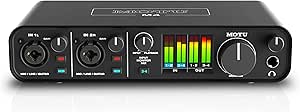 | Best for Expanding Home Studios | I/O configuration: 4-in/4-out | Channels: 8 | Microphone preamps: 2 | VIEW LATEST PRICE | See Our Full Breakdown |
| Jolgoo 2×2 USB Audio Interface, 24-Bit/192kHz Phantom Power Recording Card |  | Best for Straightforward Two-Input Recording | Maximum sample rate: 192 kHz | Audio resolution: 24-bit | Listed number of channels: 4 | VIEW LATEST PRICE | See Our Full Breakdown |
| USB C Audio Interface for Recording Music, Streaming, Podcasting, Silver |  | Best Compact Pick for Mobile Recording | Audio resolution: 24-bit | Maximum sample rate: 48 kHz | Number of channels: 2 | VIEW LATEST PRICE | See Our Full Breakdown |
| MAONO P1 USB Audio Interface with 70dB Gain for PC, Phone, iPad & Guitar |  | Best for Hybrid Streaming and Recording | Maximum sample rate: 192 kHz | Audio resolution: 24-bit | Number of channels: 2 | VIEW LATEST PRICE | See Our Full Breakdown |
| PIYONE 2X2 24-bit/192kHz USB C Audio Interface for High-Fidelity Recording |  | Best for a Simple USB-C Home Studio | Maximum sample rate: 192 kHz | Audio resolution: 24-bit | Number of channels: 2 | VIEW LATEST PRICE | See Our Full Breakdown |
| M-AUDIO M-Track Solo USB Audio Interface |  | Best for a Basic Solo Recording Setup | Audio resolution: 48 kHz | Inputs: 1 combo XLR/line input with phantom power; 1 line/instrument input | Outputs: Stereo RCA and 1/8-inch headphone | VIEW LATEST PRICE | See Our Full Breakdown |
| USB audio interfaces for recording | Connectivity | Maximum sample rate | Weight | Dimensions |
|---|---|---|---|---|
| Focusrite Scarlett Solo 3rd Ge | USB-C | 192 kHz | 12.32 oz | 1.71 × 5.65 × 3.77 in |
| MAONO P2 Hybrid USB Audio Inte | USB | 192 kHz | 0.5 kg | 6.42 × 8.27 × 3.23 in |
| XTUGA USB Audio Interface for | USB | 48 kHz | — | 5.98 × 4.92 × 1.97 in |
| Focusrite Scarlett 2i2 4th Gen | USB | 192 kHz | 1.7 lb | 4.61 × 7.09 × 1.87 in |
| 2×2 USB-C Audio Interface for | USB | 192 kHz | — | 6 × 6.5 × 1.75 in |
| Focusrite Scarlett Solo 4th Ge | USB | 192 kHz | 14.4 ounces | 3.78 × 5.63 × 1.83 inches |
| BOMGE Mini 2 Channel USB Audio | USB | 48 kHz | 0.32 kg | — |
| M-AUDIO M-Track Duo USB Audio | — | — | — | — |
| USB Audio Interface with 48V P | USB | 48 kHz | 1.5 pounds | — |
| Motu M4 4×4 USB-C Audio Interf | USB | 192 kHz | 16 ounces | 4.25 × 8.25 × 1.75 inches |
| Jolgoo 2×2 USB Audio Interface | USB | 192 kHz | 0.81 kg | — |
| USB C Audio Interface for Reco | USB and AUX | 48 kHz | 0.41 kg | 4.53 × 5.51 × 1.77 in |
| MAONO P1 USB Audio Interface w | USB | 192 kHz | — | 5.9 × 5.98 × 3.46 in |
| PIYONE 2X2 24-bit/192kHz USB C | USB | 192 kHz | 0.74 kg | — |
| M-AUDIO M-Track Solo USB Audio | — | — | — | — |
More Details on Our Top Picks
Focusrite Scarlett Solo 3rd Gen USB-C Audio Interface
The Scarlett Solo 3rd Gen keeps a recording setup focused: one XLR microphone input and one instrument input let you record vocals and guitar or bass without extra routing. Its Air mode adds brightness to the mic signal, while 24-bit/192kHz conversion supports high-resolution sessions. Compared with the Scarlett 2i2 4th Gen, this model is the simpler choice for one performer, but it gives up the second mic preamp and newer level-setting tools such as Auto Gain and Clip Safe. The included recording software can help a new owner get started, though the bundle may feel like more than a basic setup needs. Its small footprint suits a desk or travel rig; the tradeoff is that it depends on USB power and cannot expand beyond two channels.
Pros:- Separate XLR and instrument inputs suit simultaneous vocal and guitar or bass recording.
- Switchable Air mode provides a brighter mic option.
- 24-bit/192kHz maximum sample rate supports high-resolution recording.
- Compact design and included software make it practical for a small home or mobile setup.
Cons:- Only one XLR mic input, so recording two microphone sources at once requires another interface.
- USB connection is required; no external power option is listed.
- Lacks the Scarlett 2i2 4th Gen’s Auto Gain and Clip Safe features.
Best for: Solo vocalists and singer-songwriters who want to record one microphone alongside guitar or bass.
Not ideal for: Duos, interviewers, or small bands that need two microphone preamps or more than two recording channels.
- Connectivity:USB-C
- Channels:2
- Input types:XLR, instrument
- Maximum sample rate:192 kHz
- Frequency response:20 kHz
- Dimensions:1.71 × 5.65 × 3.77 in
- Weight:12.32 oz
- Warranty:3 years
Our verdict“Choose the Scarlett Solo 3rd Gen for a compact vocal-and-instrument setup, but pick the Scarlett 2i2 4th Gen if you need two mic preamps and easier level control.”
MAONO P2 Hybrid USB Audio Interface Dual XLR for PC, Phone, iPad, Guitar
The MAONO P2 is the lineup’s most flexible pick for creators who move audio between a computer and mobile devices. Its dual XLR inputs and support for PC, phone, and iPad make it better suited than the Scarlett Solo 3rd Gen to two-mic conversations or a recording setup that also feeds mobile content workflows. The listed 24-bit/192kHz recording and low-latency monitoring fit music capture as well as streaming and podcasting. That versatility comes with a learning curve: advanced routing may take time to configure, and the supplied information does not spell out every connection or routing detail. It still has only two channels, so it is not a substitute for a larger interface when recording a band or several separate mic sources.
Pros:- Dual XLR inputs accommodate two microphone sources.
- Supports computer, smartphone, and iPad workflows.
- Lists 24-bit/192kHz recording and low-latency monitoring.
- Aluminum-alloy housing is suited to home and mobile use.
Cons:- Advanced routing can make setup less straightforward for beginners.
- Two channels limit multitrack recording of several live sources.
- Full feature use depends on compatible software and configuration.
Best for: Podcasters, streamers, and home musicians who need two XLR inputs and want to connect a computer, phone, or iPad.
Not ideal for: Beginners seeking a very simple music-only interface, or groups that need more than two recording channels.
- Connectivity:USB
- Channels:2
- Audio inputs:Microphone, guitar, PC, smartphone, iPad
- Maximum sample rate:192 kHz
- Supported operating systems:Android, ChromeOS, Windows, iOS, macOS
- Supported software:Ableton Live, Studio One, Logic Pro, Cubase, GarageBand, FL Studio, OBS, and others
- Dimensions:6.42 × 8.27 × 3.23 in
- Weight:0.5 kg
Our verdict“Pick the MAONO P2 if two microphones and computer-to-mobile flexibility matter more than a simple setup or extra recording channels.”
XTUGA USB Audio Interface for PC, Recording Studio XLR & 3.5mm Microphone Jack, Plug & Play, Ultra-low Latency Q-12
The XTUGA Q-12 is a straightforward entry point for a PC-based home setup, pairing an XLR input with a 3.5mm microphone jack and phantom power for condenser mics. Its 16-bit/48kHz ceiling is adequate for basic recording and streaming, but it offers less resolution headroom than the 24-bit/192kHz Focusrite Scarlett Solo 3rd Gen and the other higher-spec options here. That makes the Q-12 easier to position as a practical starter rather than a long-term studio centerpiece. USB plug-and-play operation and support for common recording software help keep the setup accessible, while the listed one-year warranty is shorter than the Solo’s three years. Buyers should also weigh the reported latency concerns against the product’s low-latency claim, particularly if live monitoring is central to their work.
Pros:- Combines an XLR input with a 3.5mm microphone jack.
- Phantom power supports compatible condenser microphones.
- USB plug-and-play design avoids a separate power supply.
- Works with listed software including Audacity, Ableton Live, FL Studio, and Pro Tools.
Cons:- 16-bit/48kHz specification offers less recording headroom than the 24-bit/192kHz Scarlett Solo 3rd Gen.
- Limited to two channels, restricting multi-mic recording.
- Some users report latency issues, and the one-year warranty is relatively short.
Best for: PC users starting basic voice, instrument, or streaming recordings with a modest two-channel setup.
Not ideal for: Producers seeking higher-resolution capture, dependable live monitoring, or room to record multiple microphones.
- Connectivity:USB
- Channels:2
- Input types:XLR, 3.5mm microphone jack
- Maximum sample rate:48 kHz
- Bit depth:16-bit
- Compatible device:Personal computer
- Dimensions:5.98 × 4.92 × 1.97 in
- Warranty:1 year
Our verdict“Choose the Q-12 for basic PC recording on a simple setup, but step up to the Scarlett Solo 3rd Gen for higher-resolution capture and a longer listed warranty.”
Focusrite Scarlett 2i2 4th Gen USB-C Audio Interface
The Scarlett 2i2 4th Gen is the strongest all-around fit here for recording two sources at once: its two low-noise mic preamps accommodate a pair of microphones, or microphones and instruments, without forcing a solo workflow. Its 120dB dynamic range is paired with Auto Gain and Clip Safe, features that help users set usable levels and reduce the chance of clipping during a take. Compared with the Scarlett Solo 3rd Gen, the 2i2 offers more mic-input flexibility and newer level controls, though the Solo is smaller and remains sufficient for a single vocalist-instrumentalist. The 2i2’s two-channel limit still rules it out for larger ensembles, and there are no built-in effects or processing hardware. Its software bundle adds production options, but the interface itself is best for recording clean inputs rather than shaping sound onboard.
Pros:- Two low-noise mic preamps support recording two microphone sources.
- Auto Gain and Clip Safe help manage input levels and prevent clipping.
- 120dB dynamic range and a 192kHz maximum sample rate support detailed capture.
- Works with common recording software and includes a production software bundle.
Cons:- Two channels are not enough for larger ensemble recording.
- No built-in effects or processing hardware.
- USB-C connectivity may require an adapter with some devices.
Best for: Home-recording musicians, interviewers, and small duos who need two mic preamps and straightforward level-setting assistance.
Not ideal for: Bands recording several performers at once, or users who want built-in effects and onboard processing.
- Connectivity:USB
- Channels:2
- Mic preamps:2
- Maximum sample rate:192 kHz
- Dynamic range:120 dB
- Frequency response:20 kHz
- Dimensions:4.61 × 7.09 × 1.87 in
- Weight:1.7 lb
Our verdict“Choose the Scarlett 2i2 4th Gen for a flexible two-source home studio with assisted gain setting, while larger sessions call for an interface with more inputs.”
2×2 USB-C Audio Interface for PC/Mac Recording
This unnamed 2×2 USB-C interface offers a useful basic configuration for recording two microphone or line-level sources: it lists two XLR/TRS combo inputs, two inputs and outputs, and +48V phantom power. Its 24-bit/192kHz specification puts it closer on paper to the Scarlett 2i2 4th Gen than the XTUGA Q-12, whose listed maximum is 16-bit/48kHz. The product information also names compatibility with Mac, PC, and mobile devices, plus common recording applications. But unlike the Scarlett 2i2, it does not list features such as Auto Gain or Clip Safe, and the system requirements are not fully clear: Windows 10 is specified despite broader compatibility claims. That uncertainty, along with reports that some systems may need driver updates, makes it a less reassuring choice for plug-and-play reliability.
Pros:- Two XLR/TRS combo inputs accept microphones and other compatible sources.
- Lists 24-bit/192kHz recording and +48V phantom power.
- Two inputs and two outputs suit a basic recording and playback setup.
- Names compatibility with common recording software and mobile devices.
Cons:- Driver updates may be needed on some systems.
- Operating-system details are unclear, with Windows 10 specified alongside broader compatibility claims.
- No Auto Gain or Clip Safe features are listed, unlike the Scarlett 2i2 4th Gen.
Best for: Home recordists who want two combo inputs, phantom power, and high-resolution recording for microphones or instruments.
Not ideal for: Buyers who need clearly documented operating-system support, polished setup assistance, or a proven expansion path for larger sessions.
- Connectivity:USB
- Inputs and outputs:2 inputs, 2 outputs
- Input type:2 XLR/TRS combo jacks
- Maximum sample rate:192 kHz
- Frequency range:20 Hz–192 kHz
- Phantom power:+48V
- Compatibility:Mac, PC, mobile devices
- Dimensions:6 × 6.5 × 1.75 in
Our verdict“Consider this 2×2 interface for a basic two-source recording setup if its system compatibility checks out, but choose the Scarlett 2i2 4th Gen for clearer level-setting tools.”
Focusrite Scarlett Solo 4th Gen USB-C Audio Interface
I’d choose the Scarlett Solo 4th Gen for a home setup centered on one microphone and one instrument. Its two-channel layout keeps recording straightforward, while the 120 dB dynamic range, studio-grade converters, and Air mode give vocals and guitar a more detailed recording path than the basic 48 kHz options here, including the BOMGE Mini. Air mode can add presence without requiring an external processor, and the bundled software and plugins give new users tools to start recording.
The tradeoff is capacity: unlike the MOTU M4, the Solo has no MIDI I/O and won’t accommodate a larger multi-input session. It also uses USB-C, so some older computers may need an adapter. I’d pick it for focused songwriting, not for growing a band rig.
Pros:- Studio-grade converters with a stated 120 dB dynamic range
- Air mode adds presence to vocal and guitar recordings
- Recording software and plugins are included
- Compact design is easy to fit into a small home studio
Cons:- Two input channels limit multi-microphone or band recording
- USB-C connection may require an adapter with older devices
- No built-in MIDI support
Best for: Songwriters and home recordists who usually track one vocal microphone and one guitar or other instrument.
Not ideal for: Producers who need MIDI connections, more simultaneous inputs, or a setup that can expand to record several performers.
- Connectivity:USB
- Channels:2
- Maximum sample rate:192 kHz
- Frequency response:20 kHz
- Impedance:50 ohm
- Dimensions:3.78 × 5.63 × 1.83 inches
- Weight:14.4 ounces
- Warranty:Three years
Our verdict“Choose the Scarlett Solo if you want a compact, software-supported interface for detailed solo vocal and instrument recording.”
BOMGE Mini 2 Channel USB Audio Interface for Recording, Streaming, and Podcasting
The BOMGE Mini is a compact two-input option for recording a microphone and instrument without carrying a larger interface. Its combo inputs and phantom power accommodate condenser microphones, while the listed RCA, TRS, and TS connections offer flexibility for different sources. Compared with the Focusrite Scarlett Solo 4th Gen, it sticks to 48 kHz and lacks bundled recording software, but its supported device list includes iPhone as well as computers, which may suit a simple mobile or streaming setup.
That broad connection mix does not make it a better choice for demanding recording: the supplied data lists a one-year warranty and some users report noise issues. I’d favor the Scarlett for a more polished recording chain; the BOMGE makes more sense when portability and varied connections matter more than higher sample-rate support or included tools.
Pros:- Two combo XLR/line inputs with phantom power
- RCA, TRS, and TS connection options
- Compact design suits portable recording and streaming
- Listed compatibility includes computers and iPhone
Cons:- Maximum sample rate is 48 kHz
- No recording software is included
- Some users report noise issues, and the listed warranty is one year
Best for: Mobile musicians and beginner podcasters who need two inputs, phantom power, and a compact interface for a computer or iPhone.
Not ideal for: Recordists who need sample rates above 48 kHz, included production software, or a model with stronger confidence around noise performance.
- Connectivity:USB
- Channels:2
- Maximum sample rate:48 kHz
- Supported devices:Personal computer, iPhone
- Operating systems:Mac OS X, Windows XP or later
- Supported software:Ableton, Auria Pro, FL Studio, GarageBand, Live Lite, Pro Tools First
- Weight:0.32 kg
- Warranty:One year
Our verdict“Pick the BOMGE Mini for portable two-source recording with flexible connections, but choose the Scarlett Solo for higher-resolution support and bundled software.”
M-AUDIO M-Track Duo USB Audio Interface
The M-Audio M-Track Duo gives a small recording setup two combo XLR/line/instrument inputs, phantom power, and zero-latency direct monitoring. That combination is useful for recording two microphones or a mic and an instrument while hearing the input without distracting delay. Unlike the BOMGE Mini, it lists bundled software including Ableton Live Lite and MPC Beat, giving a new owner a starting point for recording and production.
Its ceiling is a straightforward 48 kHz, so the Focusrite Scarlett Solo 4th Gen is the better fit for someone prioritizing higher sample-rate capability and its Air mode. The Duo is USB powered and portable, but headphone compatibility deserves attention: the supplied data recommends TRS headphones in the 16–50 ohm range. I’d choose it for practical two-source recording, not a growing studio with more inputs.
Pros:- Two combo inputs accept XLR, line, and instrument sources
- Phantom power supports condenser microphones
- Zero-latency direct monitoring helps with live recording
- USB powered and includes listed recording software
Cons:- 48 kHz resolution is below the 192 kHz ceiling of the Scarlett Solo and MOTU M4
- Two inputs restrict larger simultaneous recording sessions
- Optimal headphone performance calls for TRS headphones rated 16–50 ohms
Best for: Budget-conscious musicians and podcasters who need two mic or instrument inputs, direct monitoring, and starter software.
Not ideal for: Recordists seeking higher sample-rate recording, more than two inputs, or easy use with headphones outside the stated impedance range.
- Audio resolution:48 kHz
- Inputs:2 combo XLR/line/instrument inputs with phantom power
- Outputs:Stereo 1/4-inch main outputs; 1/4-inch headphone output
- Power:USB powered
- Supported software:Ableton Live Lite, MPC Beat, Pro Tools First, and more
- Compatibility:Windows 7–10, macOS High Sierra to Big Sur, iOS
- Monitoring:Zero-latency direct monitoring
Our verdict“Choose the M-Track Duo for affordable, portable two-source recording with direct monitoring and starter software.”
USB Audio Interface with 48V Phantom Power, XLR/TRS Inputs, USB-C Recording Interface with Direct Monitor & Echo Control, 48kHz for PC, Mac, iOS, Guitar, Mic, Podcast
This interface stands apart from the M-Audio M-Track Duo by pairing two XLR/TRS combo inputs with a dedicated instrument input and adjustable echo effects. That feature set points toward creators who want monitoring effects for streaming or a performance-style recording setup rather than a plain capture path. It also supports 48V phantom power and lists PC, Mac, and iOS compatibility, offering flexibility across common recording devices.
The tradeoffs are substantial for buyers focused on music production. Its maximum sample rate is 48 kHz, there is no included software or detailed setup guidance in the supplied data, and the warranty is only three months. By comparison, the MOTU M4 supports up to 192 kHz and includes MIDI I/O, making it a stronger fit for a more developed studio. I’d treat this as a feature-led streaming pick, not a long-term recording hub.
Pros:- 48V phantom power supports condenser microphones
- Two XLR/TRS combo inputs plus a dedicated instrument input
- Real-time monitoring includes adjustable echo effects
- Compatibility is listed for PC, Mac, and iOS
Cons:- Maximum sample rate is limited to 48 kHz
- No included software or detailed setup instructions are listed
- Three-month warranty is shorter than the warranties listed for the Scarlett Solo and MOTU M4
Best for: Streamers and content creators who want phantom-powered mic inputs, an instrument connection, and echo effects for live monitoring.
Not ideal for: Music producers seeking high-resolution recording, bundled software, clear setup documentation, or a longer stated warranty.
- Connectivity:USB
- Channels:4
- Inputs:XLR, USB; description also lists dual XLR/TRS combo inputs and a dedicated instrument input
- Maximum sample rate:48 kHz
- Operating systems:PC, iOS, macOS
- Compatible devices:Guitar, headphones, laptop, microphone, personal computer
- Weight:1.5 pounds
- Warranty:Three months
Our verdict“Choose this interface for streaming-oriented monitoring effects and flexible inputs, not for high-resolution studio recording.”
Motu M4 4×4 USB-C Audio Interface
The MOTU M4 is the most expandable recording choice in this group. Its 4-in/4-out design, two microphone preamps, and MIDI I/O give a home studio room to connect more sources and hardware than the two-channel Scarlett Solo or M-Track Duo. The 192 kHz maximum sample rate also matches the Scarlett Solo’s listed ceiling while serving a more involved setup, and low-latency monitoring supports tracking without relying on playback delay.
That capacity is only useful if your sessions need it: for a singer recording one vocal and guitar, the Scarlett Solo takes up less space and has a more focused feature set. The M4’s USB-C connection may call for an adapter with older devices, and its stated operating-system support is specific. I’d choose it for a studio likely to use MIDI or several inputs, rather than a minimal desk setup.
Pros:- 4-in/4-out design supports more complex recording and routing than two-channel models
- Two microphone preamps accommodate mic-based recording
- MIDI I/O connects compatible keyboards and other MIDI hardware
- Supports sample rates up to 192 kHz with low-latency monitoring
Cons:- More capacity may be unnecessary for a simple solo recording setup
- USB-C connection may require an adapter for some devices
- Listed operating-system compatibility is limited to Windows 10, macOS 10.11, and iOS 9
Best for: Home-studio producers and podcasters who need multiple inputs and outputs, two mic preamps, and MIDI connections in one interface.
Not ideal for: Solo musicians who only record one microphone and one instrument, or buyers whose devices lack USB-C and cannot use an adapter.
- I/O configuration:4-in/4-out
- Channels:8
- Microphone preamps:2
- Maximum sample rate:192 kHz
- Connectivity:USB
- Operating systems:Windows 10, macOS 10.11, iOS 9
- Dimensions:4.25 × 8.25 × 1.75 inches
- Weight:16 ounces
- Warranty:Two years
Our verdict“Choose the MOTU M4 if you need more routing, MIDI, and input capacity than a compact two-channel interface can provide.”
Jolgoo 2×2 USB Audio Interface, 24-Bit/192kHz Phantom Power Recording Card
I’d shortlist the Jolgoo 2×2 for a home setup that needs two combo inputs, phantom power, and direct monitoring without the added routing features of the MAONO P1. Its stated 24-bit/192kHz recording ceiling is generous for vocals and instruments, while zero-latency monitoring lets performers hear their input without waiting for computer playback. The listed compatibility with common DAWs also makes it a flexible starting point across recording workflows. That said, the supplied specs list four channels, while the product name and description emphasize a 2×2 interface, so buyers should verify how those channels are counted before planning a multi-source session. The listing also flags possible macOS reformatting and gives little detail about included accessories. Compared with the M-AUDIO M-Track Solo, the Jolgoo is better suited to two-input recording, but it is the less established choice for a simple single-mic setup.
Pros:- XLR/line combo inputs accommodate microphones and instruments
- Phantom power supports compatible condenser microphones
- Zero-latency direct monitoring helps performers track in real time
- Listed 24-bit/192kHz recording supports high-resolution sessions
Cons:- The listed four-channel specification is unclear alongside the 2×2 name
- The product description warns that macOS may require reformatting
- Bundled accessories are not clearly specified
Best for: Home musicians and podcasters who need two XLR/line sources, phantom power, and direct monitoring for basic recording sessions.
Not ideal for: Buyers who need clearly documented channel routing, dependable Mac setup details, or a well-specified accessory bundle.
- Maximum sample rate:192 kHz
- Audio resolution:24-bit
- Listed number of channels:4
- Inputs:XLR/line combo inputs
- Phantom power:Supported
- Connectivity:USB
- Supported software:DAWs including Pro Tools, Ableton Live, Cubase, GarageBand, and Audacity
- Weight:0.81 kg
- Warranty:12 months
Our verdict“Choose the Jolgoo if you want two flexible recording inputs and direct monitoring, but check its channel configuration and Mac setup before buying.”
USB C Audio Interface for Recording Music, Streaming, Podcasting, Silver
The compact dimensions and support for computers, phones, and tablets make this USB-C interface a natural fit for recording away from a fixed desk. It supports 24-bit/48kHz audio and offers three monitoring modes, giving a mobile podcaster or solo musician practical control over how input and playback are heard. Compared with the Jolgoo 2×2, this model is lighter and smaller, but its listed channel count is only two and its audio input is specified as microphone, so it is less clearly suited to sessions involving several instruments. The 48V phantom power is useful for compatible microphones, though the product description’s reference to dynamic microphones is imprecise; phantom power is generally intended for condenser mics that require it. The stated need for a third-party ASIO driver for optimal DAW compatibility adds setup work on Windows.
Pros:- Compact 0.41 kg body is suited to portable recording kits
- Three monitoring modes offer flexible listening control
- 48V phantom power supports compatible condenser microphones
- Compatible with several computer and mobile operating systems
Cons:- Two-channel limit restricts multi-microphone recording
- Third-party ASIO driver may be needed for optimal Windows DAW use
- Listed audio input is microphone-only, with no instrument input specified
Best for: Mobile podcasters and solo creators who record one microphone source on a laptop, phone, or tablet and value a small footprint.
Not ideal for: Small bands or multi-mic recording setups, and Windows users who want to avoid installing or configuring an ASIO driver.
- Audio resolution:24-bit
- Maximum sample rate:48 kHz
- Number of channels:2
- Phantom power:48V
- Connectivity:USB and AUX
- Dimensions:4.53 × 5.51 × 1.77 in
- Weight:0.41 kg
- Operating systems:Windows 7 and above, Mac OS X 10.11 and above, Android 10 and above, iOS 10 and above
Our verdict“Pick this compact interface for portable, single-microphone recording, not for sessions that need multiple mic or instrument inputs.”
MAONO P1 USB Audio Interface with 70dB Gain for PC, Phone, iPad & Guitar
The MAONO P1 is the most routing-oriented choice in this group, with connectivity aimed at creators who move between a computer, phone, and tablet. Its stated 24-bit/192kHz recording, auto-gain, and low-latency monitoring can help streamline a creator’s recording chain, while the software routing features speak to streaming setups that combine sources. Compared with the Jolgoo 2×2, the P1 emphasizes device flexibility and software control rather than a straightforward pair of combo inputs; its listed audio inputs include microphone, guitar, bass, computer, and mobile devices. That breadth may appeal to streamers, but the two-channel specification still limits simultaneous recording, and the routing tools can add a learning curve for someone who only wants to record a vocal and guitar. Buyers should also confirm which functions work with their chosen software and device.
Pros:- Hybrid connectivity supports computer and mobile-device workflows
- Auto-gain can simplify input-level setup
- Low-latency monitoring supports live tracking
- Listed 24-bit/192kHz capability and routing software suit flexible creator setups
Cons:- Two-channel recording limits larger or multi-mic sessions
- Routing software may take time to learn
- Full functionality depends on compatible software
Best for: Streamers and podcast creators who switch among a computer, phone, or tablet and want software-based routing alongside recording.
Not ideal for: Beginners seeking a simple plug-in-and-record interface, or bands needing more than two channels captured at once.
- Maximum sample rate:192 kHz
- Audio resolution:24-bit
- Number of channels:2
- Listed gain:70 dB
- Audio inputs:Microphone, guitar, bass, PC, Mac, smartphone, and iPad
- Connectivity:USB
- Operating systems:Android, ChromeOS, Windows, and iOS
- Supported software:Pro Tools, Ableton Live, Studio One, Logic Pro, Cubase, GarageBand, FL Studio, and OBS Studio
- Dimensions:5.9 × 5.98 × 3.46 in
Our verdict“Choose the MAONO P1 if your recording setup spans mobile devices and streaming software, and skip it if you want the simplest two-input workflow.”
PIYONE 2X2 24-bit/192kHz USB C Audio Interface for High-Fidelity Recording
The PIYONE 2×2 targets a familiar home-studio job: connect a microphone and an instrument, monitor while tracking, and record through USB-C. Dual XLR/TRS combo inputs with phantom power give it more clearly defined input flexibility than the USB-C interface in this batch, whose listed audio input is microphone-only. Zero-latency monitoring is useful for performance tracking, and the claimed 24-bit/192kHz ceiling matches the Jolgoo’s listed resolution and sample rate. The PIYONE’s two-channel limit keeps the setup focused, though, and bus power means it relies on the connected device rather than an external supply. Its compatibility information is also uneven: the description mentions Mac, PC, and iOS, while the operating-system spec lists Windows. I’d verify support for the intended device before choosing it.
Pros:- Two XLR/TRS combo inputs accept microphones and instruments
- Phantom power supports compatible condenser microphones
- Zero-latency monitoring helps with real-time tracking
- USB-C connectivity and a 24-bit/192kHz specification suit a modern home setup
Cons:- Two-channel limit rules out larger ensemble recording
- Relies on bus power with no external supply included
- Mac and iOS support in the description conflicts with the Windows-only operating-system spec
Best for: Home musicians who want two combo inputs for a microphone and instrument, plus USB-C connection and direct monitoring.
Not ideal for: Buyers who need more than two simultaneous recording channels, external power, or unambiguous compatibility details for Mac and iOS.
- Maximum sample rate:192 kHz
- Audio resolution:24-bit
- Number of channels:2
- Inputs:XLR/TRS combo
- Phantom power:Supported
- Connectivity:USB
- Operating system listed in specs:Windows
- Weight:0.74 kg
- Warranty:2-year limited
Our verdict“The PIYONE suits a focused two-source home studio, provided its operating-system compatibility matches your recording device.”
M-AUDIO M-Track Solo USB Audio Interface
The M-AUDIO M-Track Solo is the clearest choice here for a simple starter rig built around one microphone or instrument at a time. It pairs one XLR/line combo input with phantom power and a separate line/instrument input, then adds direct monitoring with a switch between input and USB playback. That keeps recording and headphone checks straightforward, unlike the MAONO P1’s more involved routing approach. Its 48kHz resolution is more modest than the Jolgoo and PIYONE’s listed 192kHz ceilings, but it covers common vocal, guitar, and podcast workflows without requiring a high-resolution recording setup. The tradeoff is limited scale: the supplied specs describe two inputs, not a multichannel studio interface, and the outputs are stereo RCA rather than the more typical balanced studio connections. It is also USB-powered, with no external power option listed.
Pros:- Combo XLR/line input includes phantom power for compatible microphones
- Separate line/instrument input supports a second source
- Direct/USB monitoring switch makes input monitoring easy to control
- USB-powered design and included software support a basic desktop setup
Cons:- 48kHz resolution is lower than the listed 192kHz options from Jolgoo and PIYONE
- Stereo RCA outputs may not suit monitor setups requiring balanced connections
- No external power supply option is listed
Best for: First-time home recordists, solo podcasters, and guitarists who need one microphone input plus a separate instrument or line input.
Not ideal for: Musicians recording several microphones at once or studio owners who need balanced monitor outputs and higher sample-rate options.
- Audio resolution:48 kHz
- Inputs:1 combo XLR/line input with phantom power; 1 line/instrument input
- Outputs:Stereo RCA and 1/8-inch headphone
- Power:USB powered
- Compatibility:Mac, Windows 7–10, and iOS
- Included software:MPC Beats and Pro Tools First
- Monitoring:Zero-latency direct monitoring with direct/USB switch
Our verdict“Choose the M-Track Solo for uncomplicated solo recording with one mic and one instrument input, rather than a growing multi-mic studio.”

How We Picked
I ranked these USB audio interfaces for recording by how well their input and output layouts match common recording jobs: a single voice or instrument, two sources at once, or a more expandable setup. I weighed the practical value of microphone inputs, phantom power, instrument connections, direct monitoring, device compatibility, and control layout rather than treating a high sample-rate figure as proof of better results. I also separated compact podcast-focused devices from interfaces aimed primarily at computer-based studio recording.
The ranking favors products with a clearer fit and more useful flexibility for their intended user. That places the Scarlett 2i2 4th Gen ahead as a versatile two-input pick, with the MOTU M4 higher for users who need added I/O and the Scarlett Solo 4th Gen suited to simpler sessions. Lower-ranked and less-documented models may still suit a narrow need, but buyers should check the exact inputs, included controls, and device compatibility before choosing them over established, clearly specified alternatives.
Factors to Consider When Choosing USB Audio Interfaces For Recording
Choosing an interface is less about collecting the biggest specification and more about matching the device to the way you record. I’d work through these questions before settling on a model.
How Many Sources Must You Record at Once?
Count simultaneous sources, not just the instruments you own. A singer who records one microphone at a time can work with a Solo-style interface, but recording vocals and guitar together calls for at least two suitable inputs. Two XLR inputs are useful for interviews or stereo microphone techniques, while a mic input paired with an instrument input can be more practical for a solo artist. Avoid buying extra channels based only on a possible future setup if they add cost and complexity you will not use. If your sessions often involve guests or multiple instruments, the MOTU M4’s larger I/O layout offers more room than the 2×2 models here.
Match the Inputs to Your Microphones and Instruments
An XLR microphone connection, a line-level connection, and a high-impedance instrument input solve different jobs, even when they share a socket. Check whether the inputs can accept your actual sources and whether phantom power is available for any condenser microphones you plan to use. Phantom power is not a substitute for microphone gain, and a headline gain figure does not tell you how convenient the controls will be. A common mistake is buying an interface with two inputs but only one microphone preamp, then expecting to record two microphones at once. Read the input descriptions carefully before choosing between a compact solo interface and a two-mic model.
Plan for Monitoring While Recording
Direct monitoring lets you hear an incoming signal without relying entirely on the computer’s software path, which can make performance monitoring feel more immediate. Check whether the interface provides a simple way to balance the live input with playback from your recording software. This matters most for singers, instrumentalists, and podcast guests who need to hear themselves clearly while recording. A headphone jack alone does not tell you how flexible that mix will be. If you record alone and monitor through software without trouble, basic controls may be enough; collaborative sessions benefit from clearer monitoring options.
Check the Full Connection Chain
USB-C on an interface describes its connector, not every detail of computer, phone, or tablet compatibility. Check the manufacturer’s supported operating systems and whether your device needs an adapter, extra power, or a particular app. This is especially relevant for portable MAONO P1 and P2-style workflows, where the intended phone or tablet connection may matter as much as the microphone inputs. Also confirm that your recording software recognizes the interface and that the required cables are included or easy to source. A mismatch in the connection chain can turn a capable interface into an inconvenient one.
Choose for the Session You Record Most
Podcasting, streaming, and multitrack music recording overlap, but they do not demand identical controls. A device with echo or voice-oriented features may suit a live spoken-word workflow, while a studio-focused interface may prioritize instrument inputs and straightforward monitoring. Decide whether you need to record separate tracks for later editing or simply send a mixed signal to a stream. Buying a feature-rich portable unit for a one-microphone DAW setup can add controls you never touch. Conversely, a basic recording interface may frustrate someone who depends on phone-based production or quick live adjustments.
Treat Sample-Rate Claims as One Part of the Choice
Large bit-depth and sample-rate numbers can look decisive, but they do not describe the whole recording experience. Input quality, gain range, monitoring, driver or device support, and the room and microphone all affect the result. For typical home projects, reliable operation and a suitable input layout are often more valuable than paying extra for a specification your sessions will not use. Some less-established models in this roundup advertise high-resolution recording, so verify the exact connection and control details instead of choosing on that figure alone. Spend more when the added I/O or workflow features solve a real limitation in your current setup.
Frequently Asked Questions
Should I choose a one-input interface or a 2×2 model?
Choose one input if you record a single microphone or instrument at a time and do not need a second source connected for the same take. A 2×2 model is more useful when you want to record vocals and guitar together, use two microphones, or keep a microphone and instrument ready to go. The Scarlett Solo options fit the simpler workflow, while the Scarlett 2i2 4th Gen gives a more flexible starting point for simultaneous recording. Check that both inputs support the source types you need; a channel count by itself can be misleading. If you rarely record two sources together, the extra input may not change your day-to-day work.
Is USB-C compatibility enough to use an interface with my phone or iPad?
No. USB-C identifies a connector, but phone and tablet use also depends on device support, power needs, operating-system compatibility, and sometimes adapters or specific apps. Portable-focused models such as the MAONO P1 and P2 are presented for phone and tablet workflows, but buyers should still confirm their exact device is supported. Check whether the interface can receive enough power from the mobile device or needs an external source. Also confirm that your recording app can select the interface as its input and output. Testing the connection plan before a session avoids discovering a power or app limitation mid-recording.
Do I need phantom power to record vocals?
Not for every microphone. Many condenser microphones need 48V phantom power, while many dynamic microphones do not; check the microphone’s requirements before choosing an interface. Phantom power is useful only if the interface also has a compatible microphone input and enough practical gain for your microphone. It does not improve every vocal recording automatically, and it will not replace a suitable microphone or a quiet recording space. Several models in this roundup advertise phantom power, so compare how many microphone inputs are available as well as whether the feature is listed.
When is it worth choosing the MOTU M4 over a basic 2×2 interface?
The MOTU M4 makes more sense when you need its additional I/O for a larger recording or monitoring setup. If you record one microphone and one instrument at most, a 2×2 model such as the Scarlett 2i2 may cover the job with fewer connections to manage. Extra inputs and outputs are useful when you have more sources, external equipment, or a workflow that needs separate routing. They do not automatically improve a simple one-microphone recording. Map your current sources and outputs before paying for capacity you may not use.
Can a budget interface with a high sample-rate claim outperform a better-known model?
A high sample-rate claim alone cannot answer that. It says little about the interface’s input layout, monitoring controls, connection reliability, or suitability for your microphone and computer. In this roundup, several less-established 2×2 options advertise high-resolution recording, but their practical value depends on the details of the whole setup. Compare supported devices, available inputs, phantom power, and direct-monitor controls before treating specifications as a ranking. For most buyers, a clearly matched and supported interface is a safer choice than selecting solely by the largest number on the feature list.
Conclusion
For the broadest home-recording fit, I recommend the Focusrite Scarlett 2i2 4th Gen as best overall: two inputs make it more adaptable than the Solo models without requiring a larger I/O setup. The M-AUDIO M-Track Duo is a sensible value-oriented option for buyers who want a straightforward two-input interface, while the MOTU M4 is my premium pick for users who need its extra connections and flexibility. Beginners recording one source at a time should look first at the Scarlett Solo 4th Gen; the Solo 3rd Gen remains an alternative if that generation better matches their needs. For phone- and tablet-centered podcasting or streaming, compare the MAONO P1 and P2 with your exact device and workflow before choosing. If you need more than two sources, prioritize the M4’s expanded I/O; if you only record one source, skip paying for channels you will leave unused.
Fall Picks
fall essentials
As an affiliate, we earn on qualifying purchases.