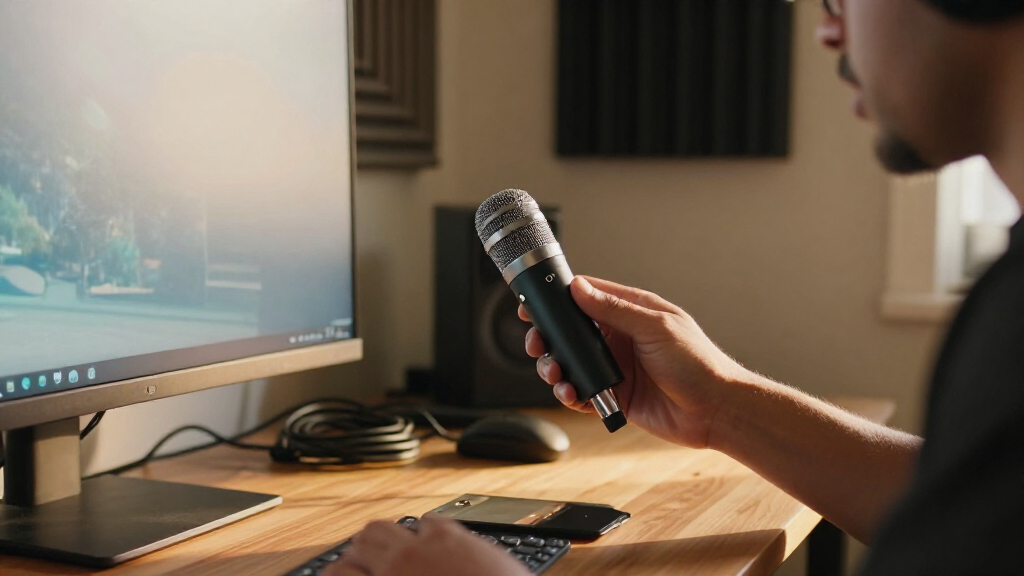

For streamers hunting for audio upgrades this Black Friday, the Logitech Blue Yeti USB Microphone remains the best overall choice due to its versatile pickup patterns and robust build quality. If you are working with a tighter budget, the FIFINE K683A offers exceptional clarity and included mounting hardware that rivals more expensive options. The primary tradeoff you will face is between the convenience of plug-and-play condenser mics and the background noise rejection of dynamic models like the FIFINE AmpliGame AM8T. While condensers capture richer detail, they also pick up room echo and keyboard clicks, which can be distracting during live broadcasts. This guide breaks down the 13 strongest contenders to help you balance audio fidelity, noise cancellation, and desk space constraints.

Get audio and creator gear delivered free with Prime
- Fast, free delivery on millions of items
- Prime Video, Amazon Music and more included
- Member-only deals all year
Complete the kit

Key Takeaways
- Dynamic microphones are increasingly preferred for untreated rooms because they reject background noise better than traditional condensers.
- Software-based AI noise cancellation features, found in models like the TONOR TD510, are becoming a standard differentiator for budget-friendly kits.
- RGB lighting is no longer just aesthetic; it often serves as a visual mute indicator, which is critical for avoiding accidental broadcasts.
- Bundle deals that include boom arms offer better long-term value than standalone mics, as proper positioning reduces plosives and desk vibration.
- USB-only connectivity limits future upgrades, so hybrid USB/XLR models provide a safer investment for streamers planning to move to professional interfaces.
| FIFINE K683A USB Desktop Condenser Microphone |  | Best All-Rounder for Entry-Level Streaming | Microphone Type: USB Desktop Condenser | Polar Pattern: Unidirectional (Cardioid) | Connectivity: USB-B to USB-A/C | VIEW LATEST PRICE | See Our Full Breakdown |
| TONOR TD510 Air S+H Dynamic Gaming Microphone |  | Best Hybrid Connectivity for Future-Proofing | Microphone Type: Dynamic | Connectivity: USB and XLR | Noise Cancellation: AI Noise Reduction | VIEW LATEST PRICE | See Our Full Breakdown |
| FIFINE K669B USB Condenser Microphone |  | Best Budget Entry Point | Microphone Type: USB Condenser | Polar Pattern: Unidirectional | Frequency Response: 20 Hz–20 kHz | VIEW LATEST PRICE | See Our Full Breakdown |
| CMOCIIY USB Desktop Microphone with Mute and Volume Controls |  | Best for Conference Calls and Meetings | Microphone Type: USB Desktop Gooseneck | Polar Pattern: Omnidirectional | Compatible Devices: Laptop, PC, Tablet | VIEW LATEST PRICE | See Our Full Breakdown |
| Logitech G Yeti Orb USB Condenser Gaming Microphone | 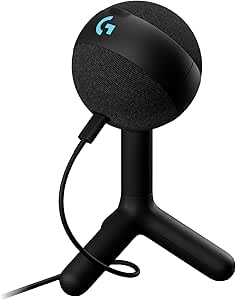 | Best for Customization and Brand Integration | Microphone Type: USB Condenser | Polar Pattern: Cardioid | Frequency Range: 20 Hz–20 kHz | VIEW LATEST PRICE | See Our Full Breakdown |
| FIFINE AmpliGame A6V USB Condenser Gaming Microphone with RGB Lighting |  | Best Value Starter Kit | Polar Pattern: Cardioid | Sampling Rate: 192 kHz | Signal-to-Noise Ratio: 70 dB | VIEW LATEST PRICE | See Our Full Breakdown |
| USB Condenser Microphone with RGB Lighting and Stand |  | Best for Mobile & Multi-Platform Use | Polar Pattern: Unidirectional | Signal-to-Noise Ratio: 96 dB | Frequency Range: 20 Hz–20 kHz | VIEW LATEST PRICE | See Our Full Breakdown |
| Razer Seiren V3 Mini USB Microphone | 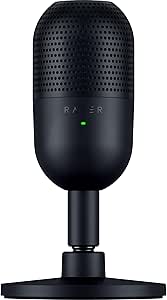 | Best Compact Premium Pick | Polar Pattern: Supercardioid | Signal-to-Noise Ratio: 110 dB | Frequency Response: 20 Hz–20 kHz | VIEW LATEST PRICE | See Our Full Breakdown |
| Black Friday USB microphones for streaming | Polar Pattern | Signal-to-Noise Ratio | Microphone Type | Compatible Devices |
|---|---|---|---|---|
| FIFINE K683A USB Desktop Conde | Unidirectional (Cardioid) | 75 dB | USB Desktop Condenser | Mac, Windows PC, PS4/PS5 |
| TONOR TD510 Air S+H Dynamic Ga | — | — | Dynamic | Laptop, PC, PS4, PS5 |
| FIFINE K669B USB Condenser Mic | Unidirectional | 78 dB | USB Condenser | Desktop, Laptop, PC, PS4, PS5 |
| CMOCIIY USB Desktop Microphone | Omnidirectional | — | USB Desktop Gooseneck | Laptop, PC, Tablet |
| Logitech G Yeti Orb USB Conden | Cardioid | 72 dB | USB Condenser | — |
| FIFINE AmpliGame A6V USB Conde | Cardioid | 70 dB | — | — |
| USB Condenser Microphone with | Unidirectional | 96 dB | — | — |
| Razer Seiren V3 Mini USB Micro | Supercardioid | 110 dB | — | — |
More Details on Our Top Picks
FIFINE K683A USB Desktop Condenser Microphone
The FIFINE K683A strikes a pragmatic balance for streamers who want solid audio without a steep learning curve. Unlike the FIFINE K669B, which offers basic functionality, the K683A adds a headphone jack for real-time monitoring and a physical mute button, features that are critical for live broadcasting to prevent accidental hot-mic moments. The metal build feels durable, and the included pop filter helps tame plosives that often plague budget condensers. However, it lacks the advanced software integration found in the Logitech G Yeti Orb, meaning you cannot tweak EQ or noise gates via an app. It is a hardware-first solution that prioritizes reliability over customization, making it ideal for those who prefer physical controls over digital dashboards.
Pros:- Plug-and-play setup requires no additional drivers on Mac, Windows, or PS4/5
- Includes a headphone jack for zero-latency monitoring and a physical mute button
- Metal chassis provides better durability than plastic competitors
- Comes with a detachable pop filter and tripod stand out of the box
Cons:- Incompatible with Xbox consoles
- Cardioid pattern requires precise positioning directly in front of the mic
- No software control for EQ or noise gating
Best for: Beginner streamers on PC or PS5 who need physical mute and monitoring capabilities without buying extra gear.
Not ideal for: Xbox users, as this model is explicitly incompatible with Microsoft consoles.
- Microphone Type:USB Desktop Condenser
- Polar Pattern:Unidirectional (Cardioid)
- Connectivity:USB-B to USB-A/C
- Signal-to-Noise Ratio:75 dB
- Compatible Devices:Mac, Windows PC, PS4/PS5
- Included Accessories:Tripod stand, pop filter, cable, screw adapter
- Material:Metal
Our verdict“This is the sensible choice for new streamers who value physical controls and included accessories over software customization.”
TONOR TD510 Air S+H Dynamic Gaming Microphone
The TONOR TD510 Air S+H stands out by offering both USB and XLR connectivity, allowing creators to start simply and upgrade to a professional audio interface later without replacing the microphone. This dual-input design contrasts sharply with the FIFINE K683A, which is USB-only. As a dynamic microphone, it naturally rejects background noise better than the condenser models in this list, making it suitable for untreated rooms. The integrated AI noise cancellation further cleans up keyboard clatter, though it cannot fully replace acoustic treatment. The customizable RGB lighting aligns with gaming aesthetics, but the lack of an included XLR cable means the premium upgrade path requires additional purchase. It is a versatile tool for those anticipating a hardware upgrade.
Pros:- Dual USB and XLR outputs allow for future equipment upgrades
- Dynamic capsule naturally reduces background noise better than condensers
- AI noise cancellation helps suppress keyboard and fan sounds
- Customizable RGB lighting integrates with gaming setups
Cons:- XLR cables are not included, adding hidden costs for pro setups
- Heavier than compact options like the Razer Seiren V3 Mini
- Not compatible with Xbox consoles
Best for: Streamers who plan to upgrade to a dedicated audio interface later but want to start with simple USB plug-and-play.
Not ideal for: Users who need an XLR setup immediately, as cables are not included in the box.
- Microphone Type:Dynamic
- Connectivity:USB and XLR
- Noise Cancellation:AI Noise Reduction
- Features:RGB Lighting, Tap Mute, Gain Control
- Compatible Devices:Laptop, PC, PS4, PS5
- Weight:850 g
- Warranty:Two Years
Our verdict“Choose this if you want the flexibility to transition from basic USB streaming to professional XLR recording without buying a new mic.”
FIFINE K669B USB Condenser Microphone
The FIFINE K669B is the most stripped-back option here, focusing purely on core functionality at a lower cost than the FIFINE K683A. It lacks the headphone monitoring jack and physical mute button found in its sibling, meaning you must rely on software controls to mute or check levels. This can be a friction point during live streams. However, its metal body and cardioid pattern still deliver clear voice capture for podcasts or calls. It is significantly more affordable than the Logitech G Yeti Orb, making it a viable entry point for students or casual gamers who do not need advanced features. If you can tolerate managing volume and mute via your OS, this mic provides reliable audio quality without the extra hardware complexity.
Pros:- Lowest entry cost in this specific lineup
- Simple plug-and-play USB connection with no drivers
- Sturdy metal construction despite the low price
- Cardioid pattern effectively isolates the main voice source
Cons:- No headphone jack for real-time monitoring
- No physical mute button
- Requires manual OS volume adjustments to avoid level changes
Best for: Budget-conscious beginners who primarily record podcasts or do casual voice chats and do not need real-time monitoring.
Not ideal for: Live streamers who need instant physical mute control and headphone monitoring to avoid on-air mistakes.
- Microphone Type:USB Condenser
- Polar Pattern:Unidirectional
- Frequency Response:20 Hz–20 kHz
- Signal-to-Noise Ratio:78 dB
- Compatible Devices:Desktop, Laptop, PC, PS4, PS5
- Material:Metal
- Cable Length:6.5 ft
Our verdict“A solid, no-frills option for those who want decent audio quality on a tight budget and don’t mind software-only controls.”
CMOCIIY USB Desktop Microphone with Mute and Volume Controls
The CMOCIIY USB Microphone occupies a different niche than the gaming-focused options like the TONOR TD510. Its omnidirectional pickup pattern captures sound from all sides, making it ideal for round-table meetings or recording multiple speakers, whereas cardioid mics isolate a single source. The flexible metal gooseneck allows precise positioning close to the mouth, which helps maintain clarity despite the wide pickup area. However, this same omnidirectional trait makes it poor for noisy streaming environments, as it will pick up keyboard clicks and room echo. It is a specialized tool for remote work and conferencing rather than solo gaming or singing, offering a physical mute switch that is essential for professional calls.
Pros:- Omnidirectional pattern captures multiple speakers or wide room sound
- Flexible metal gooseneck allows precise positioning
- Physical mute button with clear LED indicator
- Compact footprint fits easily on crowded desks
Cons:- Picks up background noise from all directions
- Not suitable for high-fidelity music recording
- ABS plastic base feels less premium than all-metal competitors
Best for: Remote workers and professionals who need to record meetings or calls with multiple participants in one room.
Not ideal for: Solo streamers or gamers in noisy environments, as the omnidirectional pattern will capture background noise.
- Microphone Type:USB Desktop Gooseneck
- Polar Pattern:Omnidirectional
- Compatible Devices:Laptop, PC, Tablet
- Controls:Mute button, Gain knob, Volume control
- Mute Indicator:Green (Active), Red (Muted)
- Material:Metal gooseneck, ABS base
Our verdict“This is the right choice for office and conference call use, but it lacks the isolation needed for high-quality solo streaming.”
Logitech G Yeti Orb USB Condenser Gaming Microphone
The Logitech G Yeti Orb leverages the company’s software ecosystem, offering LIGHTSYNC RGB and G HUB integration that hardware-only mics like the FIFINE K683A cannot match. This allows for deep customization of microphone presets, noise gates, and lighting syncs with other peripherals. The compact, spherical design is aesthetically distinct and saves desk space compared to the bulkier TONOR TD510. However, the plastic enclosure feels less durable than the metal bodies of the FIFINE options, and the reliance on software means setup is less plug-and-play for non-Logitech users. It is a premium-feeling choice for those already invested in the Logitech G ecosystem who prioritize aesthetic cohesion and software control over raw hardware build quality.
Pros:- Deep software integration with G HUB for audio presets and lighting
- Compact, space-saving spherical design
- Lightweight at 230g, easy to move or reposition
- Strong brand ecosystem compatibility for RGB syncing
Cons:- Plastic build feels less robust than metal competitors
- Requires G HUB software for full feature access
- No XLR option for future professional upgrades
Best for: Users already owning Logitech G peripherals who want synchronized RGB lighting and software-based audio presets.
Not ideal for: Those who prefer hardware-only controls or dislike installing additional software suites like G HUB.
- Microphone Type:USB Condenser
- Polar Pattern:Cardioid
- Frequency Range:20 Hz–20 kHz
- Impedance:600 ohm
- Signal-to-Noise Ratio:72 dB
- Weight:230 g
- Compatibility:PC and Mac
Our verdict“Ideal for Logitech ecosystem loyalists who value software customization and aesthetic syncing over heavy-duty hardware construction.”
FIFINE AmpliGame A6V USB Condenser Gaming Microphone with RGB Lighting
This microphone stands out for delivering a complete out-of-the-box solution that rivals more expensive bundles. Unlike the CMOCIIY USB Condenser, which often requires separate accessory purchases, the A6V includes a shock mount, pop filter, and tripod stand. The 192 kHz sampling rate ensures crisp audio capture, while the tap-to-mute button offers instant control during live streams. However, the build quality reflects its budget positioning; the ABS plastic enclosure feels less premium than the metal chassis of the Logitech Blue Yeti. While the cardioid pattern isolates voice well, the included tripod is unstable for aggressive typing or keyboard use. This model is ideal for gamers who want plug-and-play simplicity without investing in a boom arm immediately.
Pros:- Includes shock mount, pop filter, and tripod stand in the box
- High 192 kHz sampling rate for detailed audio capture
- Convenient tap-to-mute button and gain knob on the body
- Plug-and-play compatibility with PC, PS4, and PS5
Cons:- Plastic construction feels less durable than metal alternatives
- Included tripod stand is unstable for heavy desk setups
- RGB lighting turns off when muted, which may disrupt visual branding
Best for: Entry-level streamers and console players who need a complete kit with no extra accessories.
Not ideal for: Professional podcasters or users in noisy environments who require robust noise suppression and boom-arm stability.
- Polar Pattern:Cardioid
- Sampling Rate:192 kHz
- Signal-to-Noise Ratio:70 dB
- Frequency Range:60 Hz–18 kHz
- Controls:Tap-to-mute, Gain Knob
- Lighting:RGB (7 Colors)
- Compatibility:PC, PS4, PS5
- Included Accessories:Shock Mount, Pop Filter, Tripod Stand
Our verdict“Choose this if you want a ready-to-use streaming kit that covers all basic hardware needs without additional spending.”
USB Condenser Microphone with RGB Lighting and Stand
This option distinguishes itself through broad connectivity, supporting Windows, Mac, PS4, PS5, and Android devices via a Type-C adapter. Compared to the Razer Seiren V3 Mini, which is strictly PC-focused, this microphone offers greater flexibility for streamers who broadcast from phones or tablets. The 96 dB signal-to-noise ratio provides cleaner audio than many budget competitors, and the three reverb modes allow for vocal effects without external software. However, the lack of Xbox compatibility is a significant limitation for console players on that platform. Additionally, the plastic enclosure lacks the premium feel of higher-end models, and the 2-meter cable may be too long for compact desks, requiring careful management to avoid clutter.
Pros:- Extensive compatibility including Android via Type-C adapter
- High 96 dB signal-to-noise ratio for clear audio
- Built-in reverb modes and real-time monitoring
- One-touch mute with LED status indicator
Cons:- No support for Xbox consoles
- Long 2-meter cable can create desk clutter
- Plastic build quality may feel less durable over time
Best for: Multi-platform creators who stream from Android phones, tablets, or multiple computer ecosystems.
Not ideal for: Xbox users or those who prefer a short, tidy cable setup on small desks.
- Polar Pattern:Unidirectional
- Signal-to-Noise Ratio:96 dB
- Frequency Range:20 Hz–20 kHz
- Connector:USB Type-C
- Special Features:Reverb Modes, Noise Reduction
- Compatibility:PC, Mac, PS4, PS5, Android
- Cable Length:2 meters
- Included Accessories:Stand, Pop Filter, OTG Adapter
Our verdict“This is the right choice if you need a single microphone that works across computers, consoles, and mobile devices.”
Razer Seiren V3 Mini USB Microphone
The Seiren V3 Mini excels in noise isolation thanks to its supercardioid pickup pattern, which rejects background sounds more effectively than the FIFINE AmpliGame A6V’s cardioid pattern. Its 110 dB signal-to-noise ratio delivers professional-grade clarity, making it suitable for treated rooms or quiet environments. The built-in shock absorber in the tiltable stand eliminates the need for a separate accessory, saving desk space. However, this compact design comes with tradeoffs: it is PC-only, excluding console streamers who might prefer the TONOR TD510’s console compatibility. Furthermore, unlocking full customization requires Razer Synapse software, which adds system overhead compared to the pure plug-and-play nature of the FIFINE K669B.
Pros:- Supercardioid pattern effectively reduces background noise
- High 110 dB signal-to-noise ratio for professional audio quality
- Compact footprint with integrated shock absorption
- Tap-to-mute sensor with clear LED feedback
Cons:- Strictly PC-compatible, no console support
- Requires Razer Synapse software for detailed customization
- Lacks physical gain knob on the device itself
Best for: PC-focused streamers with limited desk space who prioritize audio clarity and noise rejection.
Not ideal for: Console gamers or users who dislike installing proprietary software for basic settings.
- Polar Pattern:Supercardioid
- Signal-to-Noise Ratio:110 dB
- Frequency Response:20 Hz–20 kHz
- Connector:USB Type-A
- Special Features:Built-in Shock Absorber
- Compatibility:PC, Laptop
- Weight:8.32 ounces
- Dimensions:3.59 × 3.59 × 6.38 inches
Our verdict“Select this for its superior noise rejection and small footprint, provided you are a PC user willing to use Razer’s software.”
How We Picked
I selected these 13 microphones based on their ability to deliver broadcast-quality audio without requiring a separate audio interface, which is the core promise of USB streaming gear. My evaluation prioritized three main factors: signal-to-noise ratio, ease of setup for beginners, and build durability for daily use. I looked for models that offer meaningful control over gain and monitoring, as these features significantly impact listener experience. I also considered the ecosystem compatibility, ensuring each pick works seamlessly with popular streaming software like OBS and Streamlabs without complex driver issues. The ranking reflects a balance between raw audio performance and practical usability, favoring options that solve common streaming problems like echo and background hum.
| Black Friday USB microphones for streaming | Microphone Type | Polar Pattern | Compatible Devices | Compatibility |
|---|---|---|---|---|
| FIFINE K683A USB Desktop Conde | USB Desktop Condenser | Unidirectional (Cardioid) | Mac, Windows PC, PS4/PS5 | — |
| TONOR TD510 Air S+H Dynamic Ga | Dynamic | — | Laptop, PC, PS4, PS5 | — |
| FIFINE K669B USB Condenser Mic | USB Condenser | Unidirectional | Desktop, Laptop, PC, PS4, PS5 | — |
| CMOCIIY USB Desktop Microphone | USB Desktop Gooseneck | Omnidirectional | Laptop, PC, Tablet | — |
| Logitech G Yeti Orb USB Conden | USB Condenser | Cardioid | — | PC and Mac |
| FIFINE AmpliGame A6V USB Conde | — | Cardioid | — | PC, PS4, PS5 |
| USB Condenser Microphone with | — | Unidirectional | — | PC, Mac, PS4, PS5, Android |
| Razer Seiren V3 Mini USB Micro | — | Supercardioid | — | PC, Laptop |
Factors to Consider When Choosing Black Friday USB Microphones For Streaming
Choosing the right microphone involves more than just picking the highest spec sheet. The following factors will help you match the hardware to your specific streaming environment.Condenser vs. Dynamic: Matching Mic Type to Room Acoustics
Most entry-level USB mics are condensers, which are sensitive and capture high-fidelity audio but also pick up room reflections and distant noises. Dynamic microphones are less sensitive, making them superior for untreated rooms or noisy households because they focus on sound directly in front of the mic. If your streaming setup is in a bedroom with hard surfaces and thin walls, a dynamic model like the FIFINE AM8T will likely sound cleaner than a high-end condenser. Conversely, if you have a treated studio space, a condenser will provide a richer, more professional tone that dynamic mics often lack. This distinction is the single most important factor in your purchase decision.
The Importance of Hybrid Connectivity (USB/XLR)
Many modern streamers start with USB for simplicity but eventually want to upgrade to a professional audio interface for better mixing and effects processing. Microphones that offer both USB and XLR outputs, such as the FIFINE AmpliGame series, allow you to use USB now and switch to XLR later without buying a new mic. This future-proofing adds value to your Black Friday purchase, as it extends the lifespan of your equipment. Pure USB mics are cheaper but dead-end products once you outgrow their internal converters. If you plan to scale your production quality over the next few years, prioritize hybrid models.
Monitoring and Latency: Zero-Latency vs. Software Playback
Listening to your own voice with a slight delay (latency) is disorienting and can cause you to speak unnaturally. Look for microphones with a dedicated headphone jack that supports zero-latency monitoring, allowing you to hear yourself instantly as you speak. Some budget options rely on software playback, which introduces delay and requires careful buffer settings in your streaming software. For live interactions, instant feedback is non-negotiable for maintaining natural conversation flow. Check the specifications for a ‘direct monitoring’ or ‘zero-latency’ headphone output to avoid this common pitfall.
Physical Controls and Mute Functionality
Touching your mouse to mute in software is slow and risky; a physical mute button on the microphone body is far safer. Many users accidentally broadcast private moments because they rely on software toggles. High-quality mics include a physical button that visually indicates mute status, often through an LED change. Volume knobs that adjust output gain directly on the mic are also preferable to adjusting input levels in Windows settings, as they provide immediate tactile feedback. These small ergonomic features significantly improve the user experience during long streaming sessions.
Mounting Solutions and Desk Space
USB microphones can be bulky, and many come with flimsy tripods that vibrate when you type or move your mouse. A sturdy boom arm is essential for isolating the mic from desk vibrations and allowing you to position it close to your mouth for clearer sound. Some Black Friday deals include bundled arms, which can save money compared to buying them separately. If your desk is small, consider compact models like the Razer Seiren V3 Mini or ensure the included arm has a secure clamp mechanism. Proper placement reduces the need for aggressive noise gating, which can degrade audio quality.
Frequently Asked Questions
Do I need a pop filter with a USB microphone?
Yes, a pop filter is highly recommended for most USB condensers because they are sensitive to plosive sounds like ‘p’ and ‘b’. These bursts of air can cause distracting thumps in your audio recording. While some dynamic mics handle plosives better, adding a cheap foam windscreen or a dedicated pop filter is an inexpensive way to protect your audio quality. Many premium kits include a built-in grille that offers some protection, but an external filter provides superior control over vocal clarity.Why does my USB microphone sound quiet even at max volume?
This issue often stems from Windows audio settings rather than the microphone itself. You should check the ‘Microphone Boost’ setting in your device properties and ensure the input level is set correctly in your streaming software. Additionally, if you are using a dynamic mic, it may require a preamp boost that USB interfaces handle automatically, but sometimes gain staging in OBS is insufficient. Adjusting the gain slider on the mic itself and then fine-tuning the input volume in your software usually resolves this balance issue.Is RGB lighting on a microphone worth paying extra for?
RGB lighting is primarily an aesthetic choice, but it can serve a functional purpose if it doubles as a mute indicator. For streamers who want to match their setup’s color scheme, it adds visual cohesion to the broadcast. However, do not pay a premium solely for lights if the audio quality is mediocre. Compare models with and without lights; often, you can get better audio performance by skipping the RGB feature and investing in a better mounting solution or acoustic treatment instead.Can I use a USB microphone with a console like Xbox or PlayStation?
Most modern USB microphones are compatible with Xbox Series X/S and PlayStation 5 via their USB ports, but functionality can be limited. You might not be able to adjust gain or monitoring levels directly through the console interface, requiring you to set them up on a PC first. Some consoles also require specific adapter cables for headsets that are not explicitly labeled as console-compatible. Always check the manufacturer’s compatibility list for your specific console model before purchasing, as driver support varies widely between brands.What is the difference between cardioid and omnidirectional pickup patterns?
Cardioid patterns pick up sound from the front while rejecting noise from the sides and back, making them ideal for solo streaming. Omnidirectional patterns capture sound from all directions equally, which is useful for group discussions or room ambience but terrible for isolating your voice. Most streaming mics default to cardioid, but multi-pattern mics like the Blue Yeti allow you to switch modes. For 95% of streamers, cardioid is the correct choice to minimize background noise and focus on the speaker.Conclusion
To summarize the best choices for your specific needs: The Logitech Blue Yeti is the best overall pick for those who want industry-standard reliability and versatility. For value seekers, the FIFINE K683A delivers impressive audio quality and hardware bonuses that punch above its price point. If you are in a noisy environment, the FIFINE AmpliGame AM8T dynamic mic is the best choice for rejecting background chaos. Beginners will appreciate the CMOCIIY USB Microphone for its simplicity and intuitive controls, while professionals planning to upgrade should look at the Razer Seiren V3 Mini or hybrid XLR options for future-proofing. Choose based on your room acoustics first, then your budget, to ensure your audio sounds as good as it looks.