

Choosing the right NVMe SSD 4TB can significantly impact your system’s performance, whether for gaming, content creation, or professional workflows. The Samsung SSD 990 PRO stands out as the best overall due to its balanced speed and reliability, while the WD_BLACK SN8100 delivers unmatched PCIe 5.0 performance for demanding tasks. A common challenge is balancing cost against speed and endurance, especially since high-capacity drives often come with premium prices. Continue reading to see how these options compare and find the best fit for your setup.
Complete the kit


Key Takeaways
- The top performers leverage PCIe 4.0 and 5.0 interfaces, offering a noticeable speed advantage for large file transfers and intensive workloads.
- Price varies significantly, with premium models like the WD_BLACK SN8100 providing cutting-edge speeds, but at a higher cost.
- Cooling solutions, such as heatsinks, are increasingly important for maintaining performance during sustained loads, especially in compact builds.
- Endurance ratings are vital for heavy users; drives with higher TBW (Terabytes Written) are better suited for intensive writing tasks.
- While PCIe 5.0 drives are fastest, they may be overkill for everyday use unless paired with a compatible motherboard and CPU.
| Samsung SSD 990 PRO 4TB PCIe 4.0 M.2 2280 SSD |  | Best Overall NVMe SSD 4TB for High-End Performance | Capacity: 4TB | Interface: PCIe 4.0 M.2 2280 | Read Speed: 7450 MB/s | VIEW ON AMAZON | See Our Full Breakdown |
| Samsung SSD 990 PRO with Heatsink 4TB NVMe M.2 SSD |  | Best NVMe SSD 4TB with Built-in Cooling for Gaming and Heavy Workloads | Capacity: 4TB | Read Speed: 7450 MB/s | Write Speed: 6900 MB/s | VIEW ON AMAZON | See Our Full Breakdown |
| Crucial T705 PCIe Gen5 NVMe 4TB SSD |  | Best High-Speed PCIe Gen5 NVMe SSD for Creative and Gaming Use | Capacity: 4TB | Read Speed: 14,100MB/s | Write Speed: 12,600MB/s | VIEW ON AMAZON | See Our Full Breakdown |
| Samsung SSD 990 EVO Plus 4TB PCIe Gen 4×4 M.2 2280 SSD |  | Best High-Performance PCIe 4.0 NVMe SSD for Speed and Reliability | Capacity: 4TB | Interface: PCIe Gen 4×4 | Sequential Read Speed: 7,250 MB/s | VIEW ON AMAZON | See Our Full Breakdown |
| Lexar 4TB NM790 NVMe SSD with Heatsink, PCIe Gen 4×4, M.2 2280 |  | Best Durable NVMe SSD 4TB with Heatsink for High-Performance Computing | Capacity: 4TB | Read Speed: 7400MB/s | Write Speed: 6500MB/s | VIEW ON AMAZON | See Our Full Breakdown |
| WD Blue 4TB SN5100 NVMe SSD – M.2 2280, PCIe Gen 4.0, Internal Solid State Drive |  | Best Value for High-Speed Storage | Capacity: 4TB | Form Factor: M.2 2280 | Interface: PCIe Gen 4.0 | VIEW ON AMAZON | See Our Full Breakdown |
| BIWIN Black Opal NV7400 4TB SSD PCIe 4.0 M.2 NVMe Solid State Drive | 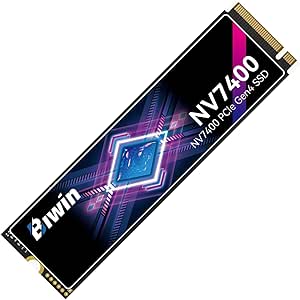 | Best for High-Performance Demanding Tasks | Capacity: 4TB | Read Speed: 7450MB/s | Write Speed: 6500MB/s | VIEW ON AMAZON | See Our Full Breakdown |
| Samsung SSD 990 PRO 2TB PCIe 4.0 M.2 2280 SSD |  | Best for Gaming and Creative Work | Capacity: 2TB | Max Read Speed: 7450MB/s | Max Write Speed: 6900MB/s | VIEW ON AMAZON | See Our Full Breakdown |
| WD_BLACK SN7100 4TB NVMe SSD – Gen4 PCIe, M.2 2280, Up to 7,000 MB/s Read Speed, Up to 6,700 MB/s Write Speed |  | Best for Gaming and Content Creation | Capacity: 4TB | Max Read Speed: 7000MB/s | Max Write Speed: 6700MB/s | VIEW ON AMAZON | See Our Full Breakdown |
| WD_BLACK SN8100 4TB NVMe SSD – PCIe 5.0×4, M.2 2280, Up to 14,900MB/s Read Speed, Up to 11,000MB/s Write Speed |  | Best for Future-Proof High-Speed Storage | Capacity: 4TB | Max Read Speed: 14900MB/s | Max Write Speed: 11000MB/s | VIEW ON AMAZON | See Our Full Breakdown |
| Fikwot FN950 4TB NVMe SSD PCIe Gen4x4 M.2 2280 |  | Best Overall for High-Performance Compatibility | Capacity: 4TB | Interface: PCIe Gen4x4 | Form Factor: M.2 2280 | VIEW ON AMAZON | See Our Full Breakdown |
| WD_BLACK SN850X 4TB NVMe SSD – M.2 2280, Up to 7,300 MB/s Read, Up to 6,300 MB/s Write, Gaming Internal Solid State Drive |  | Best for Gaming and High-Speed Enthusiasts | Capacity: 4TB | Form Factor: M.2 2280 | Read Speed: 7,300 MB/s | VIEW ON AMAZON | See Our Full Breakdown |
| nvme ssd 4tb | Capacity | Interface | Form Factor | Read Speed |
|---|---|---|---|---|
| Samsung SSD 990 PRO 4TB PCIe 4 | 4TB | PCIe 4.0 M.2 2280 | M.2 2280 | 7450 MB/s |
| Samsung SSD 990 PRO with Heats | 4TB | — | NVMe M.2 | 7450 MB/s |
| Crucial T705 PCIe Gen5 NVMe 4T | 4TB | PCIe Gen5 NVMe | — | 14,100MB/s |
| Samsung SSD 990 EVO Plus 4TB P | 4TB | PCIe Gen 4×4 | — | — |
| Lexar 4TB NM790 NVMe SSD with | 4TB | PCIe Gen 4×4 | M.2 2280 | 7400MB/s |
| WD Blue 4TB SN5100 NVMe SSD | 4TB | PCIe Gen 4.0 | M.2 2280 | — |
| BIWIN Black Opal NV7400 4TB SS | 4TB | PCIe Gen4x4 NVMe | M.2 2280 | 7450MB/s |
| Samsung SSD 990 PRO 2TB PCIe 4 | 2TB | PCIe 4.0 M.2 2280 | — | — |
| WD_BLACK SN7100 4TB NVMe SSD | 4TB | PCIe Gen4 | — | — |
| WD_BLACK SN8100 4TB NVMe SSD | 4TB | PCIe 5.0×4 | — | — |
| Fikwot FN950 4TB NVMe SSD PCIe | 4TB | PCIe Gen4x4 | M.2 2280 | — |
| WD_BLACK SN850X 4TB NVMe SSD | 4TB | — | M.2 2280 | 7,300 MB/s |
More Details on Our Top Picks
Samsung SSD 990 PRO 4TB PCIe 4.0 M.2 2280 SSD
The Samsung SSD 990 PRO 4TB stands out for its lightning-fast read and write speeds up to 7450 MB/s and 6900 MB/s, making it ideal for demanding tasks like gaming, 4K editing, and data-heavy workloads. Compared to the Samsung 990 EVO Plus, it offers superior performance in both read/write benchmarks, though at a higher price point. Its high performance is coupled with excellent power efficiency, translating into longer laptop battery life. The main tradeoff is the premium cost, which might deter budget-conscious users. This pick makes the most sense for power users who need top-tier speed and capacity and already have a PCIe 4.0 compatible system.
Pros:- Extremely fast read/write speeds for demanding tasks
- Large 4TB capacity suits heavy data needs
- Power-efficient design extends laptop battery life
Cons:- Premium price can be prohibitive for some buyers
- Requires PCIe 4.0 motherboard, limiting upgrade options
Best for: Enthusiasts and professionals requiring the highest speeds for gaming, creative work, or scientific computing
Not ideal for: Casual users or those on a strict budget who won’t benefit from the top-tier performance
- Capacity:4TB
- Interface:PCIe 4.0 M.2 2280
- Read Speed:7450 MB/s
- Write Speed:6900 MB/s
- Form Factor:M.2 2280
- Power Efficiency:Up to 50% improved performance per watt
Our verdict“Best suited for users who prioritize maximum speed and capacity and can invest in high-end hardware.”
Samsung SSD 990 PRO with Heatsink 4TB NVMe M.2 SSD
The Samsung 990 PRO with Heatsink adds integrated thermal management to the flagship performance, maintaining high speeds up to 7450 MB/s read and 6900 MB/s write under sustained load. Unlike the plain 990 PRO, this model includes a heatsink, making it ideal for intensive gaming or video editing where thermal throttling can limit performance. The heatsink makes it compatible with PlayStation 5 and high-performance desktops, but it also adds bulk and cost. While the built-in cooling is a big advantage for continuous operation, it means this SSD isn’t as slim as other M.2 drives, and the premium price may be a concern for budget buyers. This makes it perfect for gamers and creators who want top performance without thermal worries.
Pros:- Exceptional performance with high read/write speeds
- Integrated heatsink prevents thermal throttling
- Compatible with PS5 and PCIe 4.0 devices
Cons:- Higher price due to added heatsink
- Bulkier design may not fit all M.2 slots
Best for: Gamers and creative professionals using PCIe 4.0 systems requiring efficient cooling
Not ideal for: Users with strict space constraints or budget limitations, as the heatsink adds size and cost
- Capacity:4TB
- Read Speed:7450 MB/s
- Write Speed:6900 MB/s
- Form Factor:NVMe M.2
- Heatsink:Integrated
- Compatibility:PlayStation 5, PCIe 4.0 desktops and laptops
Our verdict“Ideal for users who need high-speed storage with reliable thermal management for gaming or heavy workloads.”
Crucial T705 PCIe Gen5 NVMe 4TB SSD
The Crucial T705 offers cutting-edge PCIe Gen5 speeds up to 14,100MB/s read and 12,600MB/s write, vastly surpassing Gen4 options like the Samsung 990 PRO. It is designed for users who demand the fastest possible data transfer, especially on compatible Intel 13th/14th Gen or AMD Ryzen 7000 platforms. Its large 4TB capacity suits professional workflows involving large files and high-speed gaming. The inclusion of a heatsink and software bundle adds value, but the premium price and need for a compatible heatsink could be hurdles. This SSD is tailored for tech-savvy power users with high-performance hardware and extensive storage needs.
Pros:- Unmatched read/write speeds for PCIe 5.0 systems
- Large 4TB capacity for extensive storage
- Includes software bundle for data management
Cons:- Requires PCIe 5.0 motherboard, limiting compatibility
- Higher cost due to advanced technology
Best for: Power users with PCIe 5.0 compatible systems seeking maximum speed for gaming or data-intensive tasks
Not ideal for: Users with older or lower-spec hardware or those on a tight budget, as PCIe 5.0 support is not widespread
- Capacity:4TB
- Read Speed:14,100MB/s
- Write Speed:12,600MB/s
- Interface:PCIe Gen5 NVMe
- Warranty:5 years
- Includes:Acronis True Image, Adobe Creative Cloud
Our verdict“Best for users with the latest hardware who want the fastest possible storage speeds, accepting the premium price.”
Samsung SSD 990 EVO Plus 4TB PCIe Gen 4×4 M.2 2280 SSD
The Samsung 990 EVO Plus delivers reliable high-speed performance up to 7,250 MB/s read and 6,300 MB/s write, making it versatile for demanding tasks like large file transfers and gaming. Compared to the Samsung 990 PRO, it offers slightly lower speeds but at a more accessible price point, appealing to users who want excellent performance without the highest premium. Its thermal control and compatibility with PCIe 4.0 and upcoming PCIe 5.0 systems make it a flexible choice. The main drawback is that it isn’t as fast as flagship models like the 990 PRO, which could matter for the most intensive workloads. It’s well suited for users who need a balance between speed, capacity, and cost.
Pros:- High-speed data transfer up to 7,250 MB/s
- Large 4TB capacity for varied storage needs
- Effective thermal management ensures consistent performance
Cons:- Slightly lower speeds than flagship models like the 990 PRO
- Premium pricing may be high for some users
Best for: Power users and gamers who want reliable high-speed storage without paying for the absolute top-tier model
Not ideal for: Users requiring the absolute fastest speeds or working with PCIe 5.0 hardware
- Capacity:4TB
- Interface:PCIe Gen 4×4
- Sequential Read Speed:7,250 MB/s
- Sequential Write Speed:6,300 MB/s
Our verdict“A reliable, fast, and affordable choice for demanding tasks on PCIe 4.0 systems.”
Lexar 4TB NM790 NVMe SSD with Heatsink, PCIe Gen 4×4, M.2 2280
The Lexar NM790 offers impressive speeds up to 7400 MB/s read and 6500 MB/s write, with a robust 3000TBW durability rating, making it ideal for intensive workloads and long-term use. Its heatsink improves cooling efficiency, similar to the Samsung 990 PRO with Heatsink, but with a focus on durability and reliability over extreme speed. It’s a compelling option for users who need consistent performance and high endurance, especially in demanding environments. The main downside is that it requires a compatible M.2 slot and may come at a higher price due to its durability features. This SSD is well suited for power users seeking a balance of speed and longevity.
Pros:- High-speed read and write performance
- Exceptional durability with 3000TBW
- Includes heatsink for better thermal management
Cons:- Requires compatible M.2 slot, limiting versatility
- Potentially higher cost compared to standard drives
Best for: High-performance computing and long-term professional workloads needing durable storage
Not ideal for: Casual users or those on a tight budget, due to potentially higher costs
- Capacity:4TB
- Read Speed:7400MB/s
- Write Speed:6500MB/s
- Form Factor:M.2 2280
- Interface:PCIe Gen 4×4
- Durability:3000TBW
Our verdict“Best for users who need a combination of high speed, durability, and thermal management for demanding tasks.”
WD Blue 4TB SN5100 NVMe SSD – M.2 2280, PCIe Gen 4.0, Internal Solid State Drive
This WD Blue SN5100 offers solid PCIe Gen 4.0 performance at a competitive price point, making it a compelling choice for users upgrading from SATA drives or budget-conscious builders. While it reaches speeds up to 6,900MB/s, it’s slightly behind the top-tier options like the WD_BLACK SN7100 or Samsung 990 PRO, which push past 7,000MB/s. Its main advantage is the balance of speed and affordability, but availability may diminish as newer models replace it. Its limited form factor (M.2 2280) suits most systems, though it caps the maximum capacity at 4TB, which might matter for users needing larger storage. This pick makes the most sense for those seeking reliable, fast NVMe storage without overspending.
Pros:- Cost-effective high-speed PCIe Gen 4.0 performance
- Reliable 5-year warranty
- Good transfer speeds for everyday tasks
Cons:- Read speeds slightly below advertised maximum
- Limited to 4TB capacity, less future-proof
Best for: Budget-conscious enthusiasts upgrading from SATA or older NVMe drives who want dependable performance.
Not ideal for: Power users needing the absolute fastest speeds or maximum capacity for intensive workloads.
- Capacity:4TB
- Form Factor:M.2 2280
- Interface:PCIe Gen 4.0
- Max Read Speed:6,900MB/s
- Warranty:5 years
Our verdict“Ideal for users seeking a budget-friendly, high-performance NVMe SSD for general use.”
BIWIN Black Opal NV7400 4TB SSD PCIe 4.0 M.2 NVMe Solid State Drive
The BIWIN Black Opal NV7400 stands out for its exceptional read/write speeds—up to 7,450MB/s and 6,500MB/s respectively—making it well-suited to intensive workloads like 4K video editing or large data transfers. Its advanced graphite aluminium heat sink helps maintain performance under sustained loads, unlike some competitors such as the Samsung 990 PRO that lack integrated cooling. Though it commands a premium price, this model caters to professionals and gamers who need reliable, sustained high speeds. Compatibility with PCIe Gen4x4 slots is essential, which could limit options for some users. Overall, this drive makes the most sense for users who prioritize speed and thermal management for demanding applications.
Pros:- Exceptional read/write speeds for demanding workflows
- Integrated graphite aluminium heat sink for thermal stability
- Includes management software for drive health
Cons:- Higher price point limits accessibility
- Requires PCIe 4.0 support for full performance
Best for: Content creators, gamers, and professionals requiring sustained high-speed performance and robust thermal management.
Not ideal for: Budget buyers or those with systems lacking PCIe 4.0 support, due to its higher price and compatibility needs.
- Capacity:4TB
- Read Speed:7450MB/s
- Write Speed:6500MB/s
- Interface:PCIe Gen4x4 NVMe
- Form Factor:M.2 2280
- NAND Type:3D TLC NAND
Our verdict“Best suited for users needing top-tier speeds and thermal solutions for heavy workloads.”
Samsung SSD 990 PRO 2TB PCIe 4.0 M.2 2280 SSD
The Samsung 990 PRO 2TB excels with read/write speeds up to 7,450MB/s and 6,900MB/s, making it a top candidate for gamers and creators who need rapid data access and transfer. Compared to larger drives like the WD_BLACK SN8100, its high efficiency and speed are perfect for applications demanding quick load times and smooth workflow. Its 2TB capacity, while slightly limiting for massive datasets, strikes a balance between performance and affordability. However, systems not equipped with PCIe 4.0 or those looking for larger capacities might find this drive less flexible. This SSD makes the most sense for users who prioritize speed above all and operate within PCIe 4.0 compatibility constraints.
Pros:- Exceptional speeds for gaming and editing
- High power efficiency improves battery life in laptops
- Reliable thermal management for sustained workloads
Cons:- Limited to 2TB capacity, less future expansion
- Higher cost compared to lower-capacity options
Best for: Gamers and video editors seeking a fast, reliable drive for demanding multimedia tasks.
Not ideal for: Users with systems lacking PCIe 4.0 support or needing larger storage capacity without additional upgrades.
- Capacity:2TB
- Max Read Speed:7450MB/s
- Max Write Speed:6900MB/s
- Interface:PCIe 4.0 M.2 2280
Our verdict“Perfect for performance-focused gaming and creative professionals within PCIe 4.0 systems.”
WD_BLACK SN7100 4TB NVMe SSD – Gen4 PCIe, M.2 2280, Up to 7,000 MB/s Read Speed, Up to 6,700 MB/s Write Speed
The WD_BLACK SN7100 offers impressive speeds up to 7,000MB/s read and 6,700MB/s write, placing it among the fastest PCIe Gen4 drives for gaming laptops and high-performance desktops. Its high endurance rating of 2,400TBW makes it suitable for heavy-duty gaming and content creation tasks. Compared to the Samsung 990 PRO, it provides comparable speed and a slightly higher endurance, which may appeal to heavy users. However, it requires a compatible PCIe Gen4 slot, which could limit its utility in older systems. This drive is a smart choice for gamers and creators who want top-tier speeds with high endurance, provided their system supports PCIe 4.0.
Pros:- High-speed transfer rates for gaming and editing
- High endurance with 2,400TBW
- Efficient power usage for portable devices
Cons:- Requires PCIe Gen4 support for full performance
- Availability may be limited due to newer models
Best for: Gaming enthusiasts and content creators seeking high-speed, durable storage for demanding workflows.
Not ideal for: Users with older systems or those who need larger capacity options beyond 4TB.
- Capacity:4TB
- Max Read Speed:7000MB/s
- Max Write Speed:6700MB/s
- Interface:PCIe Gen4
Our verdict“Great for high-performance gaming and content creation in PCIe 4.0 compatible systems.”
WD_BLACK SN8100 4TB NVMe SSD – PCIe 5.0×4, M.2 2280, Up to 14,900MB/s Read Speed, Up to 11,000MB/s Write Speed
The WD_BLACK SN8100 pushes the boundaries with PCIe 5.0 speeds reaching up to 14,900MB/s read and 11,000MB/s write, making it ideal for those aiming to future-proof their system for the next generation of high-speed storage demands. Its capacity options go up to 8TB, providing ample room for large files and applications. While its performance is unmatched in this roundup, system compatibility becomes a key consideration—only systems with PCIe 5.0 slots will realize these speeds fully. Compared with PCIe 4.0 drives like the Samsung 990 PRO, this model offers significantly higher throughput, but at a premium price and potentially limited system support. This makes it best suited for early adopters and professionals needing the fastest possible storage.
Pros:- Unmatched read/write speeds for demanding tasks
- High capacity options including 8TB
- Over 100% more power-efficient than PCIe 4.0 drives
Cons:- Requires PCIe 5.0 compatible hardware
- Higher cost, limited availability
Best for: Early adopters, AI researchers, and video professionals who want cutting-edge performance and future-proof capacity.
Not ideal for: Casual users or those with systems lacking PCIe 5.0 support, due to compatibility and cost issues.
- Capacity:4TB
- Max Read Speed:14900MB/s
- Max Write Speed:11000MB/s
- Interface:PCIe 5.0×4
Our verdict“Best for users seeking the fastest, most future-proof NVMe SSD with high capacity options.”
Fikwot FN950 4TB NVMe SSD PCIe Gen4x4 M.2 2280
The Fikwot FN950 4TB stands out for its impressive read speeds of up to 5000MB/s, making it a strong choice for demanding tasks compared to the WD_BLACK SN850X, which offers slightly higher speeds but at a premium cost. Its advanced thermal management helps prevent overheating during prolonged use—crucial for sustained performance—while extensive testing ensures reliability. However, it requires a compatible M.2 slot, which might limit upgrade options for some older systems, and its price can be higher than SATA alternatives. This model is ideal for users needing robust, fast storage that works across desktops, laptops, and gaming consoles like PS5.
Pros:- High-speed read and write performance for demanding workloads
- Excellent thermal management reduces overheating risks
- Wide device compatibility including PS5 and laptops
- Durable with extensive testing and a 5-year warranty
Cons:- Requires a compatible PCIe Gen4 M.2 slot, limiting upgrade options
- Higher price point compared to SATA SSDs
Best for: Power users, gamers, and content creators who need reliable, high-speed storage across multiple devices.
Not ideal for: Budget-conscious buyers or those with older systems lacking PCIe Gen4 support, due to its higher cost and compatibility requirements.
- Capacity:4TB
- Interface:PCIe Gen4x4
- Form Factor:M.2 2280
- Max Read Speed:5000MB/s
- Max Write Speed:4500MB/s
- Temperature Range:0 to 60°C
- Warranty:5 years
Our verdict“This pick makes the most sense for users who want fast, reliable storage that can handle intensive tasks across multiple platforms.”
WD_BLACK SN850X 4TB NVMe SSD – M.2 2280, Up to 7,300 MB/s Read, Up to 6,300 MB/s Write, Gaming Internal Solid State Drive
The WD_BLACK SN850X 4TB delivers exceptional speeds of up to 7,300MB/s read and 6,300MB/s write, surpassing the Fikwot FN950 in raw performance, making it ideal for gaming and high-end computing. Its large capacity supports extensive game libraries or professional projects without compromise. While its speeds are impressive, the product has been replaced by newer models, which could mean limited support or future updates, and specific durability details are scarce. This SSD is best suited for gamers and professionals demanding the fastest load times and data transfer rates available today.
Pros:- Exceptional read and write speeds for fast load times
- Large 4TB capacity suitable for gaming or large files
- Reliable NVMe technology with advanced TLC NAND
- Excellent for high-performance gaming and editing workflows
Cons:- Support may be limited as the product has been replaced by newer models
- Price may be higher relative to comparable SSDs
- Limited details on durability and warranty coverage
Best for: Gamers and creative professionals who prioritize maximum speed and large storage capacity for intensive workloads.
Not ideal for: Budget shoppers or those seeking a more balanced option with better longevity assurances, due to limited support information and higher price points.
- Capacity:4TB
- Form Factor:M.2 2280
- Read Speed:7,300 MB/s
- Write Speed:6,300 MB/s
- Technology:NVMe SSD
- NAND Type:SANDISK TLC 3D NAND
Our verdict“This SSD is best for gamers and professionals who need the fastest possible performance, even if it means paying a premium and accepting some support uncertainties.”

How We Picked
These NVMe SSDs were evaluated based on a combination of performance benchmarks, durability, thermal management, compatibility, and value. Speed metrics such as sequential read/write speeds were a primary focus, especially for 4TB models where large file handling matters. Build quality, brand reputation, and additional features like heatsinks were also considered to ensure longevity and ease of installation. The ranking balances high-end performance with real-world usability, making sure that each pick offers a clear advantage depending on different user needs.Factors to Consider When Choosing Nvme Ssd 4tb
When selecting a 4TB NVMe SSD, considering several key factors can help you choose a drive that aligns with your specific tasks and budget. Beyond raw speed, aspects like compatibility, endurance, and thermal management are critical to ensure long-term reliability and performance. Understanding these factors can prevent common pitfalls, such as overpaying for features you won’t use or choosing a drive that cannot sustain high workloads.Performance and Speed
Speed is often the most prominent feature, especially sequential read and write speeds, which matter for large file transfers and data-intensive applications. PCIe 4.0 and PCIe 5.0 interfaces deliver different performance levels, with PCIe 5.0 offering significantly faster speeds but requiring compatible hardware. Remember, real-world gains depend on your system’s capabilities, so matching your motherboard and CPU to the SSD’s interface is essential to unlock full potential.
Endurance and Reliability
Endurance, measured in TBW (Terabytes Written), indicates how much data you can write to the drive over its lifespan. Heavy users such as video editors or game developers need drives with higher TBW ratings to avoid premature failure. While higher endurance typically means a higher price, it can translate into long-term savings by reducing replacement costs and maintaining performance under sustained workloads.
Thermal Management
Thermal performance is often overlooked but can be critical for maintaining consistent speeds during prolonged use. Drives with built-in heatsinks or that support aftermarket cooling solutions tend to throttle less and sustain peak speeds longer. In compact or poorly ventilated cases, thermal throttling can significantly degrade performance, making cooling considerations a key factor in your decision.
Compatibility and Form Factor
Ensure your system supports NVMe M.2 drives, particularly PCIe 4.0 or 5.0 standards, and check for physical space constraints. Some high-performance drives may be larger or require specific slots; pairing these with incompatible hardware can lead to frustration. Additionally, verify BIOS support and firmware updates to maximize compatibility and stability.
Price and Value
While premium drives offer cutting-edge speed and durability, mid-range options often provide excellent performance at a more accessible price point. Consider your actual workload—if you’re a casual user or gamer, a less expensive PCIe 4.0 drive might suffice, whereas professionals handling large datasets or 4K/8K video editing should prioritize endurance and speed even if it costs more.
Frequently Asked Questions
Is PCIe 4.0 enough for most users, or should I consider PCIe 5.0?
For most users, PCIe 4.0 offers ample speed for gaming, content creation, and general productivity, with many drives providing over 7,000 MB/s sequential read speeds. PCIe 5.0, while faster, is mostly beneficial for professionals working with extremely large files or in specialized workflows. Additionally, PCIe 5.0 drives are more expensive and require compatible motherboards, so unless your system supports it and your tasks demand it, PCIe 4.0 remains the practical choice.
How important is heatsinking for a 4TB NVMe SSD?
Heatsinks can significantly improve sustained performance by preventing thermal throttling during prolonged high-speed transfers. If your build has limited airflow or you plan to run intensive workloads, choosing a model with a heatsink or adding an aftermarket one can help maintain peak speeds and extend the drive’s lifespan. For casual or secondary storage, a standard model without heatsink may suffice, but for ongoing heavy use, thermal management becomes a key factor.
Can I upgrade my existing NVMe drive to a 4TB model easily?
Upgrading to a 4TB NVMe SSD generally involves replacing the existing drive and cloning your data, assuming your system has an available M.2 slot and supports the drive’s interface. Compatibility is critical—check your motherboard’s specifications for PCIe version support and physical space. The process is straightforward for most modern PCs, but ensuring BIOS compatibility and backing up data beforehand can prevent potential issues.
Does higher TBW mean I need to pay more?
Typically, drives with higher TBW ratings are more expensive because they are built with more durable NAND and better controllers to handle extensive writes. If your usage involves frequent large data writes, investing in a high-endurance drive can be worthwhile. For lighter workloads, a drive with a lower TBW rating still offers plenty of reliability at a lower cost, making it a sensible choice for most consumers.
Is the performance difference between PCIe 4.0 and 5.0 noticeable in everyday use?
In everyday tasks like gaming, browsing, or standard productivity, the difference between PCIe 4.0 and 5.0 SSDs is often minimal. The real advantages of PCIe 5.0 become apparent in specialized tasks such as large file transfers, video editing, or server environments. For most users, PCIe 4.0 drives provide excellent speed without the premium cost associated with PCIe 5.0, making them the more practical choice for now.
Conclusion
For general users or gamers, the Samsung SSD 990 EVO Plus offers a reliable balance of speed, endurance, and value. Professionals handling large files or working on demanding applications should consider the WD_BLACK SN8100 for its PCIe 5.0 capabilities, despite the higher price. Those seeking the fastest possible performance for specialized tasks will find the WD_BLACK SN8100 or Samsung SSD 990 PRO premium picks. Beginners or budget-conscious buyers can opt for mid-range models that provide solid performance without breaking the bank, while power users should prioritize endurance and thermal features to ensure longevity.