

The best tech deal in this roundup is the Beats Studio Pro for buyers who want noise cancellation, long battery life, and broad device compatibility in one pair of headphones. The 8Bitdo Ultimate 2 stands out for gaming with its wireless setup and charging dock, while the Fanttik E1 Max is a practical pick for small repair jobs. The tradeoff across these options is whether to prioritize versatile daily use, a specialized task, or a compact accessory. I compared all 12 picks by usefulness, ease of use, and the features that make each purchase worthwhile. Read on for the full breakdown and a guide to choosing the right tech deal for your needs.

Get audio and creator gear delivered free with Prime
- Fast, free delivery on millions of items
- Prime Video, Amazon Music and more included
- Member-only deals all year
Complete the kit


Key Takeaways
- The amazon.com/dp/B0CZPHPJLN?tag=strongmocha04-20&ascsubtag=dc-823406″ target=”_blank” rel=”nofollow sponsored noopener”>Beats Studio Pro is the strongest all-around pick for audio buyers who value active noise cancellation, long battery life, and compatibility with Apple and Android devices.
- The 8Bitdo Ultimate 2 has a clearer use case than most accessories here: its gaming controls and included charging dock make it a focused choice for regular players.
- The SUPVAN T50M Pro and Nelko P21 serve the same broad need—making labels from a phone—so compare tape support and the specific features you need before choosing between them.
- Several picks solve narrow, practical problems: the Fanttik screwdriver suits small DIY jobs, while the Mifaso outlet extender adds a shelf and night light where outlets are hard to reach.
- Not every multifunction device is a better deal. A phone-stand speaker or smart display may earn its space in a suitable room, but buyers who need only one function may prefer a dedicated product.
| DEWALT Mini Wearable Bluetooth Speaker, Clip-On Jobsite Pro (Yellow) |  | Best for Jobsite Portability | Bluetooth: 5.0 | Water resistance: IP56 | Battery life: Up to 10 hours | VIEW ON AMAZON | See Our Full Breakdown |
| Beats Solo 4 Wireless On-Ear Bluetooth Headphones – Slate Blue | 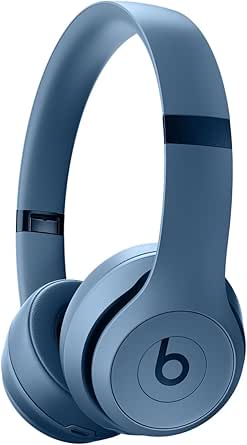 | Best for Battery Life | Battery life: Up to 50 hours | Fast charging: 10 minutes for up to 5 hours of playback | Connectivity: Bluetooth, USB-C, 3.5 mm audio cable | VIEW ON AMAZON | See Our Full Breakdown |
| Beats Studio Pro Wireless Over-Ear Headphones – Up to 40-Hour Battery, Active Noise Cancelling, Lossless Audio, Apple & Android Compatible, Deep Brown | 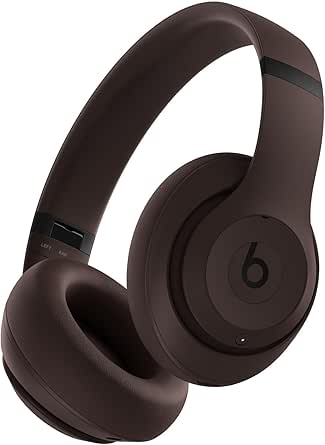 | Best for Noise-Controlled Listening | Battery life: Up to 40 hours | Bluetooth: 5.3 | Active noise cancelling: Yes | VIEW ON AMAZON | See Our Full Breakdown |
| SUPVAN T50M Pro Bluetooth Label Maker with 3 Tapes |  | Best for Custom Home and Small-Business Labels | Printer type: Thermal | Output: Monochrome | Print resolution: 203 dpi | VIEW ON AMAZON | See Our Full Breakdown |
| Wireless Induction Speaker with Phone Stand – 5-in-1 Bluetooth Gadget for Home & Office |  | Best for Desk Convenience | Maximum output power: 5 watts | Connectivity: Bluetooth and NFC | Connectivity protocol: Bluetooth and induction | VIEW ON AMAZON | See Our Full Breakdown |
| Amazon Echo Show 5 (Newest Model), Smart Display with Alexa, Glacier White |  | Best Compact Smart Display | Display: 5.5-inch touchscreen | Camera: 2 MP with built-in shutter | Speaker: Full-range 1.75-inch speaker | VIEW ON AMAZON | See Our Full Breakdown |
| Meta Quest 3S 128GB Virtual Reality Headset with Gorilla Tag Bundle |  | Best Immersive Gaming Pick | Storage: 128 GB | Display: LCD, 1832 x 1920 pixels per eye | Field of view: 110 degrees | VIEW ON AMAZON | See Our Full Breakdown |
| 8Bitdo Ultimate 2 Wireless Gaming Controller with Charging Dock – Purple |  | Best Gaming Accessory Upgrade | Controller type: Gamepad | Connectivity: Bluetooth | Compatible devices: PC and Android | VIEW ON AMAZON | See Our Full Breakdown |
| J-Tech Digital Ergonomic Wireless Mouse with Removable Palm Rest and Adjustable DPI |  | Best Ergonomic Desk Upgrade | Connectivity: USB; described as wireless | Movement detection: Optical | Buttons: 6 | VIEW ON AMAZON | See Our Full Breakdown |
| Nelko P21 Label Maker Machine with Tape, Bluetooth Label Printer, White |  | Best for Home Organization | Printer type: Thermal | Connectivity: Bluetooth | Resolution: 203 x 203 DPI | VIEW ON AMAZON | See Our Full Breakdown |
| Fanttik E1 Max Electric Screwdriver, 53-in-1 DIY (Grey) | 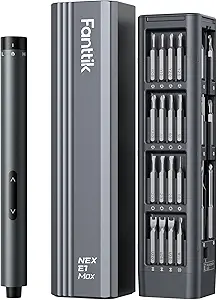 | Best for Precision Repairs | Motor speed: 200 RPM | Selectable torque: 0.05–0.2 N·m | Manual torque boost: 3 N·m | VIEW ON AMAZON | See Our Full Breakdown |
| Mifaso Outlet Extender with Shelf and Night Light, 1800J Surge Protector |  | Best for Space-Saving Charging | AC outlets: 5 | USB ports: 4 total: 3 USB-A and 1 USB-C | Surge protection: 1800 joules | VIEW ON AMAZON | See Our Full Breakdown |
| tech deal | Dimensions | Weight |
|---|---|---|
| DEWALT Mini Wearable Bluetooth | 1.29 x 1.98 x 2.69 inches | 1.38 ounces |
| Beats Solo 4 Wireless On-Ear B | 8.23 x 5.2 x 3.7 inches | 1.2 pounds |
| Beats Studio Pro Wireless Over | 7.01 x 3.07 x 7.13 inches | 9.2 ounces |
| SUPVAN T50M Pro Bluetooth Labe | 5.9 x 2.6 x 4.3 inches | 303 g |
| Wireless Induction Speaker wit | 2 x 2 x 2 inches | — |
| Amazon Echo Show 5 | 5.8 x 3.6 x 3.2 inches | 16.1 oz (456 g) |
| Meta Quest 3S 128GB Virtual Re | — | — |
| 8Bitdo Ultimate 2 Wireless Gam | — | — |
| J-Tech Digital Ergonomic Wirel | 5.83 x 3.74 inches | — |
| Nelko P21 Label Maker Machine | 6.65 x 4.5 x 1.9 inches | 11.52 oz |
| Fanttik E1 Max Electric Screwd | — | — |
| Mifaso Outlet Extender with Sh | 4.8 × 3.5 inches | 100 g |
More Details on Our Top Picks
DEWALT Mini Wearable Bluetooth Speaker, Clip-On Jobsite Pro (Yellow)
As a tech deal, this speaker’s appeal is its pocket-size, clip-on design and the ability to take it into dusty or damp settings without carrying a larger portable speaker. Its IP56 rating, 10-hour battery life, and 100-foot Bluetooth range suit work gear and outdoor errands where easy access matters more than room-filling sound. Compared with the Beats Solo 4, it is built for hands-free background listening, not immersive personal audio or long listening sessions. The tradeoff is its 2-watt output: it may struggle to be heard across a busy work area or by a group. Bluetooth is the only listed audio connection, too, so there’s no auxiliary option if wireless pairing is inconvenient. I’d choose it for rugged portability, not volume or versatility.
Pros:- Lightweight clip-on design is easy to carry on gear.
- IP56 dust and water resistance suits rougher outdoor settings.
- Up to 10 hours of battery life supports extended use.
- Bluetooth range is listed at up to 100 feet.
Cons:- 2-watt output may not be loud enough for groups or noisy spaces.
- Bluetooth is the only listed connection, with no auxiliary input.
- Actual battery life can vary with usage.
Best for: People who want lightweight background audio clipped to work gear for jobsite tasks, walks, or outdoor activities.
Not ideal for: Buyers who need loud sound for a group, wired playback, or immersive headphones for travel.
- Bluetooth:5.0
- Water resistance:IP56
- Battery life:Up to 10 hours
- Maximum range:100 feet
- Audio output power:2 watts
- Weight:1.38 ounces
- Dimensions:1.29 x 1.98 x 2.69 inches
- Mounting type:Clip-on
Our verdict“Choose this compact DEWALT if jobsite-ready portability matters more than loud, room-filling sound.”
Beats Solo 4 Wireless On-Ear Bluetooth Headphones – Slate Blue
The Solo 4 is the lineup’s strongest fit for listeners who want long battery life without moving to over-ear headphones. Up to 50 hours between charges and a 10-minute charge for up to five hours of playback make it well suited to commutes and travel days when charging access is limited. Compared with the Beats Studio Pro, this on-ear model is a more compact listening option, but it does not list active noise cancelling or transparency mode. That makes the Studio Pro the better match for blocking travel noise, while the Solo 4 prioritizes endurance and a lighter-wearing format. Apple and Android compatibility, Bluetooth, USB-C, and a 3.5 mm cable add flexibility; still, on-ear fit may not suit everyone, and its listed 1.2-pound weight is not especially light on paper. I’d pick it for stamina, not noise control.
Pros:- Up to 50 hours of listed battery life.
- A 10-minute charge provides up to five hours of playback.
- Supports Apple and Android devices.
- Offers Bluetooth, USB-C, and 3.5 mm audio connectivity.
Cons:- No active noise cancelling is listed, unlike the Beats Studio Pro.
- On-ear fit may be less suitable for listeners who prefer full-ear coverage.
- Listed weight is 1.2 pounds.
Best for: Commuters and frequent travelers who want long playback time, fast charging, and compatibility with Apple or Android devices.
Not ideal for: Listeners who need active noise cancelling or prefer the full-ear coverage of over-ear headphones.
- Battery life:Up to 50 hours
- Fast charging:10 minutes for up to 5 hours of playback
- Connectivity:Bluetooth, USB-C, 3.5 mm audio cable
- Compatibility:Apple and Android
- Weight:1.2 pounds
- Dimensions:8.23 x 5.2 x 3.7 inches
- Audio features:Personalized Spatial Audio
Our verdict“Pick the Solo 4 if extended battery life and fast charging matter more than active noise cancellation.”
Beats Studio Pro Wireless Over-Ear Headphones – Up to 40-Hour Battery, Active Noise Cancelling, Lossless Audio, Apple & Android Compatible, Deep Brown
Among these tech picks, the Studio Pro is the clearest choice for focused listening: active noise cancelling can help reduce distractions, while transparency mode lets outside sound back in when awareness matters. It also supports lossless audio through USB-C and offers a 3.5 mm cable option, giving it more wired flexibility than the Beats Solo 4’s listed connections. The Solo 4, though, has a longer claimed battery life at up to 50 hours; the Studio Pro lists up to 40, so it trades some endurance for noise-control features and an over-ear design. Bluetooth 5.3, Apple and Android support, and a 9.2-ounce weight round out a travel-friendly feature set. The cost of this richer feature mix is bulk: it is less suited to buyers seeking a small, lightweight everyday pair.
Pros:- Active noise cancelling and transparency mode support different listening environments.
- Up to 40 hours of listed battery life.
- USB-C lossless audio and a 3.5 mm cable option add wired flexibility.
- Bluetooth 5.3 and Apple and Android compatibility.
Cons:- The Beats Solo 4 lists longer battery life at up to 50 hours.
- Over-ear dimensions make it bulkier than an on-ear option.
- The listed charging-time specification is unclear.
Best for: Frequent travelers and desk workers who want over-ear headphones with noise cancelling, transparency mode, and wired listening options.
Not ideal for: Listeners who prioritize the longest listed battery life or want a compact, lightweight headphone format.
- Battery life:Up to 40 hours
- Bluetooth:5.3
- Active noise cancelling:Yes
- Transparency mode:Yes
- Audio support:Lossless audio via USB-C; 3.5 mm cable option
- Weight:9.2 ounces
- Dimensions:7.01 x 3.07 x 7.13 inches
- Compatibility:Apple and Android
Our verdict“Choose the Studio Pro for noise control and wired audio flexibility, but opt for the Solo 4 if battery endurance comes first.”
SUPVAN T50M Pro Bluetooth Label Maker with 3 Tapes
The T50M Pro stands out in this tech-deals roundup for turning a phone into a practical inkless labeling tool. Its app supports fonts, icons, and images, while the included three tapes give buyers a few label options from the start. Compared with the Nelko P21 label maker listed elsewhere in this roundup, the supplied product details here specifically call out waterproof labels and a 203 dpi resolution; those are useful advantages for organizing items that may see moisture. The tradeoff is a monochrome, narrow-format output, with maximum media listed at 1-5/8 by 1-3/16 inches. It is better for storage bins, school supplies, and small business labeling than broad signage or colorful branding. Operation also depends on a compatible Android or iOS device, so it is not a standalone desktop printer.
Pros:- Thermal printing requires no ink or toner.
- App-based editing supports fonts, icons, and images.
- Waterproof labels suit practical organization tasks.
- Three tapes are included in different sizes or colors.
Cons:- Monochrome output cannot produce color labels.
- Maximum listed media size limits label width and height.
- Requires a compatible Android or iOS device for operation.
Best for: Home organizers, teachers, and small-business owners who want customizable waterproof labels from a phone or tablet.
Not ideal for: Buyers who need color printing, wider labels, or a printer that works without a compatible mobile device.
- Printer type:Thermal
- Output:Monochrome
- Print resolution:203 dpi
- Maximum media size:1-5/8 x 1-3/16 inches
- Device control:Android and iOS
- Weight:303 g
- Dimensions:5.9 x 2.6 x 4.3 inches
- Included tapes:White 40 x 30 mm, white 50 x 80 mm, pink 50 mm
Our verdict“Choose the T50M Pro for customizable, waterproof small labels, but skip it if you need color or a wider format.”
Wireless Induction Speaker with Phone Stand – 5-in-1 Bluetooth Gadget for Home & Office
This tabletop gadget’s selling point is consolidation: it combines a phone stand, Bluetooth speaker, induction speaker, RGB ambient light, and emergency charger in one device. That makes it a different kind of tech deal from the DEWALT Mini Wearable Speaker, which is built for clipped-on outdoor use rather than desk convenience. A 360-degree adjustable stand and vertical or horizontal phone positioning suit video calls and casual viewing, while Bluetooth and NFC are listed for connectivity. The main caveat is that the supplied specs give only 5 watts of output and no battery-life details, so I wouldn’t choose it as a dependable speaker for long sessions or as a replacement for dedicated audio gear. Multiple modes may also mean extra setup compared with a simple speaker. Its value depends on whether the bundled functions earn space on your desk.
Pros:- Combines five functions in one tabletop device.
- Adjustable stand supports vertical and horizontal phone viewing.
- Lists both Bluetooth and NFC connectivity.
- Touch controls and a one-year warranty are specified.
Cons:- 5-watt maximum output may not satisfy buyers seeking powerful sound.
- Battery-life details are not provided.
- Switching among multiple functions may add setup complexity.
Best for: Desk users who want a phone stand and casual audio in a single compact device, with lighting and emergency charging as extras.
Not ideal for: People who need substantial speaker volume, confirmed all-day battery life, or a simple single-purpose audio device.
- Maximum output power:5 watts
- Connectivity:Bluetooth and NFC
- Connectivity protocol:Bluetooth and induction
- Mounting type:Tabletop
- Controls:Touch
- Dimensions:2 x 2 x 2 inches
- Warranty:1 year
- Functions:Induction speaker, Bluetooth speaker, phone stand, RGB light, emergency charger
Our verdict“Pick this gadget if its stand and bundled desk features matter as much as casual sound, not if speaker performance is your priority.”
Amazon Echo Show 5 (Newest Model), Smart Display with Alexa, Glacier White
For a small-space tech deal, the Echo Show 5 combines a 5.5-inch touchscreen with a speaker and Alexa-enabled smart-home controls. Its compact footprint makes it easier to fit on a bedside table or kitchen counter than a larger display, while the screen can show weather, news, photos, and compatible security-camera feeds. Compared with the Nelko P21, which focuses on making labels, this is a more versatile connected-home device—but it depends on voice control and a small screen rather than serving as a dedicated work tool. The 2 MP camera is suitable for basic video calls, not a high-detail camera experience. A physical camera shutter and microphone-off button add useful privacy control, though hands-free voice control is not supported on Mac OS X devices.
Pros:- Compact 5.5-inch touchscreen fits small surfaces
- Can control compatible smart-home devices and show security-camera feeds
- Camera shutter and microphone-off button offer direct privacy controls
- Recycled polyester fabric and recycled aluminum are used in its materials
Cons:- The 2 MP camera is limited for detailed video calls
- Small display is less suited to extended video viewing than a larger screen
- Does not support hands-free voice control on Mac OS X devices
Best for: People furnishing a bedside table or small kitchen counter who want Alexa, basic video calls, and smart-home controls in one device.
Not ideal for: Buyers who need a large screen, a high-resolution video-call camera, or hands-free Alexa control from a Mac OS X device.
- Display:5.5-inch touchscreen
- Camera:2 MP with built-in shutter
- Speaker:Full-range 1.75-inch speaker
- Wi-Fi:Dual-band 802.11a/b/g/n/ac
- Bluetooth:A2DP and AVRCP profiles
- Dimensions:5.8 x 3.6 x 3.2 inches
- Weight:16.1 oz (456 g)
- Privacy features:Microphone/camera-off button and camera shutter
Our verdict“Choose the Echo Show 5 if you want a compact smart-home hub with a screen, but skip it if video-call quality or a larger display is your priority.”
Meta Quest 3S 128GB Virtual Reality Headset with Gorilla Tag Bundle
The Meta Quest 3S is the most immersive entertainment pick in this batch: it runs wirelessly, tracks motion with included controllers, and gives each eye a 1832 x 1920-pixel LCD display. That makes it a very different kind of tech deal from the 8Bitdo Ultimate 2, which improves conventional PC and Android gaming without requiring a headset or dedicated play space. The Quest 3S bundle adds Gorilla Tag items and a three-month game trial, giving new owners a starting point for exploring VR. Its practical limit is session length: the stated 2.5-hour battery life means regular recharging and shorter play windows. Wi-Fi is also needed for the full experience, and its 128GB storage calls for some game-library management.
Pros:- Wireless design allows movement without a tether
- 1832 x 1920-pixel resolution per eye supports detailed VR visuals
- Motion-sensing controllers suit interactive games
- Gorilla Tag items and a three-month game trial add bundled content
Cons:- Approximately 2.5 hours of battery life limits play sessions
- Full experience requires Wi-Fi
- 128GB storage may require managing installed games
Best for: First-time VR buyers and casual gamers who want wireless motion-controlled play and are interested in the included Gorilla Tag bundle.
Not ideal for: Players who want long uninterrupted sessions, a large locally stored game library, or gaming that does not depend on Wi-Fi.
- Storage:128 GB
- Display:LCD, 1832 x 1920 pixels per eye
- Field of view:110 degrees
- Processor:Snapdragon XR2 Gen 2
- Memory:8 GB RAM
- Battery life:Approximately 2.5 hours
- Refresh rate:60 Hz
- Operating system:Meta Horizon OS
Our verdict“Pick the Quest 3S for wireless VR and an included game bundle, but choose the 8Bitdo Ultimate 2 if you want a simpler controller upgrade for PC or Android.”
8Bitdo Ultimate 2 Wireless Gaming Controller with Charging Dock – Purple
The 8Bitdo Ultimate 2 earns its place as a flexible controller upgrade for PC and Android players who want more adjustment than a basic gamepad offers. Switchable triggers, customizable buttons, vibration, and a turbo function let players tailor controls to different games; its charging dock also gives the controller a dedicated place to recharge between sessions. Compared with the Meta Quest 3S, this is the less immersive but more familiar gaming choice: it enhances supported games on existing devices rather than requiring a headset and its own play space. The tradeoff is a more involved setup, especially for buyers who want a plug-and-play controller. Its feature set may also be excessive for casual players, and the supplied compatibility details cover PC and Android rather than a wider range of platforms.
Pros:- Switchable triggers and customizable buttons allow control adjustments
- Charging dock provides a convenient recharging spot
- Wireless connectivity is designed for low-latency play
- Includes vibration, turbo function, headphone jack, and RGB lighting
Cons:- Setup and customization may be complicated for less technical users
- Feature set may be unnecessary for occasional gaming
- Listed compatibility is limited to PC and Android
Best for: PC and Android gamers who want configurable controls, wireless play, and a charging dock for their regular gaming setup.
Not ideal for: Casual players seeking a simple, low-setup gamepad, or buyers who need confirmed compatibility with consoles or devices beyond PC and Android.
- Controller type:Gamepad
- Connectivity:Bluetooth
- Compatible devices:PC and Android
- Additional features:Headphone jack, RGB Fire Ring, turbo function, vibration
- Power source:Battery powered
- Color:Purple
Our verdict“Choose the Ultimate 2 if configurable PC or Android controls and a charging dock matter more than a basic, straightforward gamepad.”
J-Tech Digital Ergonomic Wireless Mouse with Removable Palm Rest and Adjustable DPI
The J-Tech Digital ergonomic mouse is aimed at right-handed computer users who want a more supportive grip than a conventional mouse provides. Its handshake shape, thumb buttons, and removable palm rest offer more ways to position the hand than the 8Bitdo Ultimate 2, which is built for game controls rather than everyday pointer work. Adjustable sensitivity up to 3200 DPI can help users switch between slower, precise movement and quicker cursor travel. This makes the mouse a practical desk-focused tech pick, especially for long computer sessions, though its ergonomic shape is a personal fit rather than a guaranteed comfort solution. It also tracks best on non-metallic surfaces, and the listed USB connectivity and PC hardware platform make it a less clearly specified choice for users seeking a broadly compatible wireless mouse.
Pros:- Handshake design and removable palm rest offer adjustable hand support
- Six buttons include thumb controls for added convenience
- Sensitivity adjusts up to 3200 DPI
- Rechargeable battery and power-saving modes reduce reliance on disposable batteries
Cons:- Designed for right-handed use
- Tracking works best on non-metallic surfaces
- Listed USB connectivity and PC hardware platform leave wider device support unclear
Best for: Right-handed Windows or Mac computer users who want a handshake-style mouse, thumb buttons, and adjustable cursor sensitivity.
Not ideal for: Left-handed users, people who work on metallic surfaces, or buyers who need clearly specified compatibility beyond personal computers.
- Connectivity:USB; described as wireless
- Movement detection:Optical
- Buttons:6
- Hand orientation:Right
- Maximum sensitivity:3200 DPI
- Compatibility:Windows, Linux, and Mac OS listed
- Dimensions:5.83 x 3.74 inches
- Warranty:1 year
Our verdict“Pick this mouse for a right-handed desk setup that benefits from a palm rest and sensitivity control, but skip it if surface or handedness compatibility is an issue.”
Nelko P21 Label Maker Machine with Tape, Bluetooth Label Printer, White
The Nelko P21 is a focused pick for turning a phone into a portable label-printing station. It uses thermal printing, so there is no ink or toner to replace, and its app supports text, QR codes, barcodes, images, and templates for jobs ranging from storage labels to reminders. Compared with the Echo Show 5, which brings a screen and smart-home controls to a room, the P21 does one narrower task—but it can make that task more useful for organizing a pantry, home office, or classroom. The compromise is output flexibility: printing is monochrome, and the maximum media size is 14 x 75 mm, so this is for small labels rather than general document printing. Buyers should also check phone compatibility, since Google Pixel phones running Android 14 are listed as unsupported.
Pros:- Thermal printing works without ink or toner
- Bluetooth printing from compatible iOS and Android smartphones
- App supports text, QR codes, barcodes, images, and templates
- Compact, rechargeable design is suited to portable use
Cons:- Prints only monochrome output
- Maximum media size is limited to 14 x 75 mm
- Not compatible with Google Pixel phones running Android 14; charging adapter is not included
Best for: Home organizers, teachers, and small-office users who want to print compact labels from a compatible iOS or Android phone.
Not ideal for: Buyers who need color output, standard document printing, larger labels, or support for a Google Pixel phone running Android 14.
- Printer type:Thermal
- Connectivity:Bluetooth
- Resolution:203 x 203 DPI
- Maximum media size:14 x 75 mm
- Compatible devices:Smartphones, iPhone, iOS, and Android
- Hardware interface:USB
- Dimensions:6.65 x 4.5 x 1.9 inches
- Weight:11.52 oz
Our verdict“Choose the P21 for small, app-designed labels around the home or office, but skip it if you need color, larger formats, or broad phone compatibility.”
Fanttik E1 Max Electric Screwdriver, 53-in-1 DIY (Grey)
The Fanttik E1 Max is a targeted tech deal for people who repair small electronics, where controlled torque matters more than raw power. Its 0.05–0.2 N·m settings help reduce the risk of damaging delicate screws, while the manual boost gives extra leverage when a fastener resists. The 50 S2-steel bits sit in a magnetic aluminum case, making this more organized and repair-focused than general accessories such as the J-Tech Digital Ergonomic Wireless Mouse.
The tradeoff is its narrow job range: 0.2 N·m motor torque is not suited to larger fasteners, and frequent heavy use may mean more charging. USB-C and a stated capacity of over 450 small screws per charge make it practical for occasional repair sessions, but this is a specialty tool, not a household driver for bigger projects.
Pros:- Selectable low torque suits delicate electronics screws
- Includes 50 S2-steel bits across 12 types
- Magnetic aluminum case keeps bits organized and accessible
- USB-C charging and a stated capacity of over 450 small screws per charge
Cons:- Limited motor torque makes it unsuitable for larger fasteners
- Modest 350 mAh battery may require more frequent charging during heavy use
Best for: People who regularly open laptops, controllers, phones, or other small electronics and want controlled torque with a wide bit selection
Not ideal for: DIYers handling furniture, construction, or larger fasteners, since the motor torque is limited and the manual boost does not make it a full-size power screwdriver
- Motor speed:200 RPM
- Selectable torque:0.05–0.2 N·m
- Manual torque boost:3 N·m
- Battery:350 mAh rechargeable
- Included bits:50 S2-steel bits across 12 types
- Case:Magnetic aluminum alloy
- Charging port:USB-C
- LED light:Yes
Our verdict“Choose the E1 Max for careful electronics repairs and an organized precision-bit kit, not for general-purpose driving.”
Mifaso Outlet Extender with Shelf and Night Light, 1800J Surge Protector
The Mifaso extender makes the most sense as a practical home or dorm upgrade: it turns one wall outlet into five AC outlets and four USB ports, with a shelf for a small device and a built-in night light. That combination is more useful for tidying a bedside charging area than a standalone gadget such as the Wireless Induction Speaker with Phone Stand, which serves a different entertainment role rather than expanding wall power.
Its 1800-joule surge protection adds a layer of protection for connected electronics, while wide plug clearance helps when adapters crowd neighboring outlets. The tradeoffs are physical and functional: it occupies the wall outlet, the shelf may not suit every plug layout, and the USB-C port is not for high-voltage devices. I’d pick it for consolidating everyday charging, not as a replacement for a high-capacity USB-C charger.
Pros:- Combines five AC outlets with three USB-A ports and one USB-C port
- 1800-joule surge protection for connected devices
- Built-in LED night light adds low-light visibility
- Detachable shelf provides a spot for a small device
Cons:- USB-C port does not support high-voltage devices
- Wall-mounted form and shelf may not fit every outlet location or plug arrangement
- Night-light sensor may be pressed accidentally during packaging
Best for: Dorm residents and bedside users who need several AC connections, basic USB charging, and a small shelf in one wall-mounted unit
Not ideal for: Buyers who need high-power USB-C charging, or households whose outlet position and plug arrangement would make the attached shelf awkward
- AC outlets:5
- USB ports:4 total: 3 USB-A and 1 USB-C
- Surge protection:1800 joules
- Voltage:125 V
- Maximum current:15 A
- Dimensions:4.8 × 3.5 inches
- Weight:100 g
- Mountable:Yes
- Additional features:LED night light and detachable shelf
Our verdict“Pick the Mifaso to consolidate bedside or dorm charging and gain a small shelf, but choose a dedicated charger for high-power USB-C devices.”
How We Picked
I ranked these 12 products by how clearly their features address a real buyer need, how usable they appear for that task, and whether their design offers meaningful utility beyond a single headline feature. Audio picks were judged by their listening features and compatibility; gaming and smart-home products by the experience they support; and practical accessories by how directly they help with labeling, repairs, workspace setup, or outlet organization.
The ranking favors products with a distinct purpose and useful feature combinations, rather than treating every item as an equal-value purchase. That puts the Beats Studio Pro first for its broad audio appeal, with the 8Bitdo controller and Fanttik screwdriver next for their focused, practical roles. More specialized or overlapping products rank lower because their value depends on a narrower need. I also account for drawbacks: buyers should weigh fit, setup, device compatibility, and whether they will use the extra functions before choosing.
Factors to Consider When Choosing Tech Deals
Tech deals cover products with very different jobs, so a low-effort way to choose is to start with the problem you want solved. The right pick should fit your devices, space, and habits—not just offer the longest feature list. These checks help separate a useful purchase from an accessory that may sit unused.
Start With the Job, Not the Feature List
Write down the task you want the product to handle before comparing specifications. A label maker is useful when you regularly organize storage, cables, or supplies, but it adds little if you only label something once. The same distinction applies to an electric screwdriver: frequent small repairs can justify a dedicated tool, while occasional work may not. Multifunction products can save space, yet extra functions are only valuable when they fit your routine. A common mistake is paying attention to the number of features instead of how often each one will get used. Prioritize the main job, then treat secondary features as a bonus.
Check Compatibility Before You Commit
Compatibility affects whether a device is convenient or frustrating, especially for headphones, controllers, smart displays, and Bluetooth accessories. Confirm that the product supports your phone, computer, console, or home setup rather than assuming wireless means universal. Check how it connects and whether any key feature depends on a particular platform or app. Households with a mix of Apple and Android devices may prefer products that state support for both. For gaming gear, verify that the controller works with the specific system you play on. A short compatibility check can matter more than a small difference in advertised features.
Match the Product to Your Space and Routine
Size, placement, and storage can shape how often tech gets used. A smart display makes more sense where its screen and voice controls are easy to reach, while a shelf-style outlet extender needs a suitable outlet location and enough clearance. Portable audio gear can suit work areas or travel, but fit and how you plan to carry it matter. Think about charging, cable access, tape storage, and whether the product will live on a desk or move around. Buyers often overlook these everyday details while focusing on the main specification. A product that fits its location naturally is more likely to earn a regular place in your routine.
Choose Dedicated Tools or Multifunction Gadgets Deliberately
A dedicated device often performs its main job with less setup, while a multifunction gadget can reduce clutter if you will use several of its functions. The wireless induction speaker combines a phone stand and speaker features, but that combination only helps if the arrangement suits your desk or home. Likewise, an Echo Show adds a screen to a voice-assistant setup, which may be unnecessary if you only want a basic speaker. Consider whether a combined design creates convenience or compromises the way you use each function. Avoid buying a bundle of features simply because they appear to add value. Choose the simplest format that covers your real needs.
Know When Premium Features Matter
Paying for advanced features makes sense when they address a recurring annoyance or improve a task you do often. Active noise cancellation may be meaningful for people who listen in busy environments, while long battery life can reduce charging interruptions. A gaming dock can be useful if a controller stays in regular rotation, but it is less compelling for occasional play. For practical accessories, look at whether the design saves time or improves access rather than counting included parts. The common mistake is paying for a premium feature that sounds impressive but has little effect on daily use. Compare the feature with your own habits before deciding that a more advanced model is the better deal.
Account for Supplies, Setup, and Ongoing Use
Some products need compatible supplies or ongoing setup, and those needs can shape long-term convenience. Label makers depend on tape that suits the labels you plan to print, so check the available formats and replacement options before choosing a model. Smart devices may require app setup, network access, and a suitable account, while wireless accessories need charging and occasional pairing. DIY tools should feel manageable for the types of repairs you expect to handle. Consider where consumables will be stored and how often you are likely to replace them. A little planning helps prevent a purchase from becoming inconvenient after the initial setup.
Frequently Asked Questions
Which pick makes the most sense if I want one versatile tech purchase?
The Beats Studio Pro is the clearest choice here for buyers focused on everyday audio, since its listed features include active noise cancellation, up to 40 hours of battery life, and Apple and Android compatibility. It is still a headphone purchase, not a general-purpose gadget, so it will not help with home organization or repairs. If gaming is the main activity, the 8Bitdo Ultimate 2 is a better match. If your goal is to solve a practical household task, the Fanttik screwdriver or a label maker may deliver more useful value. Pick according to the job you expect to do most often.
Should I choose the SUPVAN T50M Pro or the Nelko P21 label maker?
Both are Bluetooth label makers intended for printing labels from a phone, so the right choice depends on the tape options and workflow that suit your labeling tasks. The SUPVAN listing includes three tapes, which may be useful if you want supplies ready to start. The Nelko P21 is another compact Bluetooth option, but compare its compatible tape choices and app features with the SUPVAN before buying. Check replacement tape availability and label dimensions rather than choosing on included supplies alone. If you only label occasionally, either model may be more device than you need.
Is a smart display a better choice than a basic smart speaker?
A smart display is a stronger fit when you will use its screen alongside voice controls, such as for visual information or hands-free interaction. If you mainly want audio or voice responses, a screen may add cost, space, and setup without improving your routine. The Echo Show 5 is the only smart display in this lineup, so there is no direct display-to-display comparison here. Consider where it will sit and whether you can comfortably see and reach it. Choose a simpler speaker format if the display would rarely be used.
What should I verify before buying wireless gaming gear?
Check system compatibility first, since a controller that does not support your platform will not serve its main purpose. Then compare the connection method, charging arrangement, and whether the controller’s layout fits the games you play. The 8Bitdo Ultimate 2 includes a charging dock, which can make storage and charging simpler if you use it often. Do not assume that wireless convenience outweighs compatibility or control preferences. If you play only occasionally, a more basic controller you already own may be enough.
Are multifunction gadgets a good choice for a small home or desk?
They can be, when the combined functions replace separate items you would otherwise keep nearby. The phone-stand speaker and the outlet extender with shelf and night light each combine functions, but they solve different placement problems. Measure the space and check outlet access before choosing an outlet accessory, and think about whether a speaker stand will suit your phone and listening habits. Multifunction designs can also be less useful if one part is awkward or unnecessary. Choose the combination only when each major function has a place in your routine.
Conclusion
Best overall: I recommend the Beats Studio Pro for audio buyers who want noise cancellation, long battery life, and compatibility across Apple and Android devices. Best value: the 8Bitdo Ultimate 2 is the more compelling pick for regular gamers who will use its wireless controller and charging dock together. Best premium: the Beats Studio Pro also leads for buyers who specifically want its advanced headphone features. Best for beginners: the Amazon Echo Show 5 suits someone starting with a smart display and voice assistant, provided they want a screen in the room. Best for specific needs: choose the Fanttik E1 Max for small DIY repairs, either label maker for recurring organization tasks, or the Mifaso extender when a shelf and night light solve a real outlet-placement problem. If none of those needs is part of your routine, skip the specialized accessory and choose the product that addresses a regular daily task.
Fall Picks
fall essentials
As an affiliate, we earn on qualifying purchases.