

Home automation systems range from whole-home hubs to focused controls for lighting, energy use, and garage doors. I name the Hubitat Elevation C-8 Pro best overall for buyers who want broad device support and detailed automation, while Home Assistant Green stands out for customization and Amazon Echo Hub for straightforward Alexa-based control. The main tradeoff is between flexibility and ease: powerful hubs can take more setup, while simpler devices may cover only one part of a home. Compatibility, local control, and the need for extra hardware also vary across these picks. Read on for the full breakdown and help matching a system to your home.

Get audio and creator gear delivered free with Prime
- Fast, free delivery on millions of items
- Prime Video, Amazon Music and more included
- Member-only deals all year
Complete the kit


Key Takeaways
- Hubitat Elevation C-8 Pro leads for buyers who want a dedicated hub with support for Z-Wave, Zigbee, and Matter; its appeal depends on comfort with hands-on automation setup.
- Home Assistant Green is the strongest choice for deep customization, but its flexibility is less useful to anyone who wants a mostly guided, low-maintenance setup.
- Amazon amazon.com/dp/B0C5DPSW5Y?tag=strongmocha04-20&ascsubtag=dc-257716″ target=”_blank” rel=”nofollow sponsored noopener”>Echo Hub and Echo Show 15 both bring Alexa into home control, but one is a purpose-built panel while the other combines control with a large screen and entertainment.
- Philips Hue Bridge, Emporia Vue 3, and the garage controllers solve narrower problems; they can be sensible additions, but they are not substitutes for a general-purpose hub.
- The lineup includes a duplicate Emporia Vue 3 entry, so the comparison covers ten distinct product models rather than eleven different systems.
| Aqara Smart Home Hub M3 with Matter Controller and IR Blaster |  | Best for Multi-Protocol Automation | Protocols: Zigbee, Thread, Wi-Fi, Bluetooth | Connectivity: PoE, USB-C, and 2.4/5 GHz Wi-Fi | Device capacity: Up to 127 Zigbee devices and 127 Thread devices | VIEW ON AMAZON | See Our Full Breakdown |
| Echo Show 15 (2024 Model) – 15.6-inch Full HD Smart Display with Alexa, Fire TV, and Smart Home Hub |  | Best for Family Command Centers | Display: 15.6-inch Full HD, 1920 x 1080 | Dimensions: 16.1 x 10.1 x 1.4 inches | Weight: 4.96 pounds | VIEW ON AMAZON | See Our Full Breakdown |
| Emporia Vue 3 Home Energy Monitor – Smart Home Automation Module and Real-Time Electricity Usage Monitor |  | Best for Energy-Aware Automation | Model: EMV3A-2P-16 | Connectivity: 2.4 GHz Wi-Fi | Included sensors: Sixteen current sensors | VIEW ON AMAZON | See Our Full Breakdown |
| Amazon Echo Hub (newest model), 8-inch smart home control panel with Alexa+ |  | Best Dedicated Control Panel | Screen: 8 inches | Compatibility: Alexa+, Ring, Zigbee, Matter, Sidewalk, Thread | Controls: Smart-home devices, cameras, routines, and media | VIEW ON AMAZON | See Our Full Breakdown |
| Shelly 1 Gen4 Wi-Fi, Zigbee & Matter Smart Relay Switch with Dry Contacts, 1-Channel 16A |  | Best for Retrofitting Individual Circuits | Connectivity: Wi-Fi, Zigbee, Matter | Channels: 1 | Current: 16 A | VIEW ON AMAZON | See Our Full Breakdown |
| Emporia Vue 3 Home Energy Monitor – Smart Home Automation Module and Real-Time Electricity Usage Monitor |  | Best for Energy Monitoring | Model: EMV3A-2P-8 | Dimensions: 10 x 5 x 5 inches | Compatibility: iPhone, Android, web app | VIEW ON AMAZON | See Our Full Breakdown |
| eKyro Smart Garage Door Opener – WiFi Remote Controller Compatible with Alexa, Google Home, iPhone, Siri, Android |  | Best for Multi-Opener Control | Compatibility: Most garage door openers; adapter may be required | Connectivity: Wi-Fi | Voice assistants: Alexa, Google Home, Siri, Android | VIEW ON AMAZON | See Our Full Breakdown |
| Chamberlain Smart Garage Control – Wireless Hub and Sensor with WiFi & Bluetooth | 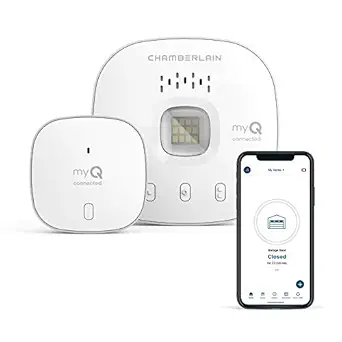 | Best for Amazon Key Garage Access | Compatibility: Most brands made after 1993 with photoelectric sensors | Connectivity: 2.4 GHz Wi-Fi, Bluetooth | Router range: Within 50 feet | VIEW ON AMAZON | See Our Full Breakdown |
| Philips Hue Bridge – Smart Lighting Hub with Matter Compatibility, Out-of-Home Control, and Automations |  | Best for Hue Lighting Automation | Dimensions: 6.26 x 5.79 x 2.91 inches | Weight: 8.3 ounces | Power source: Corded electric | VIEW ON AMAZON | See Our Full Breakdown |
| Hubitat Elevation C-8 Pro Smart Home Hub – Z-Wave Zigbee Matter |  | Best for Advanced Local Automation | Model: C8 Pro | Dimensions: 2.95 x 3.23 x 0.67 inches | Weight: 2.56 ounces | VIEW ON AMAZON | See Our Full Breakdown |
| Home Assistant Green | Smart Home Hub with Advanced Automation |  | Best for Local, Highly Customizable Automation | Operating system: Home Assistant OS | Processor: Quad-core processor | RAM: 4 GB | VIEW ON AMAZON | See Our Full Breakdown |
| home automation system | Connectivity | Compatibility | Dimensions |
|---|---|---|---|
| Aqara Smart Home Hub M3 with M | PoE, USB-C, and 2.4/5 GHz Wi-Fi | Apple HomeKit, Alexa, SmartThings, Home Assistant | — |
| Echo Show 15 | — | — | 16.1 x 10.1 x 1.4 inches |
| Emporia Vue 3 Home Energy Moni | 2.4 GHz Wi-Fi | — | 10 x 5 x 5 inches |
| Amazon Echo Hub | Wi-Fi and Bluetooth | Alexa+, Ring, Zigbee, Matter, Sidewalk, Thread | — |
| Shelly 1 Gen4 Wi-Fi | Wi-Fi, Zigbee, Matter | — | — |
| Emporia Vue 3 Home Energy Moni | — | iPhone, Android, web app | 10 x 5 x 5 inches |
| eKyro Smart Garage Door Opener | Wi-Fi | Most garage door openers; adapter may be required | — |
| Chamberlain Smart Garage Contr | 2.4 GHz Wi-Fi, Bluetooth | Most brands made after 1993 with photoelectric sensors | — |
| Philips Hue Bridge | LAN cable, Zigbee | — | 6.26 x 5.79 x 2.91 inches |
| Hubitat Elevation C-8 Pro Smar | — | Alexa, Google Home, Apple HomeKit, Ring Cameras | 2.95 x 3.23 x 0.67 inches |
| Home Assistant Green | Smart H | Ethernet, USB | — | 4.41 × 4.41 × 1.26 inches |
More Details on Our Top Picks
Aqara Smart Home Hub M3 with Matter Controller and IR Blaster
I’d choose the Aqara Hub M3 when a system needs to bridge several device types without making a display the center of the setup. Its support for Zigbee, Thread, and Wi-Fi, plus Matter integration, gives it broader protocol coverage than the display-focused Echo Show 15. Local automation and encrypted onboard storage can also keep some routines running without depending on cloud processing. The built-in IR blaster adds a practical bonus: compatible air conditioners and other infrared devices can join automated scenes without a separate controller. The tradeoff is that it is a hub, not a complete control interface, and cloud notifications still rely on internet access. I’d also account for its router placement guidance and the missing power adapter. Compared with the Echo Hub, this is the more protocol-oriented choice, but less of a ready-to-use wall dashboard.
Pros:- Combines Zigbee, Thread, Wi-Fi, and Bluetooth support in one hub.
- Local automation and encrypted storage can reduce reliance on cloud processing.
- IR blaster can bring compatible air conditioners and other infrared devices into routines.
- PoE, USB-C, and wireless connectivity offer flexible installation options.
Cons:- Power adapter is not included.
- Placement guidance calls for positioning 6 to 19 feet from the router for optimal connection.
- Some cloud notifications and services still depend on internet access.
Best for: Households combining Zigbee and Thread accessories with infrared-controlled air conditioners, especially those who want local routines and broad ecosystem links.
Not ideal for: Buyers who want a screen-first control panel, or who need cloud notifications and remote features to work through an unreliable internet connection.
- Protocols:Zigbee, Thread, Wi-Fi, Bluetooth
- Connectivity:PoE, USB-C, and 2.4/5 GHz Wi-Fi
- Device capacity:Up to 127 Zigbee devices and 127 Thread devices
- Local storage:8 GB encrypted
- Compatibility:Apple HomeKit, Alexa, SmartThings, Home Assistant
- Warranty:12 months
Our verdict“Choose the Aqara M3 if protocol flexibility and local routines matter more than having an integrated touchscreen.”
Echo Show 15 (2024 Model) – 15.6-inch Full HD Smart Display with Alexa, Fire TV, and Smart Home Hub
The Echo Show 15 suits homes that want smart-home controls alongside calendars, household lists, video calls, and streaming on one prominent screen. Its built-in Zigbee, Matter, and Thread hub makes it more than a display, while customizable widgets give family members a shared view of routines and plans. The 15.6-inch Full HD screen and Fire TV also make it a more versatile household hub than the smaller Echo Hub, which is focused more directly on controlling devices. That breadth comes with a footprint: at over 16 inches wide, it needs a deliberate spot rather than a cramped counter. It also depends on internet access for much of its content, and streaming may require compatible subscriptions. I’d pick it for a busy kitchen or shared space, not for a discreet, automation-only installation.
Pros:- Large Full HD display makes dashboards, calendars, and controls easy to see across a room.
- Built-in Zigbee, Matter, and Thread support reduces the need for a separate basic hub.
- Fire TV adds entertainment functions beyond smart-home control.
- Centered 13 MP camera with shutter supports video calls and privacy control.
Cons:- Its large, nearly five-pound body needs substantial mounting or counter space.
- Internet access and compatible subscriptions are needed for full content access.
- Some smart-home functions depend on compatible devices and additional setup.
Best for: Families who want a large shared screen for Alexa smart-home controls, household organization, video calls, and streaming in a kitchen or common room.
Not ideal for: Buyers with limited wall or counter space, or those seeking a compact control panel devoted mainly to automation.
- Display:15.6-inch Full HD, 1920 x 1080
- Dimensions:16.1 x 10.1 x 1.4 inches
- Weight:4.96 pounds
- Smart-home hub:Zigbee, Matter, Thread
- Camera:13 MP with shutter
- Wi-Fi:Wi-Fi 6E, tri-band, dual-antenna MIMO
- Audio:Two 2-inch woofers and two 0.6-inch tweeters
- Processor:Octa-core SoC with Amazon AZ2 neural engine
Our verdict“Choose the Echo Show 15 if your household wants a large shared organization and entertainment screen that also controls smart devices.”
Emporia Vue 3 Home Energy Monitor – Smart Home Automation Module and Real-Time Electricity Usage Monitor
The Emporia Vue 3 earns a place for buyers who want automation informed by what their home is actually consuming, rather than another general-purpose device hub. Installed at the electrical panel, it tracks whole-home usage and can monitor selected circuits with its included sensors; support for solar and net metering makes the data useful for homes that generate electricity, too. That is a different job from the Aqara M3, which connects smart devices across protocols, or the Echo Hub, which gives residents a convenient control surface. The Vue 3’s strength is energy visibility that can guide decisions and energy-focused automation. The tradeoff is installation inside the panel, which may call for an electrician, and real-time data needs 2.4 GHz Wi-Fi. Its cloud-based data storage may also deter buyers who want local-only records.
Pros:- Provides real-time electricity-use monitoring for energy-aware decisions and automation.
- Includes sixteen sensors for monitoring selected critical loads.
- Supports solar and net metering setups.
- UL certification and support for several electrical system types broaden installation fit.
Cons:- Panel installation can require electrical knowledge or a qualified installer.
- Real-time monitoring depends on a 2.4 GHz Wi-Fi connection.
- Data retention is cloud-based, and some three-phase systems need an additional sensor.
Best for: Homeowners who want to track household or circuit-level electricity use, including solar and net-metering households interested in energy-focused routines.
Not ideal for: Renters or buyers unwilling to install equipment in an electrical panel, and anyone requiring real-time monitoring without Wi-Fi or cloud storage.
- Model:EMV3A-2P-16
- Connectivity:2.4 GHz Wi-Fi
- Included sensors:Sixteen current sensors
- Supported systems:Single phase, single-split phase, 2-wire, 3-wire, and 3-phase, 4-wire Wye systems with earthed neutral
- Solar support:Solar and net metering monitoring
- App access:iPhone, Android, and web
- Certification:UL and CE
- Dimensions:10 x 5 x 5 inches
Our verdict“Choose the Vue 3 if energy monitoring is the missing piece in your automation plan, rather than a device-control hub or dashboard.”
Amazon Echo Hub (newest model), 8-inch smart home control panel with Alexa+
I’d favor the Amazon Echo Hub when the main goal is a glanceable place to control devices, cameras, routines, and media—not a large screen for watching shows or organizing family calendars. Its 8-inch customizable dashboard keeps the focus on smart-home management, while Alexa voice control and support for Ring, Zigbee, Matter, Sidewalk, and Thread connect it to a broad device mix. Compared with the Echo Show 15, it takes up less visual space and is more purpose-built for control, but gives up that model’s large Full HD screen, camera, and built-in Fire TV. The Echo Hub also isn’t a complete security package by itself: some Ring features require a separate subscription, and wall mounts or other accessories are sold separately. I’d choose it as a central interface, not as the most versatile household display.
Pros:- Customizable 8-inch dashboard puts smart-home controls and routines in one place.
- Supports Alexa+, Ring, Zigbee, Matter, Sidewalk, and Thread.
- Voice control complements touchscreen access to devices and cameras.
- Includes a microphone-off button and other privacy controls.
Cons:- Wall mounts and other installation accessories are sold separately.
- Full Ring security features may require a separate subscription.
- Some functions depend on compatible devices or additional services.
Best for: Alexa-centered households that want a dedicated, relatively compact dashboard for controlling compatible devices, cameras, and routines.
Not ideal for: Buyers who want a large family display, built-in video calling, or a security setup with all features included without a separate subscription.
- Screen:8 inches
- Compatibility:Alexa+, Ring, Zigbee, Matter, Sidewalk, Thread
- Controls:Smart-home devices, cameras, routines, and media
- Connectivity:Wi-Fi and Bluetooth
- Privacy features:Microphone-off button and multiple privacy controls
- Recycled materials:27%
Our verdict“Choose the Echo Hub if you want a dedicated Alexa control surface rather than a larger, entertainment-focused smart display.”
Shelly 1 Gen4 Wi-Fi, Zigbee & Matter Smart Relay Switch with Dry Contacts, 1-Channel 16A
The Shelly 1 Gen4 is the most hands-on option here: instead of coordinating a whole home like the Aqara M3, it automates a specific appliance, circuit, or compatible garage-door setup through a compact relay. Its support for Wi-Fi, Zigbee, and Matter gives buyers flexibility to fit it into an existing system, while dry contacts help with applications where a simple smart plug is not the right tool. Remote, manual, and scheduled control can turn an ordinary switch or appliance into part of a routine. The limit is its one-channel design, so it controls one circuit at a time; it is not a substitute for a multi-device hub or dashboard like the Echo Hub. Installation inside an electrical box may also require electrical skills, and full functionality can depend on the chosen hub or ecosystem.
Pros:- Wi-Fi, Zigbee, and Matter support provide options for fitting an existing ecosystem.
- Dry contacts suit compatible control applications beyond ordinary plug-in devices.
- Compact form is designed to fit standard electrical boxes.
- Offers remote, manual, and scheduled control.
Cons:- Single-channel design controls only one circuit at a time.
- Installation may require electrical knowledge and safe access to wiring.
- Some functions depend on a compatible hub or ecosystem.
Best for: DIY-minded homeowners who want to automate one compatible appliance, circuit, or garage-door control and can handle safe relay installation.
Not ideal for: Buyers seeking a whole-home hub, multi-channel control, or a plug-in device that needs no electrical installation.
- Connectivity:Wi-Fi, Zigbee, Matter
- Channels:1
- Current:16 A
- Voltage compatibility:12 V and 24–48 V DC
- Contact type:Dry contacts
- Control modes:Remote, manual, scheduled
- Ecosystem compatibility:Alexa, SmartThings, Google Home, Apple HomeKit
Our verdict“Choose the Shelly 1 Gen4 to add targeted control to a compatible wired device, not to serve as your home’s central automation hub.”
Emporia Vue 3 Home Energy Monitor – Smart Home Automation Module and Real-Time Electricity Usage Monitor
The Emporia Vue 3 earns a place in a home automation roundup for making electricity use visible enough to act on. Its clamp-on sensors report real-time usage, while solar and net-metering support help households track both consumption and generation. Compared with the Hubitat Elevation C-8 Pro, which coordinates devices and rules across several protocols, the Vue 3 has a narrower job: energy insight and management rather than serving as a general-purpose hub. That focus suits homeowners who want data to guide schedules or reduce waste, but installation in the circuit panel is a more involved step than adding a plug-in controller. It also depends on 2.4 GHz Wi-Fi and an internet connection, and some three-phase setups need extra sensors. App-inactive data retention is limited, so it is less suitable for buyers who want a fully independent, long-term energy record.
Pros:- Provides real-time electricity-use data that can inform energy-management decisions.
- Supports solar and net metering for households that track both generation and consumption.
- Works with several electrical system configurations.
- UL and CE certifications are specified.
Cons:- Requires circuit-panel installation rather than a simple plug-in setup.
- Needs 2.4 GHz Wi-Fi and an internet connection.
- Some three-phase installations need additional sensors, and data retention is limited when the app is inactive.
Best for: Homeowners with solar or high electricity use who want circuit-panel data to inform energy-saving routines.
Not ideal for: Renters and buyers seeking a broad device-control hub, or anyone who needs energy history retained independently of the app.
- Model:EMV3A-2P-8
- Dimensions:10 x 5 x 5 inches
- Compatibility:iPhone, Android, web app
- Certifications:UL, CE
- Supported systems:Single phase, split phase, 2-wire, 3-wire, 3-phase, 4-wire Wye
- Sensor type:Clamp-on sensors
- Warranty:1 year
Our verdict“Choose the Vue 3 if energy monitoring is your main automation goal; pick Hubitat instead if you need a hub for coordinating many device types.”
eKyro Smart Garage Door Opener – WiFi Remote Controller Compatible with Alexa, Google Home, iPhone, Siri, Android
The eKyro is a focused add-on for people who want garage access in their connected-home routines without adding a subscription for core functions. It supports multiple openers, remote control, open-and-close alerts, and automatic closing, giving it a stronger fit for households managing more than one garage door than the Chamberlain Smart Garage Control, whose listed compatibility centers on a single sectional door setup. Broad voice-assistant support also makes eKyro easier to fold into an Alexa, Google Home, or Siri household. The tradeoff is that compatibility is not universal: some openers need an adapter, and RYOBI models are excluded. It is also a Wi-Fi garage controller, not a general home automation hub, so buyers looking to coordinate lighting, sensors, and climate devices should look to something like Hubitat instead. SMS alerts may also bring extra costs.
Pros:- Supports control of multiple garage door openers.
- Works with Alexa, Google Home, Siri, iPhone, and Android.
- Offers open-door alerts and automatic closing.
- Core features have no monthly fee.
Cons:- Some opener models may require an adapter, and RYOBI openers are not supported.
- Additional alert services such as SMS may incur extra costs.
Best for: Households with multiple compatible garage doors that want app and voice control without a monthly fee for core features.
Not ideal for: Owners of RYOBI openers or buyers seeking one central hub for lighting, sensors, and other smart devices.
- Compatibility:Most garage door openers; adapter may be required
- Connectivity:Wi-Fi
- Voice assistants:Alexa, Google Home, Siri, Android
- Door features:Left-open alerts and automatic closing
- Opener support:Multiple openers
- Monthly fees:None for core features
Our verdict“Pick eKyro when multiple garage doors and broad voice-assistant support matter more than whole-home device automation.”
Chamberlain Smart Garage Control – Wireless Hub and Sensor with WiFi & Bluetooth
Chamberlain Smart Garage Control is the more access-focused pick for buyers who want remote door control and Amazon Key In-Garage Delivery in one setup. Bluetooth-assisted setup can simplify initial pairing, while compatibility with many openers made after 1993 gives it a broad starting point. Compared with the eKyro, however, the Chamberlain option is more specific to a supported sectional-door installation and does not list the same range of voice assistants or multiple-opener support. Its clearest distinction is delivery access, not serving as a broader automation controller like the Hubitat Elevation C-8 Pro. Before buying, check the opener exclusions and the location of your router: it needs 2.4 GHz Wi-Fi within 50 feet. US-only certification also limits its appeal outside that market.
Pros:- Enables remote opening and closing through a smartphone app.
- Supports Amazon Key In-Garage Delivery.
- Bluetooth assists with setup.
- Designed for many openers manufactured after 1993 with photoelectric sensors.
Cons:- Not compatible with certain Chamberlain and Linear openers.
- Requires 2.4 GHz Wi-Fi and a router within 50 feet.
- Limited to US use and sectional garage doors.
Best for: US households with a compatible sectional garage door that want phone control and Amazon Key in-garage delivery.
Not ideal for: Buyers outside the US, owners of excluded Chamberlain or Linear openers, and homes without nearby 2.4 GHz Wi-Fi.
- Compatibility:Most brands made after 1993 with photoelectric sensors
- Connectivity:2.4 GHz Wi-Fi, Bluetooth
- Router range:Within 50 feet
- Door requirement:Sectional garage door
- Delivery feature:Amazon Key In-Garage Delivery
- Certification region:US only
Our verdict“Choose Chamberlain for compatible US garage installations where Amazon Key delivery is a priority; eKyro is the better fit for broader assistant and multi-opener support.”
Philips Hue Bridge – Smart Lighting Hub with Matter Compatibility, Out-of-Home Control, and Automations
The Philips Hue Bridge is a lighting specialist, connecting Hue bulbs and accessories so they can run automations and remain available for remote control. Its Zigbee connection keeps Hue devices communicating through the bridge rather than relying on each bulb’s Wi-Fi connection, and Matter support helps Hue lighting join a wider smart-home setup. That makes it a more straightforward choice for a Hue-centered household than the Hubitat Elevation C-8 Pro, which offers broader protocol coverage and more flexible automation but calls for more configuration. The boundary is just as clear as the benefit: the Bridge is primarily for Hue devices, supports up to 50 lights and accessories, and needs a router and app for setup. Buyers who want one hub to coordinate devices from many manufacturers may outgrow this focused approach.
Pros:- Enables Hue lighting automations and out-of-home control.
- Supports Matter, Alexa, Google Assistant, and Apple HomeKit.
- Uses Zigbee connectivity for Hue devices.
- Supports up to 50 lights and accessories.
Cons:- Requires a router connection and app-based setup.
- Limited to 50 connected lights and accessories.
- Advanced or outdoor lighting setups require additional Hue components.
Best for: Households building automations around Philips Hue lights and accessories, especially those wanting remote lighting control and platform integration.
Not ideal for: Buyers who need one hub to coordinate a broad mix of non-Hue devices or want to avoid a separate lighting bridge.
- Dimensions:6.26 x 5.79 x 2.91 inches
- Weight:8.3 ounces
- Power source:Corded electric
- Connectivity:LAN cable, Zigbee
- Platform compatibility:Matter, Alexa, Google Assistant, Apple HomeKit
- Supported lights and accessories:Up to 50
- Wattage:3 watts
Our verdict“Choose the Hue Bridge for a Hue-led lighting system; choose Hubitat if your priority is broader control across device brands and protocols.”
Hubitat Elevation C-8 Pro Smart Home Hub – Z-Wave Zigbee Matter
The Hubitat Elevation C-8 Pro is the broadest automation controller in this group, combining Z-Wave, Zigbee, Matter, and Bluetooth support with local processing. Local rules can respond without waiting on a cloud service, a useful distinction from focused Wi-Fi add-ons such as the eKyro Smart Garage Door Opener, which handle a narrower task. Its Rule Machine supports multi-condition logic, while external antennas are intended to extend Z-Wave and Zigbee range. Hubitat also avoids a subscription for full platform functionality. The tradeoff is a steeper learning curve: advanced routines are better suited to buyers comfortable configuring devices and rules than to someone seeking the simplest setup. The Philips Hue Bridge is easier to approach for lighting-only automation, but it cannot match Hubitat’s stated protocol breadth.
Pros:- Supports Z-Wave, Zigbee, Matter, and Bluetooth.
- Local processing allows automation responses without internet access.
- Full platform functionality does not require a subscription.
- External antennas support extended Z-Wave and Zigbee range.
Cons:- Advanced automation configuration requires technical knowledge.
- The available product data does not specify power requirements or setup details.
- Included accessories and optional add-ons are not described.
Best for: Technically confident smart-home owners who want local, multi-protocol routines across compatible devices without a subscription.
Not ideal for: Beginners who want a guided, minimal-configuration system, or buyers focused only on automating Hue lighting.
- Model:C8 Pro
- Dimensions:2.95 x 3.23 x 0.67 inches
- Weight:2.56 ounces
- Supported protocols:Z-Wave 800 Series with Long Range, Zigbee 3.0, Matter 1.5, Bluetooth
- Compatibility:Alexa, Google Home, Apple HomeKit, Ring Cameras
- Automation features:AI-assisted routines, Rule Machine multi-condition logic
- Wireless hardware:External Z-Wave and Zigbee antennas
- Manufacturer:Hubitat Inc.
Our verdict“Choose Hubitat if you want a customizable local hub for multiple protocols; choose the Hue Bridge for simpler, Hue-specific lighting automation.”
Home Assistant Green | Smart Home Hub with Advanced Automation
Home Assistant Green is the strongest fit here for buyers who want their home automation to run locally and leave room for detailed customization. Its pre-installed Home Assistant OS removes the need to build a hub from scratch, while the 4 GB RAM and 32 GB storage provide the base for a broad set of automations. Compared with the Amazon Echo Hub, Green is less focused on a ready-made Alexa control panel and more on configurable automation. It also differs from the Hubitat Elevation C-8 Pro: Green starts with a compact, fanless appliance, while buyers should check each hub’s specific radio and accessory requirements before choosing.
The tradeoff is that Green has no built-in Wi-Fi and requires Ethernet; Z-Wave, Zigbee, and Thread support depends on compatible USB devices. Advanced setup can also call for technical confidence, and the Home Assistant ecosystem may feel limiting to people who want a simpler, voice-assistant-led system.
Pros:- Pre-installed Home Assistant OS makes the hub ready to configure without installing an operating system.
- Local data storage supports a privacy-focused setup and automation that does not depend entirely on cloud services.
- Compact, fanless design suits a quiet, always-on home network setup.
- USB connectivity can add compatible Z-Wave, Zigbee, or Thread devices as the system grows.
Cons:- Ethernet is required because the hub has no built-in Wi-Fi.
- Z-Wave, Zigbee, and Thread connectivity requires compatible USB devices rather than built-in radios.
- Advanced customization can demand more technical knowledge than a simpler Alexa-centered panel.
Best for: Privacy-minded smart-home owners who want local automation, plan to customize routines, and are comfortable connecting compatible radios through USB.
Not ideal for: Beginners seeking a wireless, plug-and-play control panel, or households that want built-in Z-Wave, Zigbee, or Thread radios without adding USB devices.
- Operating system:Home Assistant OS
- Processor:Quad-core processor
- RAM:4 GB
- Storage:32 GB
- Connectivity:Ethernet, USB
- Wireless compatibility:Bluetooth
- USB ports:2
- Dimensions:4.41 × 4.41 × 1.26 inches
Our verdict“Choose Home Assistant Green if local control and flexible automation matter more than built-in wireless radios or the simplicity of an Alexa-first hub.”

How We Picked
I ranked these products by how much useful home automation they offer for their intended role: device compatibility, range of control, automation capabilities, and how clearly a buyer can tell what additional equipment or setup may be needed. A flexible hub scores well for coordinating devices across protocols, while a focused product can still earn a place if it handles a specific task—such as lighting, energy monitoring, or garage access—with less complexity.
I also weighed usability and tradeoffs rather than treating every product as a complete smart-home system. The top positions go to options with broader automation potential; dedicated displays and single-purpose devices rank lower because their scope is narrower. The two Emporia Vue 3 entries describe the same product, so I treat them as one distinct option rather than implying the list contains eleven unique systems. Product details can vary by configuration and software support, so I recommend checking device compatibility before building around any hub.
| home automation system | Compatibility |
|---|---|
| Aqara Smart Home Hub M3 with M | Apple HomeKit, Alexa, SmartThings, Home Assistant |
| Echo Show 15 | — |
| Emporia Vue 3 Home Energy Moni | — |
| Amazon Echo Hub | Alexa+, Ring, Zigbee, Matter, Sidewalk, Thread |
| Shelly 1 Gen4 Wi-Fi | — |
| Emporia Vue 3 Home Energy Moni | iPhone, Android, web app |
| eKyro Smart Garage Door Opener | Most garage door openers; adapter may be required |
| Chamberlain Smart Garage Contr | Most brands made after 1993 with photoelectric sensors |
| Philips Hue Bridge | — |
| Hubitat Elevation C-8 Pro Smar | Alexa, Google Home, Apple HomeKit, Ring Cameras |
| Home Assistant Green | Smart H | — |
Factors to Consider When Choosing Home Automation Systems
Before choosing among these home automation systems, decide whether you need a central coordinator or a control point for one task. The right fit depends on the devices you already own, how much setup you will accept, and whether you value local operation or app-based convenience more.
Start With the Devices You Already Own
Make a list of your current lights, sensors, switches, locks, and voice assistants before selecting a hub. A system that supports several protocols can still fail to control a particular device if that model or feature is not supported. Check the exact device and function, not only a broad Matter, Zigbee, or Z-Wave label. A common mistake is buying a hub first and discovering later that a key device needs a separate bridge. If most of your setup already belongs to one ecosystem, a focused controller may be easier than replacing equipment for a more open platform. I would prioritize verified compatibility over the longest protocol list.
Choose Between Local Control and Cloud Convenience
Some buyers want lights and routines to keep working when internet service is down; others value remote access and easy voice control. Local automation can reduce reliance on outside services, but the setup may ask more of you and remote access can involve extra configuration. Cloud-linked systems often feel simpler to manage from a phone, though features may depend on account access and an internet connection. Do not assume that a local radio automatically means every automation runs locally. Read how the specific device handles routines, remote control, and outages before committing. This distinction matters most for security-related routines and controls you expect to use every day.
Match Complexity to Your Appetite for Setup
A powerful hub is not automatically a better buy if you do not want to build and maintain automations. Consider who will set up routines, troubleshoot a disconnected device, and make changes when household needs shift. Beginner-friendly interfaces and voice controls can lower the barrier, but they may offer fewer ways to customize behavior. More configurable platforms reward careful setup and can join devices from different ecosystems, at the cost of a steeper learning curve. Avoid buying advanced hardware on the hope that you will eventually use every feature. Choose the simplest system that can handle the routines you actually want.
Decide Whether You Need a Hub, a Panel, or a Specialist Device
A hub coordinates devices and routines, while a smart display mainly provides a visible way to control them. A specialist product can be the right answer when the goal is limited to one area, such as monitoring electricity or opening a garage door. Buyers sometimes mistake a screen with smart-home controls for a complete automation platform. Before choosing, write down the actions you want to automate and identify which product type can carry them out. A dedicated panel may make shared household control easier, while an app-centered hub can be more flexible. If your needs are narrow, paying for broad hub capabilities may add setup without adding much value.
Plan for Expansion and Ongoing Maintenance
Think beyond the first device and ask how the system will handle future additions. A mixed-brand home benefits from flexible compatibility, but every extra bridge, app, or account can make maintenance harder. Check whether routines depend on a vendor service, whether software updates are expected, and how devices are restored after a reset. Keep a simple record of device names, automations, and required hubs so another household member can troubleshoot them. For a small setup, fewer components may matter more than maximum expansion. For a growing home, broader support can prevent a costly ecosystem reset later.
Spend for Capabilities You Will Actually Use
Paying more can make sense when it delivers a feature you will rely on, such as broader device coordination, a dedicated control surface, or detailed energy visibility. It is less useful when the added capability duplicates a phone or assistant you already use. Compare the complete setup, including any required sensors, bridges, wiring, or subscriptions, rather than judging the central device alone. Energy monitors and garage controllers can provide focused value, but they do not replace a general automation hub. Start with one practical routine and estimate what it takes to run it reliably. Add complexity only when a clear household need justifies it.
Frequently Asked Questions
Should I choose Hubitat Elevation C-8 Pro or Home Assistant Green?
I would choose Hubitat Elevation C-8 Pro if you want a dedicated hub with support for multiple common smart-home protocols and are willing to configure routines. Home Assistant Green suits buyers who want extensive customization and are comfortable managing a more hands-on platform. Neither is the automatic choice for every household: device compatibility and the kind of setup you prefer should decide it. Check whether your existing devices and desired automations are supported before buying. If you want a mostly voice-led setup with minimal configuration, compare both against the Echo options instead.
Can an Echo Hub or Echo Show 15 replace a smart-home hub?
They can provide a convenient Alexa control point, but they should not be assumed to replace every dedicated hub or bridge. The Echo Hub is built around smart-home control, while the Echo Show 15 also serves as a large display with entertainment features. What either can control depends on the devices and integrations involved. If your home uses mixed protocols or needs complex routines, check the exact compatibility requirements before relying on an Echo device as the sole coordinator. A separate hub may still be needed for some devices or automations.
Do I need a general-purpose hub if I only want smart lighting?
Not always. If your goal is to manage compatible Philips Hue lights and their routines, the Philips Hue Bridge may be a more direct fit than a whole-home hub. A general-purpose system makes more sense when you want lighting to trigger actions across other brands or device types. Before deciding, check whether your preferred bulbs, switches, and voice assistant work together as intended. Avoid buying a broad platform just because it supports many integrations if you will only use lighting controls. You can add a wider system later if your needs grow.
Are the Emporia Vue 3 and garage controllers full home automation systems?
They are better understood as specialist devices than as whole-home coordinators. Emporia Vue 3 focuses on electricity monitoring, while the eKyro and Chamberlain options address garage-door control. Each may be useful as part of a wider setup, but buyers should check which app, hub, or compatible assistant is needed for their intended automations. The list contains Emporia Vue 3 twice, so those entries do not represent two different models. If you want one system to coordinate many device categories, look at the dedicated hubs instead.
What should I check before buying a smart relay or garage-door controller?
Confirm the hardware fits the installation, not just that the product mentions your preferred assistant. For a relay, verify the electrical requirements, wiring arrangement, load limits, and whether dry contacts suit the circuit; installation may call for a qualified electrician. For a garage controller, check compatibility with the opener and sensor arrangement, plus how the system reports door status. Remote access and voice commands are useful only if the device reliably reflects the door’s actual state. I would review the manufacturer’s compatibility information and installation guidance before ordering either type.
Conclusion
For the broadest mix of protocol support and automation control, I recommend Hubitat Elevation C-8 Pro as the best overall, provided you are comfortable with setup. Best for deep customization is Home Assistant Green, while best for Alexa-oriented beginners is Echo Hub; Echo Show 15 makes more sense if you also want a large display and entertainment features. For best value in a focused role, the right pick depends on the job: Hue Bridge for compatible lighting, Emporia Vue 3 for energy monitoring, or a garage controller for remote door access. Buyers seeking a premium, expandable control setup should compare Hubitat and Home Assistant against their device list and maintenance comfort rather than choosing by feature count alone. Match the system to the routines you need, then confirm compatibility before building around it.